To autorun in World of Warcraft: Forever, press Num Lock. It is the default key for Toggle Autorun, so your character runs forward on its own until you press it again. If your keyboard has no Num Lock key, or you want autorun under your thumb, bind Toggle Autorun to another key or a mouse button under Options, Keybindings, Movement Keys.
That is what we did on our Night Elf Hunter in Teldrassil: we gave Toggle Autorun a second binding on Mouse Button 5, one of the side buttons on most gaming mice, and kept Num Lock as well. The steps below follow exactly what the Keybindings page showed us.
We recorded ourselves setting up autorun on PC for the video at the end of this guide. The screenshots in this guide come from the same recording.
The Default Autorun Key
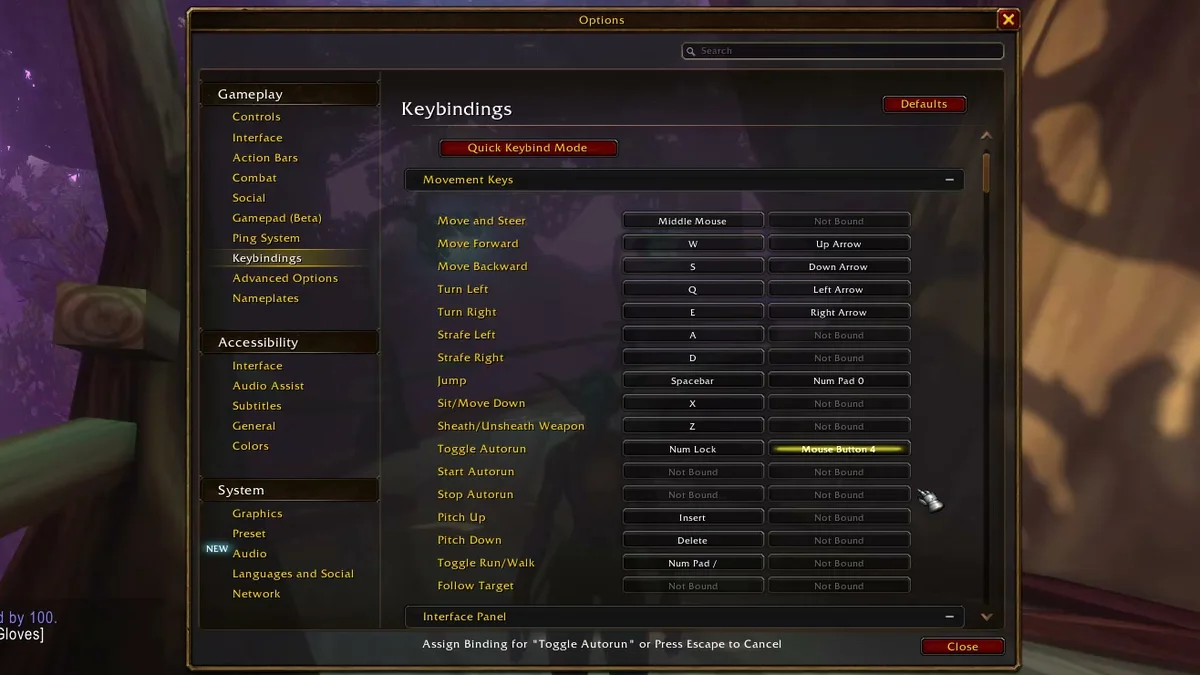
Before we changed anything, the Movement Keys list showed Toggle Autorun bound to Num Lock, with its second slot reading Not Bound. You get it without touching a setting. “Toggle” is the important word: one press starts the run, the next press stops it, so you can let go of W on a long road and take your hand off the keyboard entirely.
The same list holds the other movement defaults, which are worth a glance while you are there:
- Move Forward: W and the Up Arrow.
- Move and Steer: the middle mouse button.
- Jump: Spacebar and Num Pad 0.
- Sit/Move Down: X.
- Toggle Run/Walk: Num Pad /. If your character is suddenly walking, this is the key you bumped.
Laptops and many compact keyboards have no Num Lock key at all, and neither do most Mac keyboards. On those, the default does nothing for you until you bind autorun yourself.
How to Bind Autorun to Another Key
- Press Esc and click Options at the top of the Game Menu.
- Under Gameplay on the left, click Keybindings.
- Find Movement Keys. It sat open at the top of the list for us, with Toggle Autorun about halfway down.
-
Click the box next to Toggle Autorun. Click the second box to add a key and keep Num Lock, or the first box to replace Num Lock. The bottom of the window then reads “Assign Binding for ‘Toggle Autorun’ or Press Escape to Cancel.”
-
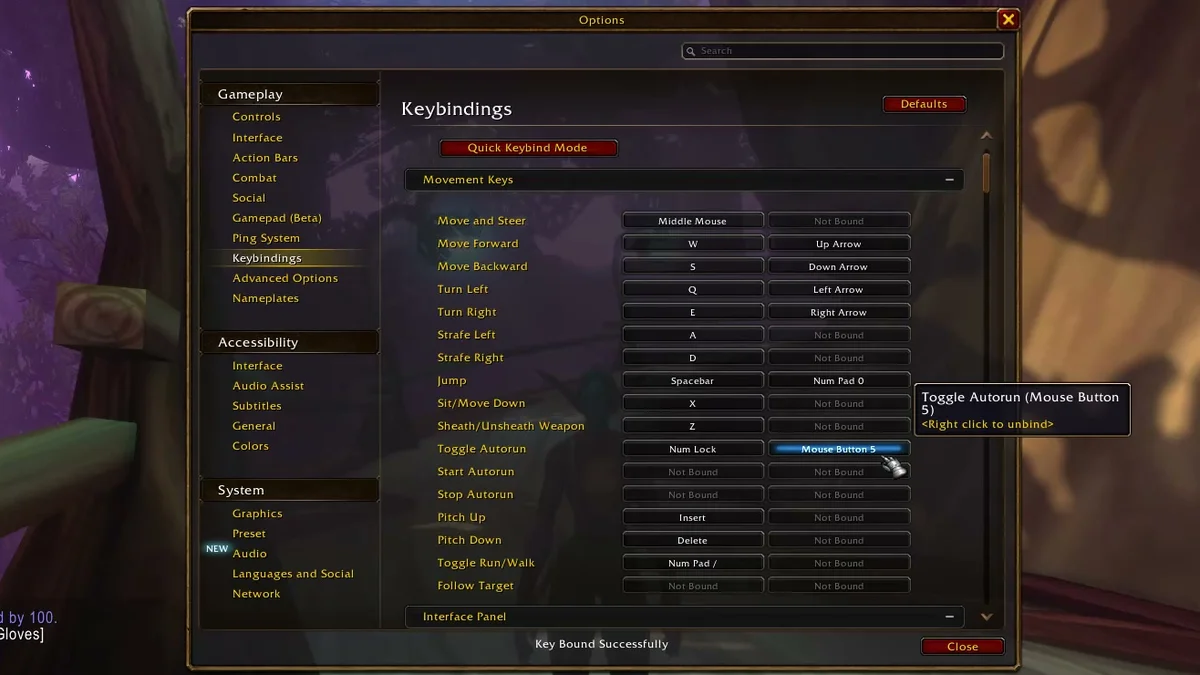
Press the key or mouse button you want. We pressed Mouse Button 5. The window said “Key Bound Successfully,” and hovering the box showed “Toggle Autorun (Mouse Button 5).”
-
Click Close at the bottom right.
Changed your mind? The same tooltip says “Right click to unbind,” so right-click the box to clear it. The red Defaults button at the top of the page resets the bindings to how the game shipped.
Start Autorun and Stop Autorun
Right under Toggle Autorun sit two more bindings, Start Autorun and Stop Autorun, and both were Not Bound on our character. They split the toggle in two: one key only starts the run, the other only ends it. If you ever press Toggle Autorun and stop when you meant to keep going, binding these two instead removes the guesswork.
Further down the list, Follow Target is also unbound by default. As the name says, it makes your character follow whoever you have targeted, which is the other way to travel without holding a key when a friend is leading.
Make Long Runs Shorter
Autorun makes the walk easier, but the walk is still long at low level. Our mount guide covers when you can ride and what it costs.
While the Options window is open, the Graphics page is worth a few minutes too: our best graphics settings go through it. And if the default interface still feels clunky after your bindings, our addon install guide shows how to add the extras. Every Forever guide we have is on our World of Warcraft hub.
Frequently Asked Questions
What is the autorun key in WoW Forever? Num Lock. It is bound to Toggle Autorun by default.
How do you stop autorunning? Press Toggle Autorun again (Num Lock unless you changed it), or bind the separate Stop Autorun key in Keybindings.
Can you put autorun on a mouse button? Yes. Click the empty second box next to Toggle Autorun under Options, Keybindings, Movement Keys, then press the mouse button. We used Mouse Button 5.
My keyboard has no Num Lock key. How do I autorun? Bind Toggle Autorun to any key or mouse button you do have, using the same Keybindings steps.
How do you remove a keybinding? Right-click the binding’s box. The tooltip says “Right click to unbind.”