
Yes. SCUM has supported controllers on PC since the November Update (version 1.3.6.0.177121), which Gamepires released on November 11, 2026. The studio calls it a first release that “may still have some rough edges,” so a pad now covers fighting, driving, fishing, photos and minigames, with some polish still to come.
Below we cover what the update says works on a controller, the button prompts Gamepires has shown, how to get your pad running through Steam, which controllers it takes, what changes for Steam Deck and Steam Machine, and where to report problems. We covered the update itself in our news story, SCUM Adds Controller Support on PC.
What Works on a Controller
Controller support was a long time coming. In March 2025, Gamepires said it would arrive “sometime after 1.0,” and the 1.0 release followed in June 2025. The November Update notes now say you can “play with your controller of choice,” and list what that covers:
- Fighting
- Driving
- Fishing
- Taking photos in Photo Mode, which the same update made free for every player
- Minigames, such as lockpicking and door hacking
SCUM has far more actions than a pad has buttons, and the notes say “radial menus and button combinations” put the extra actions within reach. They do not single out the inventory, crafting or base-building screens, and they say nothing about aim assist or remapping buttons inside the game.
The Button Prompts Gamepires Has Shown
Gamepires’ own clips and screenshots from the update show the controller prompts on screen, and they give a good idea of how the layout works:
| Activity | What the on-screen prompts show |
|---|---|
| Fishing | Cast Bait (press and hold RT), Pull Rod (LT), Reel (LT or RT), Fast Reel (A with LT or RT) |
| Playing a guitar | A note wheel picked with the sticks, LB to raise a semitone, RB to toggle chord mode, RT and LT to go up or down an octave, the d-pad to change key |
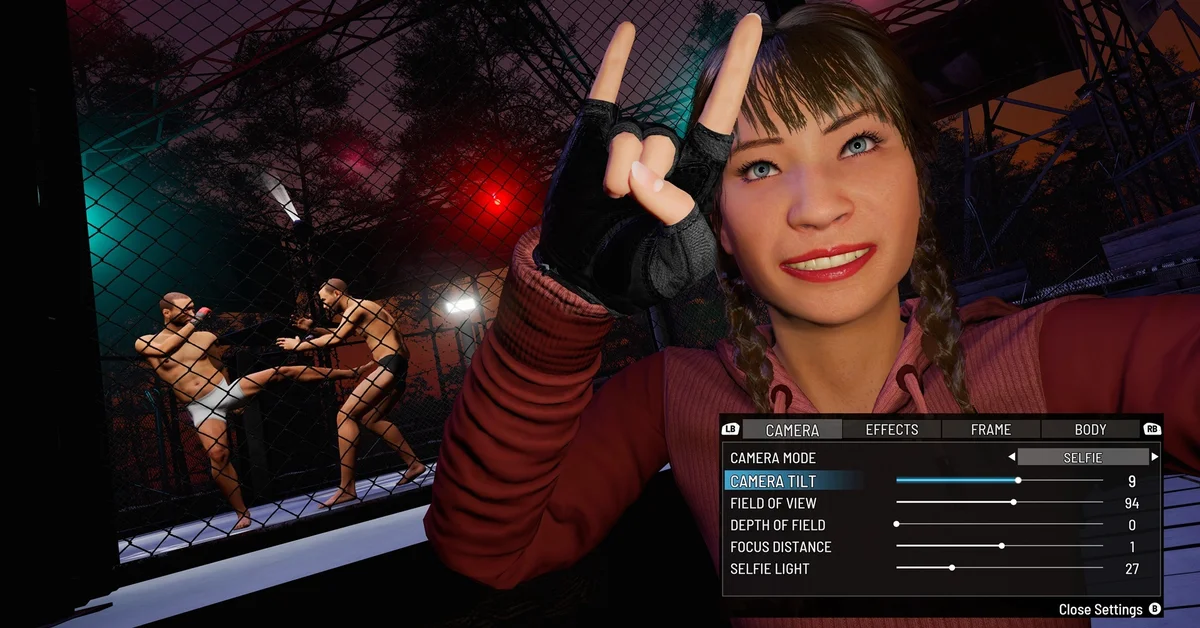
| Photo Mode | LB and RB switch between the Camera, Effects, Frame and Body tabs, and B closes the settings |
The fishing clip comes from the preview Gamepires posted the week before release, so treat these as the studio’s layout at the time rather than a full button map. The game shows its prompts in the corner of the screen as you play, which is the place to check.
How to Set Up a Controller in SCUM
The update notes name no setting to switch on, so getting started is mostly about Steam:
- Update the game. Controller support arrived in version 1.3.6.0.177121. Steam downloads it automatically, but check your Library if SCUM has been sitting unplayed.
- Connect the controller before you launch. USB, Bluetooth or a wireless adapter all work at the Windows level. Our guides cover connecting an Xbox controller to PC and pairing a PS5 controller.
- Check Steam Input if the pad does nothing. Right-click SCUM in your Steam Library, open Properties > Controller, and set the override to Enable Steam Input. If the game reacts twice to one press instead, try Disable Steam Input. This is Steam’s setting, not SCUM’s, and it is the usual fix for PlayStation, Switch Pro and generic pads.
- Launch and play. To open Photo Mode, pick it from your controller’s radial menu; on a keyboard it is P.
Which Controllers Work
Gamepires does not publish a list of supported controllers. It says you can use “your controller of choice,” and asks for your controller model when you report a bug.
Every prompt in Gamepires’ own screenshots and clips uses Xbox-style labels (LB, RB, LT, RT, A and B), and the notes do not say whether PlayStation button icons appear. If you want the prompts on screen to match the buttons in your hands, an Xbox-style controller is the safe choice. A DualSense or other pad can still run through Steam Input, as in step 3 above.
Steam Deck, Steam Machine and Linux
The same update brought official support for joining multiplayer servers through Proton “on Linux devices, including Steam Deck and Steam Machine.” Until the November Update, getting SCUM multiplayer running on those devices took workarounds. Gamepires says that, combined with controller support, this gives Steam Deck and Steam Machine players “more ways to play.”
Steam lists SCUM as a Windows game, so it runs through Proton on Linux. If Steam does not pick Proton on its own, open SCUM’s Properties > Compatibility and tick Force the use of a specific Steam Play compatibility tool. Our guide to connecting an Xbox controller to the Steam Machine covers pairing a pad there, and our best Steam Machine games list has more to play.
Rough Edges and How to Report Them
Gamepires is upfront that this is a starting point. In its preview, the studio said it would be “paying close attention to your feedback as we continue improving the experience and addressing issues,” and promised more frequent hotfixes in the weeks after the update. The release notes add: “If something isn’t working as expected, let us know through SCUM Support, including your controller model and what happened.”
Reports go to SCUM Support or the Bug Reports forum on SCUM’s Steam discussions. Include the controller model, how it is connected, and what you were doing when it went wrong.
One thing not to be thrown by: on November 11, the controller box on SCUM’s Steam store page still did not list any controller support. The update notes are the official word, and store labels often lag behind a patch.
Is SCUM on PS5 or Xbox?
No. SCUM is a PC game, sold on Steam. In a September 2025 development update, Gamepires said releasing it on consoles “is high on our wishlist,” while its focus stays on regular updates for the PC version, and it has not announced a console version. Controller support on PC is not a console release. Rust took a similar step in November 2026, as our story on Rust adding gamepad support on PC covers, and our DayZ guides cover another hardcore survival game with pad support.
Frequently Asked Questions
Do you need to turn on controller support in SCUM’s settings? The November Update notes name no setting to switch on. Connect your controller, make sure SCUM is on version 1.3.6.0.177121 or later, and launch. If the pad does nothing, check Steam Input under Properties > Controller in your Steam Library.
Does SCUM support PS5 controllers? Gamepires does not list supported controllers; it says you can use “your controller of choice.” On PC, a DualSense can run through Steam Input. The button prompts in Gamepires’ own screenshots and clips are Xbox-style.
Does SCUM have aim assist on controller? The November Update notes do not mention aim assist.
Can you remap controller buttons in SCUM? The notes do not mention remapping inside the game. Steam Input’s own controller layout editor can remap any pad at the Steam level.
Does SCUM controller support work on Steam Deck? The update added controller support and official support for joining multiplayer servers through Proton on Linux devices, Steam Deck and Steam Machine included.
How do you open Photo Mode on a controller? Select Photo Mode from your controller’s radial menu. On a keyboard, press P.