
To take cover in GTA 6 on PS5, walk up to a wall, a car or anything solid and press R1, and Jason or Lucia crouches down behind it, out of sight. Hold L2 to peek out and aim, shoot with R2, and let go of L2 to duck back behind it.
You don’t have to be pressed right up against it, either. When we took cover in a launch-night gunfight on our PS5 copy of Grand Theft Auto VI, pressing R1 a short step away from cover moved our character up to it and tucked them in behind. That clip is in the video at the end of this guide. Below are the controls, how to fight from cover, how crouching differs, the cover settings, and when cover is the wrong call.
Cover Controls on PS5
| Action | PS5 |
|---|---|
| Take cover | R1, next to a wall, car or anything solid |
| Peek out and aim | Hold L2 |
| Shoot | R2 |
| Duck back into cover | Let go of L2 |
| Crouch (no cover needed) | Circle |
| Run | L3 |
We checked these against the On Foot page of the Control Scheme screen on our PS5 copy, which puts Cover on R1, Crouch on Circle, aiming on L2, Shoot on R2 and Run on L3. On Xbox, cover is RB and you aim with the left trigger.
If your hands learned Red Dead Redemption 2 or GTA 5, cover is where you left it: both put it on R1 too. Our guides to taking cover in Red Dead Redemption 2 and taking cover in GTA 5 cover those games.
How to Fight From Cover
- Get next to something solid. A wall, a parked car, anything that blocks you from view.
- Press R1. Your character crouches behind it. If you’re a little way off, they move up to it first.
- Hold L2 to peek out. Your character leans out of cover and you can aim.
- Shoot with R2, then let go of L2 to drop back behind cover before the return fire lands.
Standing in the open is the quickest way to lose a gunfight, so it pays to make R1 a habit the moment shots start. For the hits you do take, our guides to healing in GTA 6 and body armor cover staying on your feet.
Crouching Is a Separate Move
Circle crouches anywhere, with no wall or car needed. The controls list it apart from cover, and it’s the start of sneaking: from a crouch you can creep up on someone rather than charging in. Settings > Gameplay has a Stand and Sprint switch, off on our copy, which “stands you up automatically when activating sprint instead of staying in a crouch,” in the game’s own words.
Cover Settings Worth Checking
Press Options, open Settings and go to the Gameplay tab. The Combat section at the top holds the settings that change how cover and aiming feel.
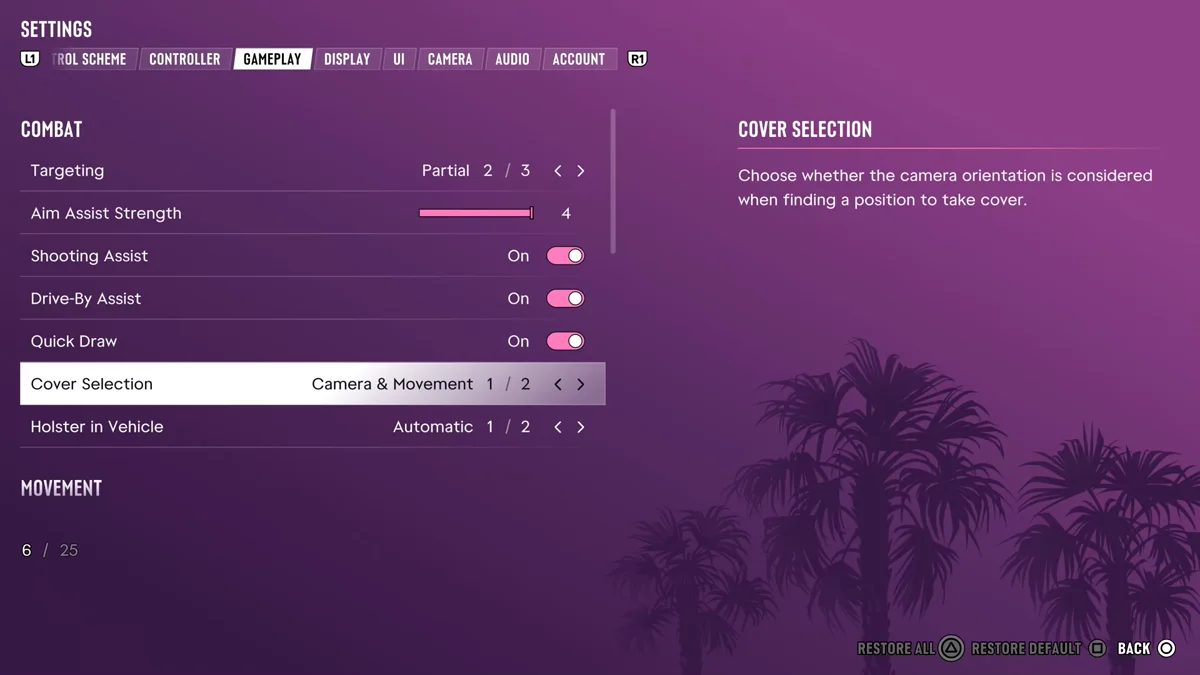
- Cover Selection. The game describes it as choosing “whether the camera orientation is considered when finding a position to take cover.” Ours was on Camera & Movement, the first of two options. It’s the one to try if R1 keeps picking a different spot from the one you wanted.
- Targeting and Aim Assist Strength. Targeting was on Partial, the second of three options, and Aim Assist Strength, which “slows down the movement of the reticle while aiming at a target,” was at the top of its slider. Shooting Assist and Quick Draw were both on.
- Aiming. Lower down, in the Accessibility part of the same tab, Aiming lets you choose “whether you hold or press L2 to aim.” Ours was on Hold. Switch it if you’d rather tap L2 to aim than hold the trigger through a long fight.
Our guide to GTA 6’s difficulty settings covers what turning the aiming help up or down does to a gunfight. The screenshot above comes from another of our GTA 6 recordings, made on launch day.
When to Leave Cover and Run
GTA 6 is built around hit and run, not holding a position. “We’re really trying to encourage this hit-and-run style of gameplay,” Rob Nelson, co-studio head at Rockstar North, told IGN, and he told Famitsu that staying to fight the police affects your Criminal Profile, adding that the police “are pretty formidable.” When cops start stacking up, the better move is usually to break line of sight and leave.
Our guides to losing a wanted level and sprinting in GTA 6 cover the escape, and every GTA 6 control is in one table on our controls guide. Every GTA 6 guide is on our GTA 6 hub.
Frequently Asked Questions
What button is cover in GTA 6? R1 on PS5 and RB on Xbox. Walk up to something solid and press it, and your character crouches behind it.
Does GTA 6 have a cover system? Yes. Press R1 next to a wall, car or other solid object to crouch behind it, hold L2 to peek out and aim, and shoot with R2.
Can you crouch in GTA 6? Yes. Circle crouches on PS5, separate from cover, so you can crouch anywhere and sneak up on people.
How do you shoot from cover in GTA 6? Hold L2 while you’re in cover to lean out and aim, then fire with R2. Let go of L2 to duck back down.
Do you have to be right next to cover in GTA 6? No. If you’re a short step away when you press R1, your character moves up to the cover and crouches behind it.