
To use nitro boost in GTA 6 on PS5, press or hold L3 while driving a vehicle that carries nitrous. The game’s Control Scheme screen lists L3 as Horn / Nitrous for land and water vehicles, so on a car without nitrous the same click just sounds the horn.
We read the button off the Control Scheme screen on our PS5 copy of Grand Theft Auto VI and found the nitro setting in its Gameplay menu, and the screenshots in this guide are from our own PS5 recordings. Below is the button, the setting that changes how it fires, and what’s known about which cars carry it.
Nitro Controls on PS5
| Action | PS5 |
|---|---|
| Fire nitro (vehicle with nitrous) | L3 |
| Horn (same button) | L3 |
| Accelerate | R2 |
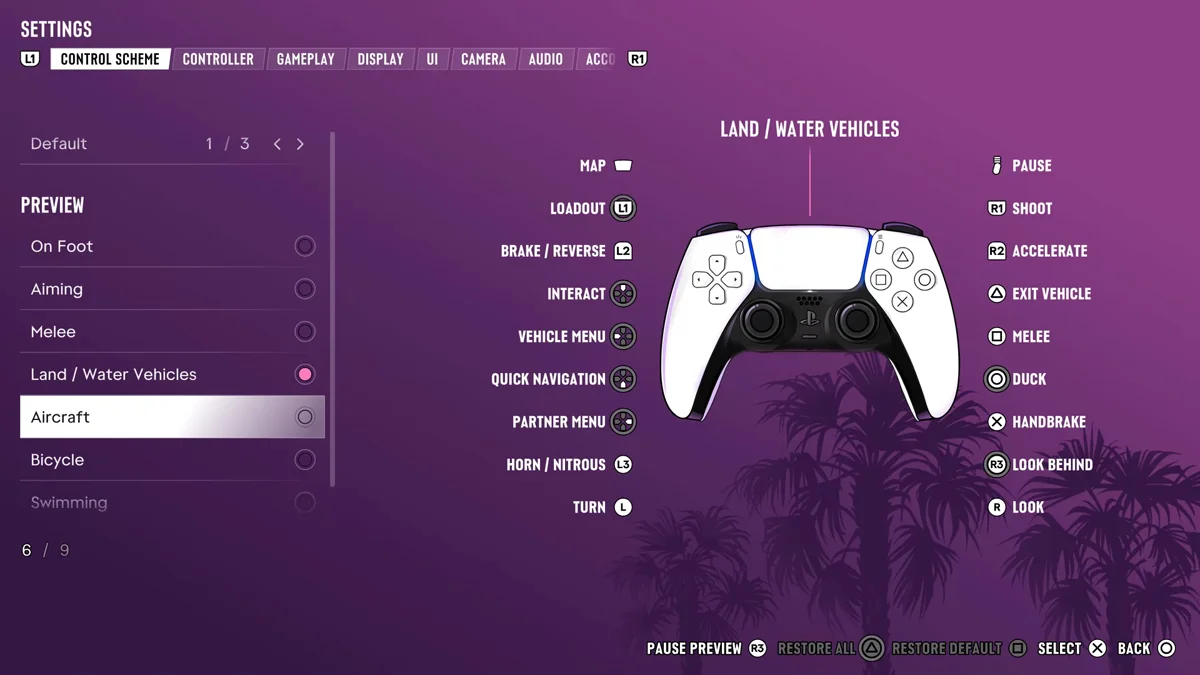
L3 is a click of the left stick, the stick you steer with, so you can fire the boost without taking your thumb off the steering.
How to Change Whether You Hold or Press
GTA 6 lets you choose how the nitro button behaves:
- Press Options and open Settings.
- Go to the Gameplay tab with L1 and R1.
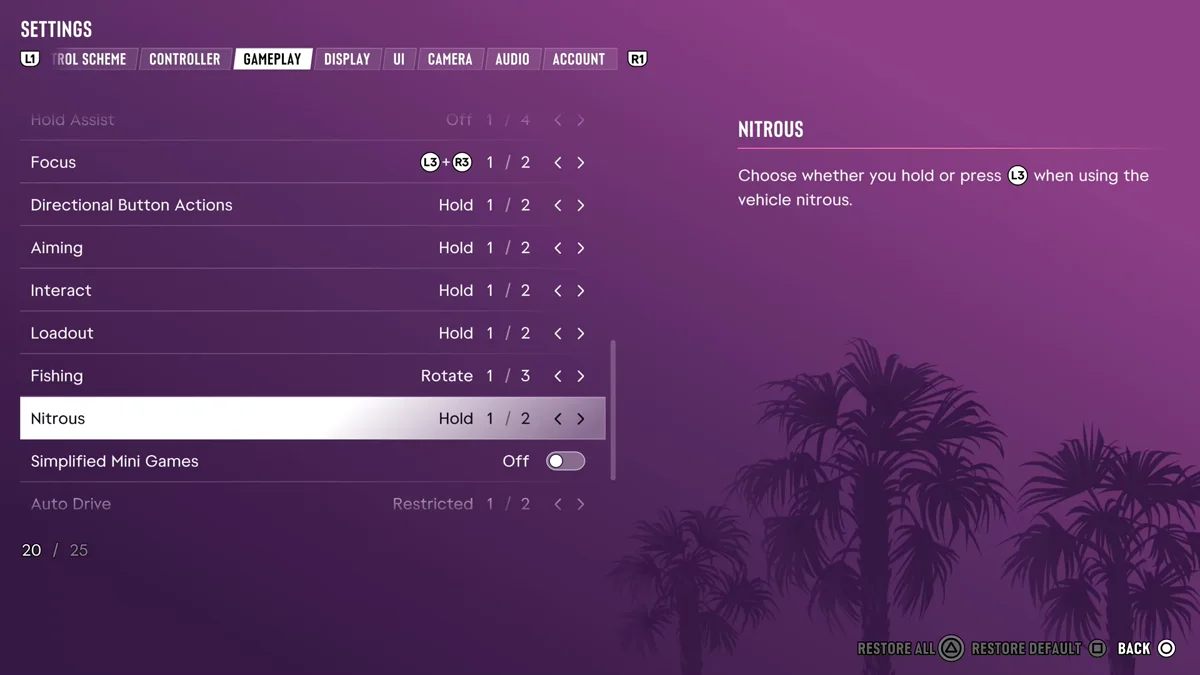
- Scroll to Nitrous. Its description reads: “Choose whether you hold or press L3 when using the vehicle nitrous.” It sat at Hold (1/2) on ours, and the other choice is to press.
The option lives in a group of similar hold-or-press settings on the same page, among them Directional Button Actions, Aiming, Interact and Loadout, so you can set them all the same way if holding buttons is a strain.
Which Cars Have Nitro
Nitrous is in the game for certain: the Unlimited Nitrous cheat promises that “nitrous and fuel never run out on vehicles.” Which cars carry it, and whether a mod shop can fit it, isn’t something Rockstar has spelled out, so for now the test is simple: in a car without nitrous, L3 only honks. Our guide to using cheats in GTA 6 has the cheat codes, and our guide to honking the horn covers the other half of the button.
Where Car Mods Happen in GTA 6
Rockstar has named several places that work on cars:
- Rideout Customs will “transform vanilla vehicles into magnificent works of art with detailed interiors, exquisite rims, and donk stylings,” per Rockstar. It’s “only open for business with the Ultimate Edition.”
- One-Eyed Willie’s Mod Shop in Lake Leonida “specializes in off-road modifications and hand-painted automotive artistry,” also Ultimate Edition only.
- Mod shops are what the game calls its customization garages, and Coastal Auto Care in Key Lento is one every copy has.
- Pay ‘n’ Spray buys stolen cars and, Rockstar North co-studio head Rob Nelson told Famitsu, repaints a car “to escape Heat.”
Our guide to upgrading your car covers what mod shops do.
How Earlier GTA Games Did It
Nitro was a garage upgrade in GTA San Andreas, fitted at mod shops and fired with a button press. GTA 5’s story mode never offered it: Los Santos Customs sold engine, turbo and other performance upgrades instead. GTA 6 brings nitrous back.
Frequently Asked Questions
What is the nitro button in GTA 6?
L3 on PS5, a click of the left stick. The Control Scheme screen lists it as Horn / Nitrous, so it only boosts in a vehicle that carries nitrous.
Can you hold the nitro button instead of pressing it?
Yes, either way. Settings > Gameplay has a Nitrous option to choose between holding and pressing L3.
Is there nitrous in GTA 6?
Yes. The game’s Unlimited Nitrous cheat says “nitrous and fuel never run out on vehicles.”
Did GTA 5 have nitrous?
Not in story mode, where Los Santos Customs sold engine and turbo upgrades instead. GTA San Andreas did sell nitro as a garage upgrade.