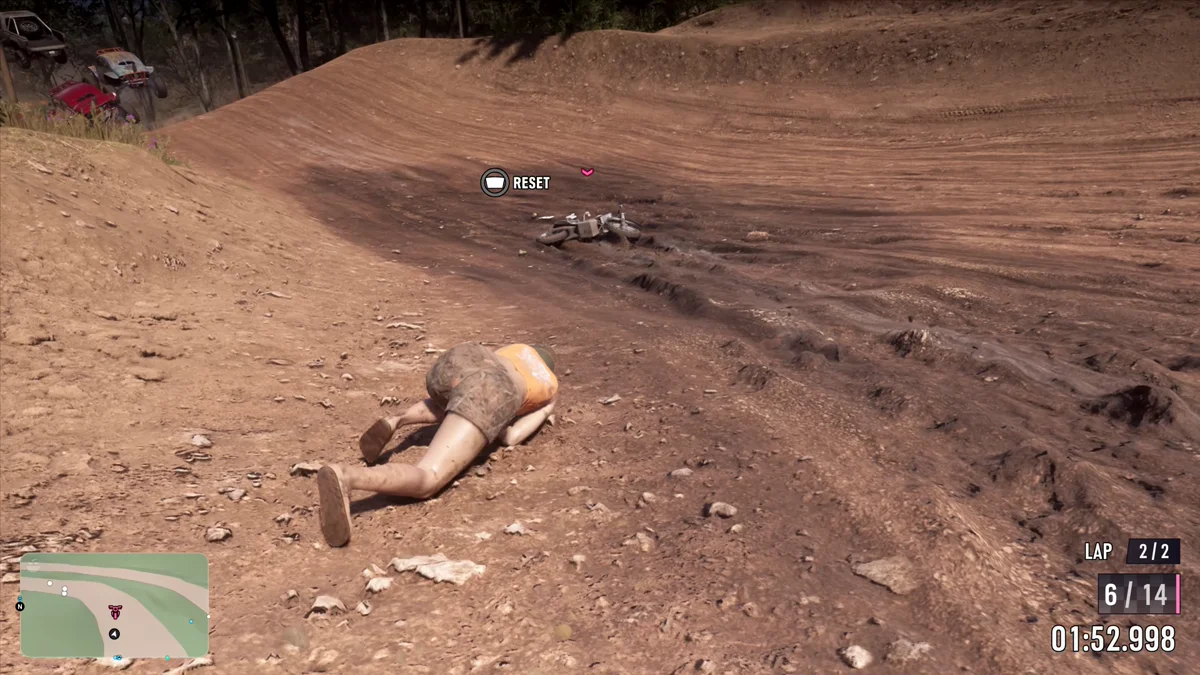
To reset a vehicle in GTA 6, hold the touch pad while the RESET prompt is on screen. The game only offers that prompt when a vehicle is stuck or down, and there’s no reset button anywhere in the controls otherwise, so when RESET isn’t showing you’ll need to push the vehicle, retry from a checkpoint or find another ride.
We’ve had the prompt come up twice on our PS5 copy of Grand Theft Auto VI, and the screenshot in this guide is from our own PS5 recording. Below is how RESET works, where we’ve seen it, and what to do when it doesn’t appear.
How the RESET Prompt Works
- Wait for the prompt. RESET only shows up once the game decides you’re stuck. On a mission, it appeared in the bottom-right corner after a truck we were driving hung up on a highway barrier. In a race at the Thrillbilly Mud Club, it floated over our dirt bike after the rider came off and the bike lay in the mud.
- Hold the touch pad. The icon beside RESET is the touch pad inside a circle, and on the Control Scheme screen a circled icon means hold. A quick tap does something else: it opens the map.
Both times we got going again without using it, so we can’t tell you exactly where a reset puts you. If you’re on a mission and the prompt does nothing useful, Retry Checkpoint is the dependable fallback (more on that below). Our guide to racing at the Thrillbilly Mud Club covers the races where a crash like ours happens most.
Why There’s No Reset Button
RESET isn’t a control you can press whenever you like. The Land / Water Vehicles page of the Control Scheme screen lists hold Left for the Vehicle Menu, Triangle to exit, L2 to brake or reverse and R2 to accelerate, and nothing that resets or flips a vehicle. The prompt is the game’s offer to help, and it only makes it when it thinks you need it.
We also haven’t seen RESET appear for a boat stranded on a beach, so don’t count on it there.
Other Ways to Get a Vehicle Moving
When the prompt doesn’t show, these get you out of trouble:
- Push it. Get out with Triangle, walk up against the vehicle and press L3 (click in the left stick) to push. It’s how you shove a beached boat back into the water, covered in our guide to getting a boat unstuck on land.
- Push a car back onto its wheels. A car lying on its side can sometimes be pushed back over the same way, but one that’s all the way over on its roof stays there. Our guide to flipping a car in GTA 6 explains the limits.
- Retry Checkpoint. On a mission, press Options to pause and pick Retry Checkpoint to go back to the last checkpoint. Our guide to restarting a mission covers it and Restart Mission.
- Call your own car. If the stuck vehicle wasn’t worth saving, the Scooter Bros app delivers any car you’ve registered to wherever you are.
A banged-up car that still drives just needs a fix, and our guide to repairing a car in GTA 6 lists where to go.
Frequently Asked Questions
How do you reset a car in GTA 6?
Hold the touch pad while the RESET prompt is on screen. The game shows it when a vehicle is stuck or down.
Why don’t I see a RESET prompt?
The game only offers it when it decides you’re stuck, and there’s no reset button in the controls otherwise. Push the vehicle with L3 or use Retry Checkpoint on a mission instead.
Can you reset a boat in GTA 6?
We haven’t seen the prompt appear for a beached boat. Get out and push it back into the water with L3.
Does tapping the touch pad reset the vehicle?
No. A tap opens the map. RESET needs the touch pad held down.