The fastest way to a working first zoo in Planet Zoo 2 is to build in the order Frontier Developments itself recommends: lay paths, add guest shops and facilities, power them, build staff and animal facilities, hire staff, and only then adopt animals into a finished habitat. After that, the game is about keeping three groups happy at once (animals, guests and staff), and your Zoo Reputation tells you which one is slipping.
These tips are drawn from Frontier’s own pre-launch material: its “Opening Your First Zoo” video, its Creature Feature articles on management, aquariums, aviaries, seasons and creative tools, and its official FAQ.
Updated October 16, 2026: Planet Zoo 2 is out, and Frontier has released Updates 1.0.4 and 1.0.5 and clarified how accreditation works. We have added the launch changes that matter to beginners: the new Edge Scrolling option, a finer default rotation snap, cheaper small loans, the Essentials filter, and Frontier’s advice for Franchise Mode connection problems.
Pick the Right Mode for Your First Zoo
Planet Zoo 2 has three modes, all linked through the new Planet Hub, a global menu you can open at any time to visit your zoos and manage trading, storage and research:
- Career: you start as the new Conservation Coordinator at FEN (the Fauna and Ecosystems Network) and travel between zoos, Wildlife Reserves and scenarios. This is the natural first stop, and Frontier opened its Zoological Summit livestream with the game’s tutorial.
- Sandbox: you choose the level of simulation and challenge. Good for learning the build tools without pressure.
- Franchise: your own international network of zoos and Wildlife Reserves, where you trade animals with other players and contribute to community conservation efforts. We would save it until Career or Sandbox has taught you the basics.
On console, keep an eye on the complexity meter. Frontier’s FAQ confirms console versions have one, a build cap that keeps performance stable on your hardware.
Build in This Order
Frontier’s Opening Your First Zoo video walks through the steps in this sequence, and it is a sensible order for any new zoo:
- Build a path from the entrance. Guests and staff both depend on it.
- Add foliage along it. Guests and staff both like a scenic zoo.
- Place guest shops and amenities. Guests need food, drink, toilets and places to rest, or they leave early or even ask for a refund.
- Power the buildings. Facilities need a power network, and habitats need water from filters and pumps.
- Build staff and animal facilities, the buildings your Keepers and Vets work from.
- Hire staff (more on the six roles below).
- Adopt animals, but only once their habitat is ready.
- Perfect the habitat, then build homes for exhibit species.
- Open the gates.
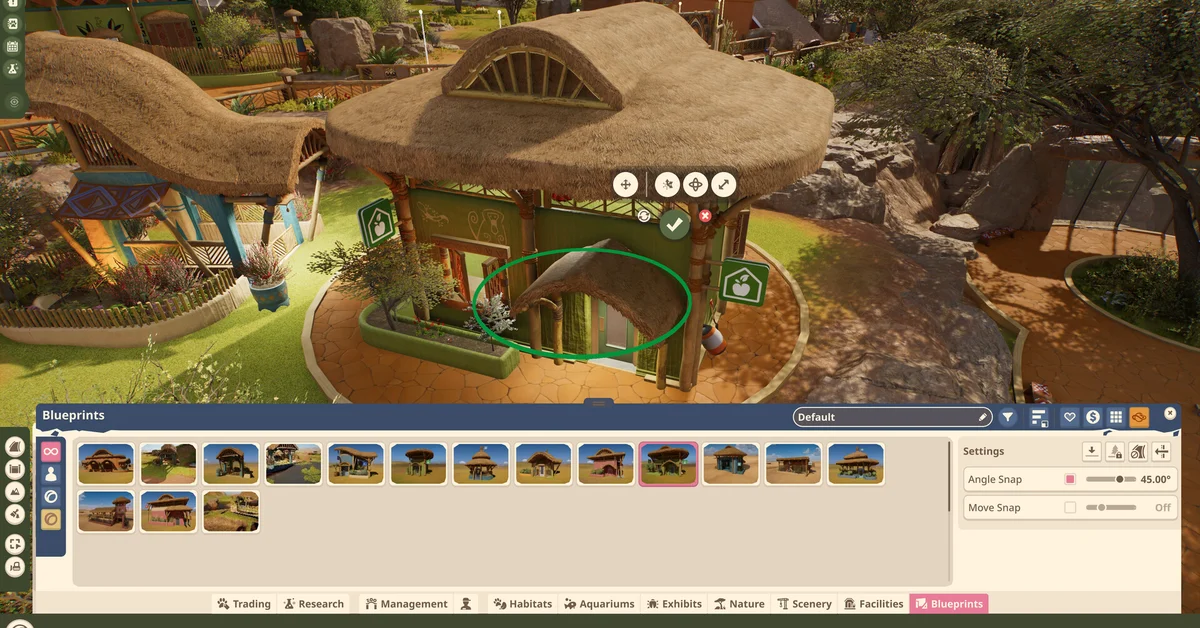
Use the bottom toolbar to find each step: Frontier’s screenshots show tabs for Trading, Research, Management, Habitats, Aquariums, Exhibits, Nature, Facilities, Scenery and Blueprints.
Habitats, Aquariums and Aviaries: The Rules That Trip Beginners Up
Every enclosure needs a staff gate on a path. A basic habitat is a closed loop of barriers plus a staff gate, and Frontier’s aquarium guide spells out the same step for tanks: add the staff gate “and connect to your path network so your staff can gain access.” When staff cannot reach an enclosure, a gate that does not touch a path is the first thing to check.
Read the Zoopedia before you build. Each animal needs food and water, enough space, the right terrain and plants, and a fulfilling social and enrichment setup. Our full animal list shows which habitat type each species needs.
Leave somewhere to hide. Frontier says guests want a good view, but animals “need space to hide away from guest view at times to recoup and avoid becoming stressed.” Build both into every habitat.
Aquariums have two extra settings. Set salinity (freshwater, saltwater or brackish) through the water filters attached to the tank, and temperature at the aquarium’s staff gate. Dirty water hides animals from guests and raises the chance of disease, and barrier types differ in how well they resist leaks.
Aviaries need a roof, flying space and nests. Select the habitat and choose “Add Roof.” Each bird species has its own flying space requirement, shown as the Flyable Area in the aviary’s Info Panel, and birds need nests to breed. Some gregarious species will even tolerate a walkthrough aviary, which you make by adding a guest gate and a path through it.
When Staff or Animals Cannot Reach Something
In the original Planet Zoo, “no path to destination” was the message players hit when an animal could not be moved into a habitat. Players on the first game’s Steam forums traced it to a path between the trade center and the habitat gate that looked connected but was not, to a habitat outside any staff work zone, or to having no caretakers hired, and some fixed it simply by unpausing and letting the game recalculate routes. Frontier has not documented how the sequel words its warnings, but the same checks are the place to start:
- Re-lay the path where it meets the staff gate rather than trusting an automatic connection.
- Make sure the enclosure sits inside a staff Work Zone if you have created zones.
- Confirm you have staff hired and on duty, then unpause for a moment so the game can work out the route.
Hire All Six Staff Roles and Keep Them
Frontier lists six jobs: Caretakers (cleaning), Keepers (feeding and care), Mechanics (facility and habitat upkeep), Vendors (shops), Vets (treating animals and running research) and Educators (Animal Talks). You can split your zoo into Work Zones so each staff member covers a manageable area. Staff quit if they are unhappy, so give them training, a fair salary and a workload they can handle.
Money, Research and Seasons
- Income comes from tickets, souvenirs and guest donations. Thriving animals encourage guests to donate more.
- Marketing campaigns for individual animals bring in more guests, at a cost. Loans give you cash now with interest attached, so treat them as a last resort.
- Research is done by Vets. It unlocks new items, better welfare options and the new Thriving state, the step above simply meeting an animal’s needs, which Frontier says helps animals live longer.
- Seasons are long. A year lasts 60 real-time minutes, up from 18 in the original Planet Zoo. Winter brings colder temperatures, so plan heaters or shelter (and the power to run them), and some species can only breed in certain seasons. Year-round breeders may need contraception to keep numbers manageable.
Build Faster With Blueprints, Paths and the Nature Brush
- Blueprints: Frontier ships ready-made buildings and enclosures, and the Frontier Workshop is built into the game, so you can browse community creations without leaving your save.
- Path tools: Line and Curve Builder, a Draw Tool that fills a shape, a Stamp Builder for premade plazas, and Border Edit for fine edges.
- The Nature Brush is the foliage paint tool fans of the original game asked for. It paints plants and rocks with adjustable intensity and size, and you can save your own brushes instead of placing foliage piece by piece.
If you play other management games, our Transport Fever 3 beginner tips cover a very different kind of network building.
Watch Your Zoo Reputation
Zoo Reputation is a rating out of five stars built from four areas: Animal Husbandry (welfare and thriving animals), Sustainability (recycling bins and renewable power), Guest Education (talks, speakers, boards, web cams and tours) and Guest Experience (happiness, decoration and animal variety). If welfare drops too far, protesters can appear outside your habitats and drive other guests away, so fix welfare problems before chasing anything else. Still deciding what to buy? Our editions guide compares Standard and Deluxe.
What Changed at Launch for New Zoos
Frontier has patched the game twice since its October 13 launch, and its post-launch posts answer a few questions new players keep running into:
- Edge scrolling is back. Update 1.0.5 on October 16 added an “Edge Scrolling” option in the keyboard and mouse settings. Frontier lists it among the quality-of-life features from the first Planet Zoo that “have not correctly deployed,” along with quick sell and release for exhibit animals.
- Rotation snaps to 1 degree by default. Update 1.0.4 on October 14 cut the default angle snap from 15 degrees to 1, so pieces rotate in much finer steps.
- Small loans are cheaper. The same update reduced the interest rates on low-level loans, so a small early loan costs less than it did at launch. It is still borrowed money, so keep it for emergencies.
- Use the Essentials filter. In its launch-week post, Frontier points new players to the Essentials filter, which narrows the item browser to functional items and blueprints such as facilities, donation bins and shop blueprints. Toggle it off to see everything again.
- Accreditation is separate in each mode. Frontier says progress in Career does not raise your Franchise accreditation, or the other way round. In Career, your Accreditation Tier rises with medals from scenario zoos and Wildlife Reserves. In Franchise, it rises with zoos that have a high Zoo Reputation and Wildlife Reserves with a high Biodiversity Rating.
- Animal quirks are known issues. Frontier lists animals climbing, jumping and pouncing badly, misaligning with enrichments, escaping habitats during certain behaviors and being boxed too often as ongoing areas of work, so an occasional escape may be a bug rather than a broken barrier.
Franchise Mode connection problems. Frontier lists Franchise Mode stability first among its high-priority areas after launch, and both patches include fixes for it. If you cannot connect, Frontier notes that playing through a VPN may cause connection issues, and that some usernames caught by its profanity filter can show a server connection error; in that case, raise a ticket with Frontier’s support team. Because Franchise Mode depends on Frontier’s servers, Career or Sandbox is the steadier place to learn while those fixes roll out.
Frequently Asked Questions
What should you build first in Planet Zoo 2? A path from the entrance, then guest shops and amenities, power, and staff facilities. Hire staff and finish a habitat before adopting your first animal.
Which mode should beginners start with? Career, which follows a story as FEN’s new Conservation Coordinator. Sandbox is the better choice if you want to learn the build tools with the challenge turned down.
Why can’t my staff reach a habitat? Usually because the staff gate is not connected to your path network. Re-lay the path at the gate and check the enclosure is inside a staff Work Zone.
How long is a year in Planet Zoo 2? Sixty real-time minutes, per Frontier, compared with eighteen in the original game.
Where is the foliage paintbrush? It is the Nature Brush, which paints foliage and rocks with adjustable intensity and size.
Can you play Planet Zoo 2 with a mouse and keyboard on console? Yes. Frontier’s FAQ confirms mouse and keyboard on console and gamepad on PC.
Does Career mode raise your Franchise accreditation? No. Frontier says accreditation is separate in each mode. Career tiers rise with medals from scenario zoos and Wildlife Reserves, and Franchise tiers rise with high Zoo Reputation and high Biodiversity Ratings.