
To drift in GTA 6 on PS5, hold R2 to keep the power on, steer into the corner with the left stick, and hold Cross, the handbrake, to kick the back of the car out. Then steer the other way and ease R2 on and off to hold the slide until the car straightens up.
We read every button below off the Control Scheme screen on our PS5 copy of Grand Theft Auto VI, and the screenshot in this guide is from our own PS5 recording. Below are the drift buttons, the steps through a corner, and what Rockstar has said about how its cars handle.
Drift Controls on PS5
| Action | PS5 |
|---|---|
| Accelerate | R2 |
| Handbrake | Cross |
| Steer | Left stick |
| Brake and reverse | L2 |
| Nitro, on a car that has it | L3 |
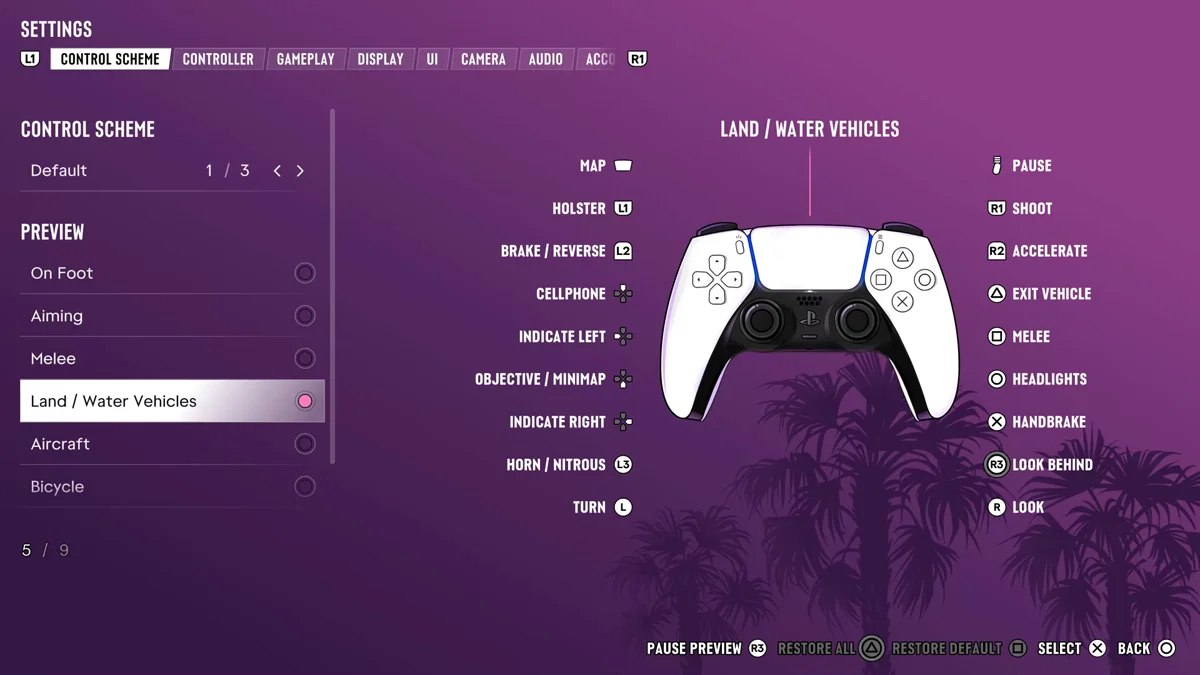
If you’re coming from GTA 5, the handbrake is the button to relearn. GTA 5 put it on R1, and in GTA 6 R1 shoots from the car, so a habit press in a corner fires your gun instead of breaking traction.
How to Drift Through a Corner
- Come in with some speed. A slide needs momentum, so approach on R2 rather than coasting.
- Turn in with the left stick a moment before the corner.
- Hold Cross to lock the rear wheels. The back of the car steps out, and holding the handbrake while you drive through the turn is what keeps the slide going.
- Countersteer. As the rear swings out, push the left stick the other way, toward the outside of the corner, so the car doesn’t spin.
- Feather R2. Too much throttle spins you, too little and the slide dies. Ease it on and off to keep the angle.
- Straighten out by centering the stick and rolling back onto full throttle as the corner opens.
If the car spins, you stayed on full throttle, so ease off R2 as you countersteer. If it barely moves sideways, go in faster or turn in harder as you hold Cross.
How GTA 6’s Handling Changes Drifting
Rockstar rebuilt the driving for this game. “It has all been built up from scratch on this hardware,” Rockstar North co-studio head Rob Nelson told the YouTube creator TGG, adding that the team has “much more control over tuning drivetrain, tyres, suspension, steering.” That means each car breaks loose differently, so a slide that works in one will need a different handbrake tap or throttle in the next.
Nelson also described the feel as a middle ground: “The team has worked hard to maintain some of the best parts of the weightiness and feel of GTA 4, but has the accessibility of GTA 5.” Expect cars to carry their weight into a slide more than GTA 5’s did.
Where to Practice
The roads are a tougher place to learn. “The streets in this game are narrower and more realistic in terms of scale,” Nelson told IGN, and the denser traffic “makes driving slightly more challenging and requires a bit of skill.” Practice on an empty car park or a wide road with little traffic before you try it in downtown Vice City.
Damage counts too. A spin into a wall costs you, and our guide to repairing your car covers fixing it afterward. Our guide to upgrading your car covers what mod shops change.
Using Nitro Out of a Drift
On a car that carries nitrous, L3 fires the boost, the same button as the horn. Firing it as the car straightens out gets you out of the corner faster. Our guide to using nitro boost explains the hold-or-press setting that controls it.
Our PS5 controls guide has the on-foot layout, and our guide to honking the horn covers the other job L3 does.
Frequently Asked Questions
What button is the handbrake in GTA 6?
Cross on PS5. The Land / Water Vehicles controls list it as Handbrake. In GTA 5 it was R1, which now shoots from the car.
How do you drift in GTA 6?
Hold R2, turn into the corner, hold Cross to swing the back out, then countersteer with the left stick and feather R2 to hold the slide.
Why does my car spin out when I drift in GTA 6?
You kept full throttle through the slide. Ease off R2 while you countersteer with the left stick.