
To give someone the middle finger in GTA 6 on PS5, hold L2 to look at them, then press R1. Put your gun away first with L1, because with a weapon out, L2 aims it at the person instead of just looking at them.
That’s the whole move, and it works on the people you pass in the street. Below we cover the steps, why your hands need to be empty, and how the gesture differs from the Taunt prompt in Grand Theft Auto VI. The screenshots in this guide are from our own PS5 recordings.
How to Flip Someone Off (Step by Step)
- Put your weapon away. Tap L1 to holster it, so your hands are empty. Our guide to putting your gun away covers it.
- Walk up to the person you want to flip off and face them.
- Hold L2 to look at them. Their label appears in the bottom-right corner (a passer-by shows up as “Stranger”), along with the prompts you can use on them.
- Press R1 while you keep holding L2. Your character flips them the bird.
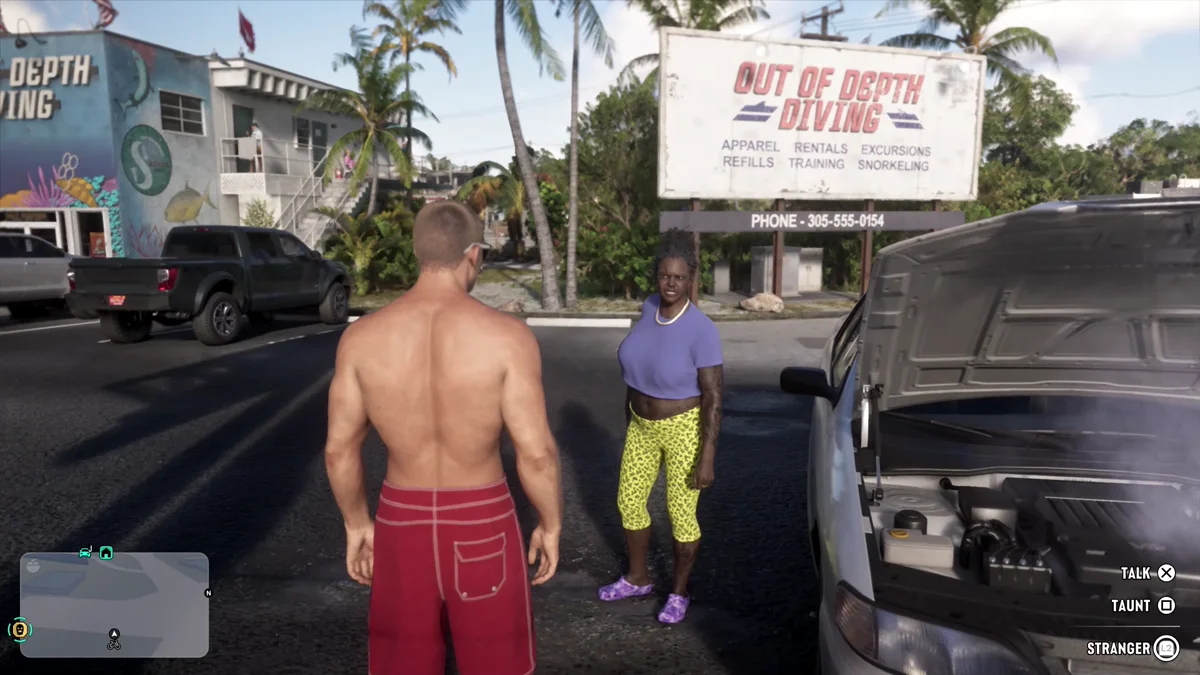
That corner panel is how you know L2 has picked the right person. If someone else’s label shows up, let go of L2, turn to face your target and hold it again.
Why Your Hands Need to Be Empty
L2 does two jobs in GTA 6. The Aiming page of the Control Scheme screen lists it as Aim / Interact: with your hands empty it looks at a person, and with a gun out it aims the gun at them. Pointing a weapon at someone is a very different message from a rude gesture, and it tends to make people nervous or aggressive, so holster first.
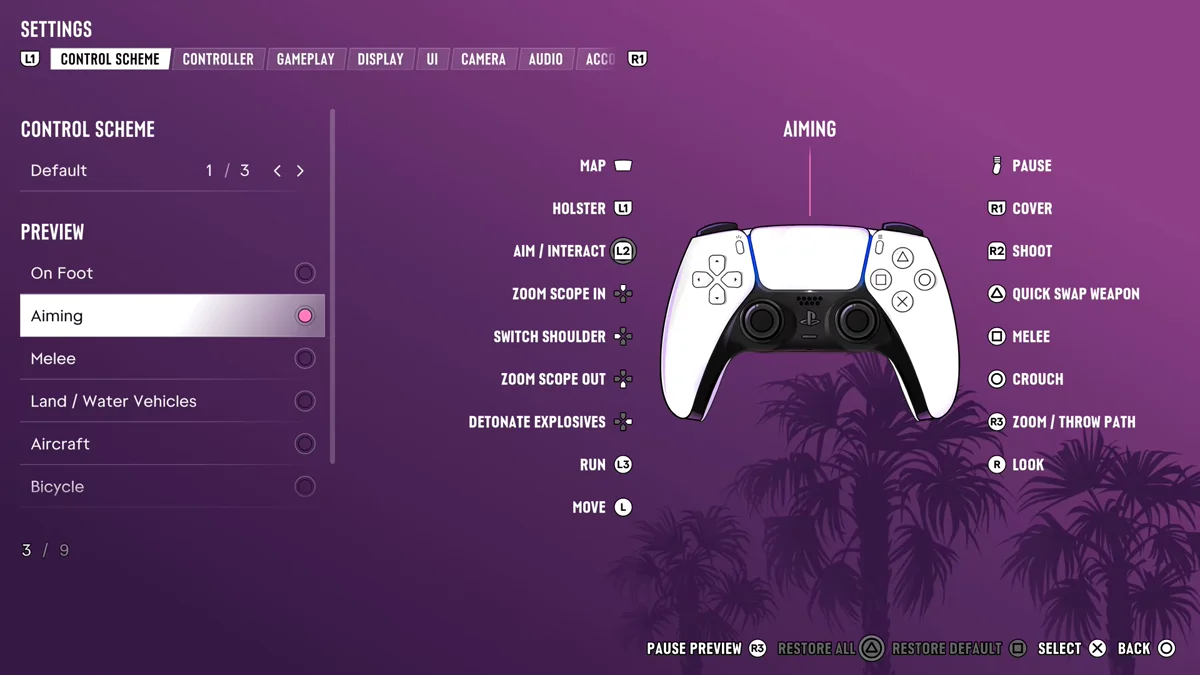
The same page shows that R1 is Cover and R2 is Shoot while you aim, so a stray R1 with a gun out won’t fire a shot, but it won’t flip anyone off either. Our guide to locking on covers how L2 aiming works when you do want the gun.
The Middle Finger vs. the Taunt Prompt
When you hold L2 on someone, the corner panel lists what you can say to them. On the woman in our screenshot, that was Talk on Cross and Taunt on Square. The middle finger isn’t on that list: it’s R1.
Taunt is one of the conversation options, a line your character says out loud, along with Greet, Provoke and Defuse on other people. Our guide to talking to NPCs explains what each option does, including the ones that can start a brawl and the one that can stop one.
More Ways to Deal With People
If flipping someone off turns into a fight, our guide to fighting in GTA 6 has the punch, block and grab buttons. If it turns into something worse and the police get involved, our guide to losing a wanted level covers getting away. Our GTA 6 controls guide has every other button, and every other GTA 6 guide is on our GTA 6 hub.
Frequently Asked Questions
How do you flip someone off in GTA 6?
Holster your weapon with L1, hold L2 to look at the person, then press R1.
What button is the middle finger in GTA 6?
R1, pressed while you hold L2 on someone with your hands empty.
Is the middle finger the same as Taunt in GTA 6?
No. Taunt is a spoken line on Square in the L2 prompts. The middle finger is a gesture on R1.
Why does L2 aim my gun instead?
You have a weapon out. Tap L1 to holster it, and L2 goes back to looking at people.