
To whistle in GTA 6 on PS5, put your gun away, look at someone and hold L2 to lock on to them, then press Triangle when Whistle appears in the options at the bottom right. Not everyone offers it: Whistle only shows up for people you can whistle at, so if it’s missing, lock on to someone else.
We whistle with Triangle on our PS5 copy of Grand Theft Auto VI, and the screenshot in this guide is from our own PS5 recording. Below are the steps, why the option comes and goes, and what else is on the menu that holding L2 opens.
How to Whistle on PS5
- Put your weapon away. With a gun in your hand, L2 aims it instead. Our guide to putting your gun away shows how.
- Look at the person you want to whistle at.
- Hold L2 to lock on. A list of options appears in the bottom right corner, with the person’s label at the bottom next to L2.
- Press Triangle at Whistle, keeping L2 held.
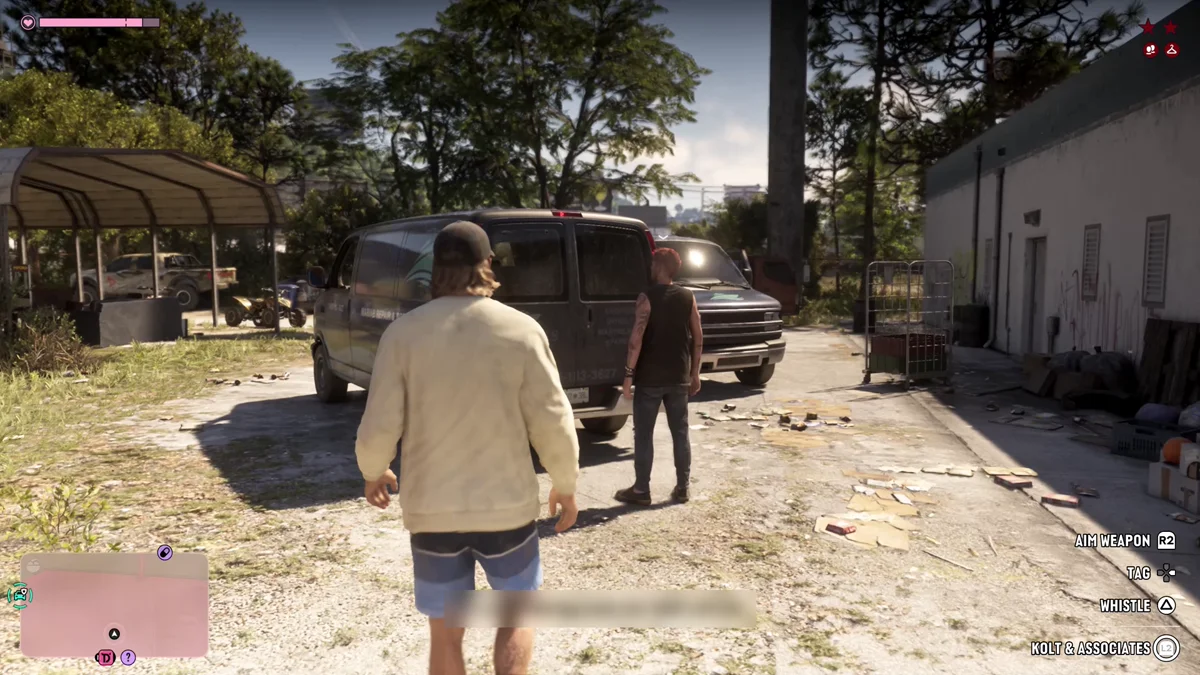
In the alley above, the man had been shouting at us, and holding L2 on him brought up Aim Weapon on R2, Tag on the D-pad and Whistle on Triangle, with his label, Kolt and Associates, beside L2.
Why Whistle Doesn’t Always Show Up
The options you get depend on who you lock on to. Whistle is offered for some people and not others, so the same button press that whistles at one person does something else, or nothing, with the next.
On other people, holding L2 brings up different sets. Strangers on the street usually get Greet, Provoke, Taunt and Defuse, as our guide to talking to NPCs explains. A shop clerk gets the store’s own options; at the Hamlet Pawn Shop counter we got Sell Collectibles and Greet. And with your partner, the list includes holding hands, which our guide to holding hands covers.
So if Triangle isn’t whistling, look at the list first. If Whistle isn’t on it, that person doesn’t offer it.
The Other Options on the Same Menu
Whistle sits alongside a few other choices while you’re locked on, and two of them are worth knowing before you press anything:
- Aim Weapon (R2) draws on the person you’re locked on to. That can scare someone off, but it can also start a fight. Our guide to locking on explains how L2 works with and without a gun.
- Defuse, when it’s offered, is the way out of a confrontation. Someone already shouting at you might back down if you pick it.
Whistling vs Talking
Whistle is one of GTA 6’s lock-on options, the system Nelson told IGN “is one that is returning and evolved from Red Dead Redemption 2.” If you played that game, holding L2 on someone works much the same way here, with the options changing person to person.
Our PS5 controls guide has the rest of the buttons.
Frequently Asked Questions
How do you whistle in GTA 6?
Put your gun away, hold L2 to lock on to someone, and press Triangle when Whistle appears in the options.
Why can’t I whistle in GTA 6?
Whistle only appears for some people. If it isn’t in the list when you hold L2 on someone, they don’t offer it. Make sure your gun is away too, or L2 aims it instead.
What button is whistle in GTA 6?
Triangle on PS5, while you hold L2 on someone who offers it.