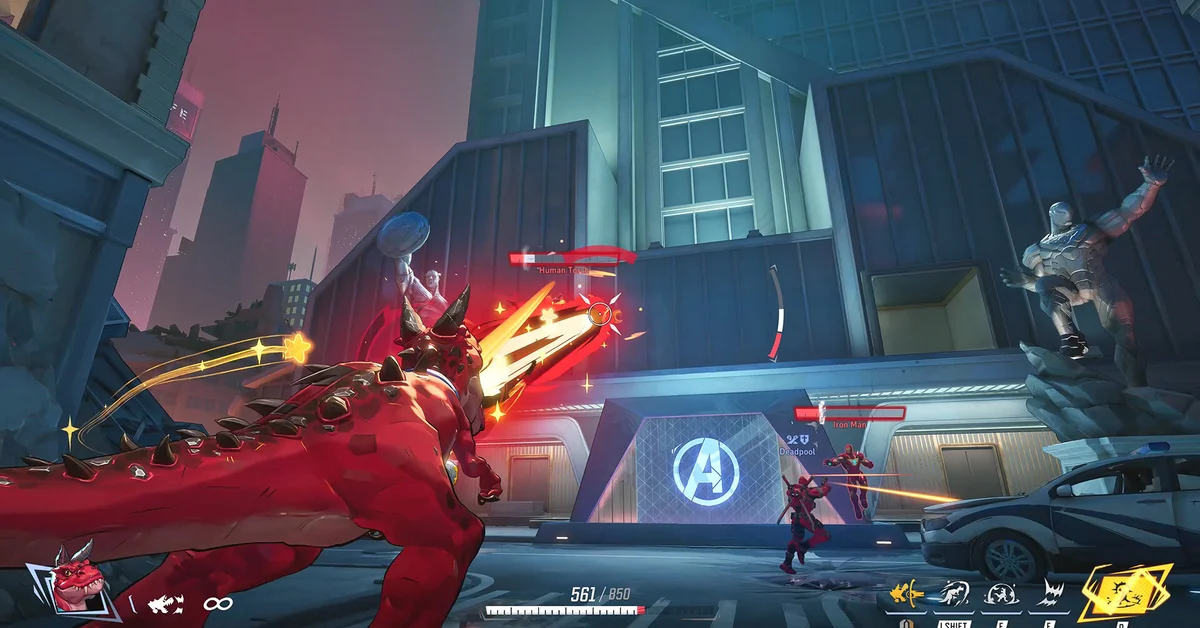
To get the Devil Dinosaur – Will of Galacta costume in Marvel Rivals, link your Marvel Rivals account to Twitch on NetEase’s official Twitch Drops page, then watch Marvel Rivals streams that have Drops enabled between November 13, 2026, at 12:00 UTC and December 11, 2026, at 09:00 UTC. That window comes from NetEase’s Version 20261113 patch notes, which list the costume “along with related bundle content.”
Below is the window in your time zone, the three linking steps, how to claim, where the rewards land in game and what to check if they do not show up.
When the Drops Run
The Season 11 drops start three hours after the season itself, which goes live after maintenance that begins at 09:00 UTC on November 13. They run for just under four weeks:
| Where | Drops start | Drops end |
|---|---|---|
| UTC | 12:00, November 13 | 09:00, December 11 |
| US Eastern (EST) | 7 AM, November 13 | 4 AM, December 11 |
| US Pacific (PST) | 4 AM, November 13 | 1 AM, December 11 |
| UK (GMT) | 12 PM, November 13 | 9 AM, December 11 |
| Central Europe (CET) | 1 PM, November 13 | 10 AM, December 11 |
Watch time only counts inside that window. In North America the drops end in the early hours of December 11, so treat December 10 as the last full day.
What the Drops Include
NetEase’s patch notes list the Devil Dinosaur – Will of Galacta costume “along with related bundle content,” without itemizing the extras. Will of Galacta is the name NetEase gives each round’s Twitch costume: Season 10 had Squirrel Girl’s, Season 10.5 had Angela’s, and Season 9.5 had Elsa Bloodstone’s. Past rounds have paired the costume with smaller items such as a nameplate and a spray. Each reward needs a set amount of watch time; NetEase’s notes do not give the minutes, so check the campaign on Twitch once it starts.
How to Link Your Accounts
NetEase’s Twitch Drops page lays out three steps:
- Log in to your Marvel Rivals account on the Twitch Drops page. The site’s login offers Steam, Epic, Xbox, PlayStation and NetEase accounts. Pick the one you play on, and check that the page shows your in-game name under “Role name” before moving on.
- Connect your Twitch account with the Step 2 button on the same page.
- Watch Marvel Rivals category livestreams on Twitch while the drops are live.
If you play on more than one platform, link the account whose character you want the costume on. NetEase’s FAQ says each Twitch account can claim a given drop only once, and reconnecting to another game character will not let you claim it again. If your platforms are already bound for cross-progression, your collection is shared between them; our guide to linking accounts for cross-progression explains how that works.
Which Streams Count
Per NetEase’s FAQ:
- Watch streams in the Marvel Rivals category on Twitch during the event period.
- A stream with Drops on carries the DropsEnabled tag, and a pop-up appears in its chat when the streamer has Drops turned on.
- Only one channel counts at a time. Watching several streams at once does not earn drops faster.
How to Claim and Find the Rewards in Game
- Open your Twitch Drops Inventory to track progress. NetEase points there as the place to check how close you are.
- When a reward is earned, claim it in the inventory before it expires.
- In Marvel Rivals, open your in-game mail. NetEase says claimed drops arrive there and the mails expire after 30 days, so collect them soon after claiming.
Once the costume is in your collection, it equips like any other. If you are working on the battle pass at the same time, our list of every Season 11 battle pass reward shows what The Incursion adds.
If Your Drops Do Not Show Up
- Check the linked character. The Drops page shows which game character is connected. If it shows the wrong one, NetEase’s FAQ says reconnecting another character will not let the same Twitch account claim that drop again.
- Check the claim. Progress alone is not enough: the reward has to be claimed in the Twitch Drops Inventory.
- Check the mail date. Rewards sit in in-game mail for 30 days, then expire.
- Check the tag. A stream without DropsEnabled earns nothing, even in the right category.
NetEase’s FAQ sends progress problems on the Twitch side to Twitch Support, and other issues to Marvel Rivals support, which it runs through its official Discord. The site’s footer also lists marvel_rivals@global.netease.com.
Other Watch Rewards This Season
Twitch Drops are separate from the in-game Livestreams tab. For the Marvel Rivals IGNITE 2026 Grand Finals, held November 23 to 29 in Stockholm, NetEase’s patch notes say you can watch live broadcasts, replays and VODs through that tab to complete event missions for rewards such as team sprays and Chrono Tokens. Match predictions in the same event pay out Units and Unstable Molecules. For the season as a whole, our guide to when Season 11 starts covers the launch, and our redeem codes page lists anything else free right now.
Frequently Asked Questions
When do the Marvel Rivals Season 11 Twitch drops start? On November 13, 2026, at 12:00 UTC, which is 7 AM Eastern and 4 AM Pacific, per NetEase’s patch notes.
When do the Devil Dinosaur Twitch drops end? On December 11, 2026, at 09:00 UTC, which is 4 AM Eastern.
What is in the Season 11 Twitch drops? The Devil Dinosaur – Will of Galacta costume, along with related bundle content that NetEase has not itemized.
How do I link Twitch to Marvel Rivals? Log in to your game account on NetEase’s Twitch Drops page at marvelrivals.com, then connect your Twitch account on the same page.
Can I watch several streams at once to earn drops faster? No. NetEase says only one active channel counts at a time.
Where do Twitch drops go in Marvel Rivals? To your in-game mail after you claim them on Twitch. The mails expire after 30 days.