
To save in Red Dead Redemption 2, open the pause menu (Esc on PC, Options on PlayStation, Menu on Xbox), go to the Story tab, choose Save Game and pick a slot. The game also autosaves at set moments, but a manual save is the only way to keep a specific point you can return to.
Below we cover the exact steps on each platform, when the game autosaves, why the save option is sometimes unavailable, how loading works, and how saving differs in Red Dead Online.
Which Version This Covers
This guide covers Story Mode in Red Dead Redemption 2 on PlayStation 4, Xbox One and PC (Steam and the Rockstar Games Launcher). Per Rockstar’s backward compatibility announcement, the PS4 and Xbox One versions also play on PS5 and Xbox Series X|S, and saving works the same there. Rockstar has not announced a native current-generation version. The save system is identical on every platform; only the button that opens the pause menu differs.
How to Save Manually, Step by Step
- Make sure you are free roaming. You cannot be in a mission, a fight or a forced activity (more on that below).
- Open the pause menu. Press Esc on PC keyboard, Options on PlayStation, or Menu on Xbox.
-
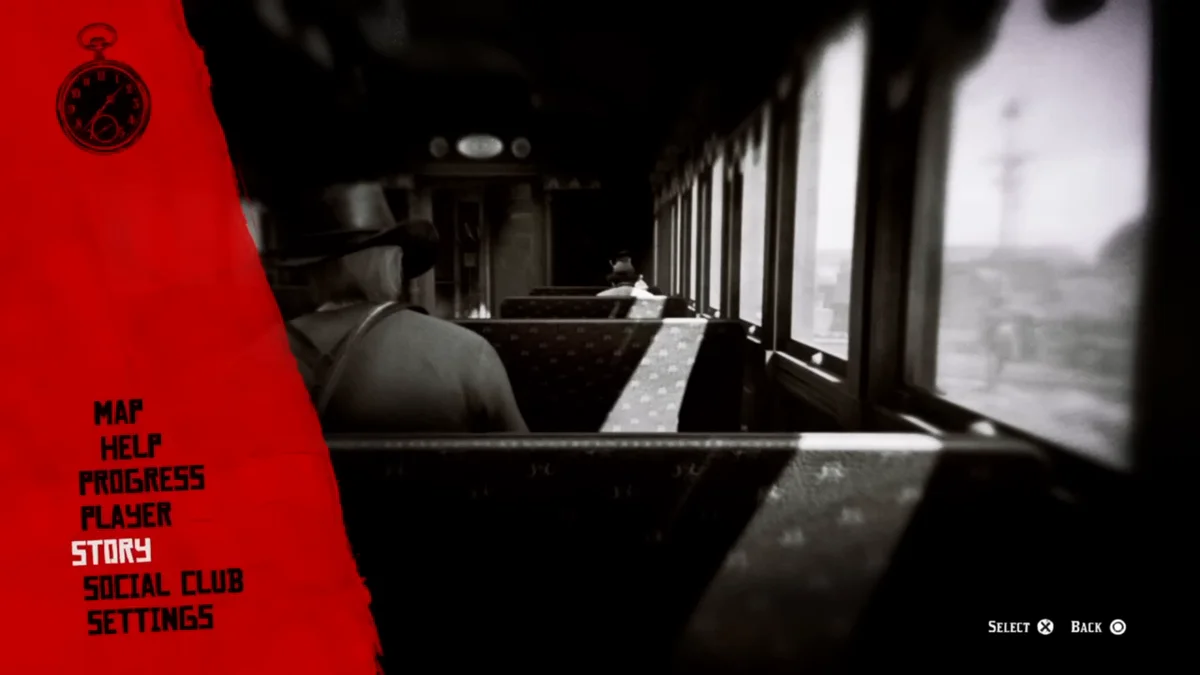
Go to the Story tab. Select it with Enter on PC, Cross on PlayStation or A on Xbox.
-
Choose Save Game. A list of save slots appears. Load Game sits right next to it.
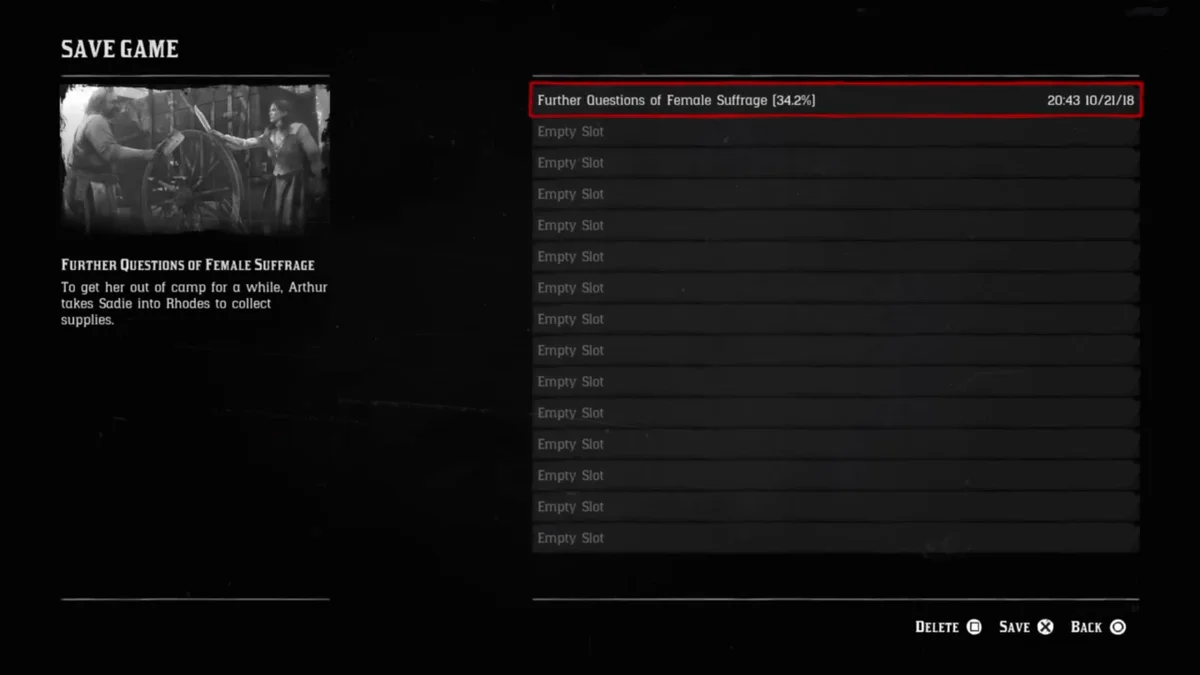
- Pick a slot. Choose an empty slot or overwrite an old one, and confirm. There are 15 slots for your own saves, and the autosave keeps a separate slot of its own.
Our video at the end of this guide shows us saving the game on PS4. The screenshots above come from the same recording.
We suggest rotating between two or three manual slots instead of always overwriting the same one. If a save lands at a bad moment (low health, an unwanted bounty, just after a mistake you cannot undo), an older slot gives you a clean way back.
When the Game Autosaves
Red Dead Redemption 2 autosaves on its own at regular points. Autosaves happen before and after main missions, when you sleep, and at moments such as bathing or buying and selling. Since chapters change during story missions, those mission autosaves also cover chapter transitions.
The autosave uses a single slot that keeps getting overwritten, which is why relying on it alone is risky. A manual save before a risky moment pays off, such as midnight in Saint Denis when you go looking for the vampire. Sleeping is a convenient way to prompt one, whether in your tent at the gang’s camp, a rented hotel room, or a camp you set up in the wild. You set up a wilderness camp through the Item Wheel (hold L1 on PlayStation or LB on Xbox) once you are far enough from towns.
Why You Cannot Save Right Now
If Save Game is greyed out or missing, the game is blocking it for one of these reasons:
- You are in a mission. Story missions and Stranger missions have their own checkpoints and do not allow manual saves until they end.
- You are in combat or wanted. Finish the fight or lose the law first. Our guide on getting rid of your bounty covers clearing it for good.
- You are in a minigame or forced activity. Poker, blackjack, dominoes and similar activities have to end first.
Once you are back to normal free roam, the option returns.
Loading a Save and Where PC Saves Live
To load, open the pause menu, go to the Story tab and pick Load Game. You will see your manual slots alongside the autosave. You can also load from the main menu when you start the game. Our guide to loading a save covers every route in more detail.
On PC, Story Mode save files live in your Documents folder under Rockstar Games > Red Dead Redemption 2 > Profiles, inside a numbered profile folder, with each slot stored as its own file. Back that folder up before installing anything that changes the game, such as the options in our best Red Dead Redemption 2 mods list. PlayStation and Xbox handle backups through their own cloud save systems.
If the game hangs on a loading screen after you pick Story, Rockstar’s support site notes this can happen when the game did not save correctly, and its troubleshooting steps are worth following before deleting anything.
Red Dead Online Is Different
Red Dead Online has no manual save option. Your character, money and progression are stored on Rockstar’s servers and save automatically as you play. There is no Story tab save slot to use, and loading an earlier point is not possible. Just leave the session normally.
What to Read Next
With saving sorted, the most useful next reads for a long playthrough are our breakdown of how many chapters there are and how long the game takes, our guide to fast travel, and the full Red Dead guides hub.
Frequently Asked Questions
How do you save in Red Dead Redemption 2? Open the pause menu, go to the Story tab, choose Save Game and pick a slot. You need to be in free roam, outside missions and combat.
Does Red Dead Redemption 2 have autosave? Yes. It autosaves at points such as the start and end of missions and when you sleep, but it uses one slot that gets overwritten, so manual saves are still worth making.
Why is Save Game greyed out? You are most likely in a mission, in combat, being chased by the law, or in a minigame. Return to free roam and the option comes back.
Can you save during a mission? No. Missions use their own checkpoints, so make a manual save before starting one if you want a fallback.
How do you save in Red Dead Online? You do not. Red Dead Online saves your progress automatically to Rockstar’s servers.