
GTA+ gives you four sets of perks in GTA 6: a bonus sports car with its own garage, 10% more when you sell vehicles you own, transit bonuses, and 10% off at select shops across Leonida. Rockstar lists all four on its GTA+ page for GTA VI, and on the US PlayStation Store the membership costs $7.99 a month, renewing until you cancel.
None of it is needed to play Grand Theft Auto VI: Rockstar calls them “optional benefits” for members. Below is every benefit in Rockstar’s own words, the GTA+ switch hidden in the game’s menus, what the membership adds outside GTA 6, and how to join and cancel. The screenshot in this guide is from our own PS5 recordings.
Every GTA+ Benefit in GTA 6
Rockstar groups the GTA VI perks under four headings. Here’s what each one says, with what it means in the game.
A Bonus Car and a Garage
“Get the high-performance ’90 Annis Venturas BLVD Elegy widebody sports car and a garage in the Crosstown District. Available to claim from Chapter 3.”
The garage is a one-car space with a weapon locker, and you can fence stolen goods from it, so it does more than hold the Elegy. Chapter 3 is a good way into the story, and our GTA 6 mission list shows where it starts. Our guide to getting the Elegy covers the car itself, and our garage locations guide covers the garages you can get without GTA+.
More Money When You Sell
“Benefit from a 10% increase on owned vehicle sales.”
Rockstar words it as owned vehicles, the cars that are yours. Our guide to selling cars covers where and how to sell.
Transit Bonuses
“Get upgrades from Scooter Bros Premium vehicle care, premium membership on the RydeMe rideshare app, and free scooter and bike rentals, plus Leonida metro benefits.”
In practice that means free rides on public transport and free Seashark rentals on top of the scooters and bikes. Scooter Bros is the app that delivers and recovers your car, and its Premium tier normally costs $12,500 in game, as our Scooter Bros guide explains. RydeMe is the rideshare app, covered in our RydeMe guide.
Shop Discounts
“Get a 10% discount from select businesses across Leonida, including weapons and clothes shops, hairdressers, tattooists, vehicle mod shops, and more.”
Rockstar says select businesses, so not every till in the state takes the discount.
The GTA+ Boosts Switch in the Menus
GTA 6 has its own GTA+ setting. Press Options to pause, open Settings and move across to the Account tab with R1. Under Rockstar Games, between Rockstar Games Account and Credits, sits GTA+ Boosts.
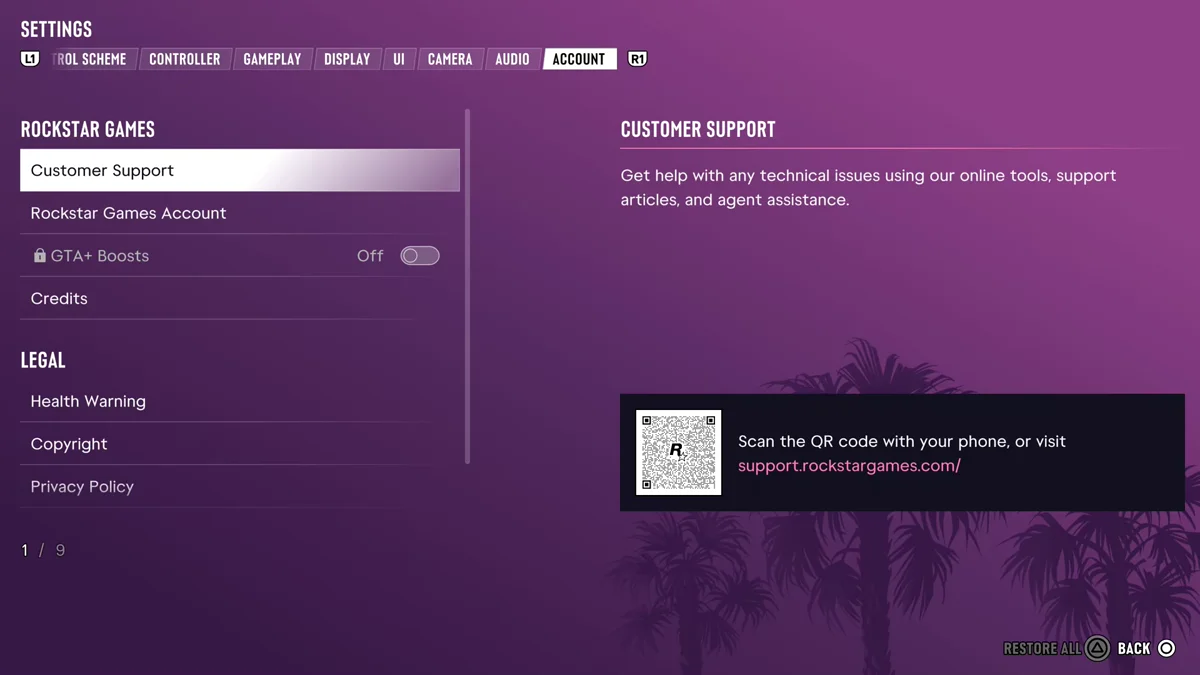
On our PS5 copy it’s greyed out with a lock beside it and set to Off, so we can’t show you exactly what it turns on. Rockstar’s terms say an “Active Membership and Internet required to access and claim benefits,” so if you’ve joined and a perk is missing, this is the first place to look, and staying online is the second.
What GTA+ Adds Outside GTA 6
Rockstar’s page also says “GTA+ Members on console can enjoy benefits including access to the Games Library and perks in GTA Online.” The PlayStation Store listing spells out the GTA Online side:
- GTA$500,000 every month
- Access to The Vinewood Club amenities
- Rotating benefits and rewards
- 15% bonus GTA$ with GTA+ Shark Cards
The Games Library is a collection of Rockstar games that members can play. GTA Online here is the online mode of GTA 5, not a GTA 6 mode, as our guide to GTA 6 online multiplayer explains.
What GTA+ Costs and How to Join
On the US PlayStation Store, “GTA+: One Month Subscription” is $7.99. Rockstar says the console membership “is available via Microsoft Store or PlayStation Store,” so on Xbox you buy it through the Microsoft Store, where the price is listed in your region.
- Buy the membership in the PlayStation Store or the Microsoft Store.
- Stay online. Benefits need an active membership and an internet connection.
- Claim the perks in game. The Elegy and its garage wait until Chapter 3.
It renews every month. Rockstar’s fine print says “Auto-renewal may be canceled at any time through the applicable store, but access to GTA+ will terminate only at the end of your then-current billing period,” so cancelling partway through still leaves you the rest of the month. The same fine print says fees and benefits are subject to change.
If you bought GTA 6 digitally before launch, you may already have a free month. Our pre-order bonus guide shows how to claim it and cancel before it renews, and our guide to GTA 6 on Game Pass and PS Plus explains why GTA+ is separate from both.
Is GTA+ Worth It in GTA 6?
It depends on how you play. The Elegy and the Crosstown garage are the headline, but you can’t claim them until Chapter 3, so a month bought on day one spends a while waiting. The 10% sale bonus and the shop discounts add up for players who buy and sell a lot, and the transit perks matter most if you leave your car behind often. If you already play GTA Online, the monthly GTA$ and the Games Library tip the balance further.
Because the perks only last while you’re a member, plan on paying for as long as you want to use the car and the garage.
Every other GTA 6 guide is on our GTA 6 hub.
Frequently Asked Questions
What does GTA+ give you in GTA 6?
Rockstar lists a ’90 Annis Venturas BLVD Elegy widebody with a garage in the Crosstown District, 10% more on owned vehicle sales, transit bonuses (Scooter Bros, RydeMe, scooter and bike rentals, and metro benefits), and 10% off at select businesses.
How much is GTA+ in GTA 6?
$7.99 for one month on the US PlayStation Store. It’s also sold through the Microsoft Store on Xbox, and it renews monthly until you cancel.
Do you need GTA+ to play GTA 6?
No. Rockstar describes the GTA VI perks as optional benefits for members, and the full game is playable without them.
Does GTA+ work offline?
No. Rockstar says an active membership and an internet connection are required to access and claim benefits.
When can you claim the GTA+ car?
From Chapter 3. Rockstar says the Elegy and its garage are “Available to claim from Chapter 3.”
How do you cancel GTA+?
Turn off auto-renewal through the store you bought it from, the PlayStation Store or the Microsoft Store. Your benefits last until the end of the billing period you’ve paid for.