
To contact Rockstar customer support about GTA 6, open Settings from the pause menu, go to the Account tab and highlight Customer Support: the game shows a QR code to scan with your phone and the address of Rockstar’s support site, support.rockstargames.com. The game says that’s where you “get help with any technical issues using our online tools, support articles, and agent assistance.”
We found the Customer Support panel on our PS5 copy of Grand Theft Auto VI, and the screenshot in this guide is from our own PS5 recordings. Below is how to reach it, which problems Rockstar handles and which belong to PlayStation or your retailer, what to check before you get in touch, and what to have ready.
How to Find Customer Support in GTA 6
- Press Options to open the pause menu. Its options run Map, Game, Store, Help, Photo Studio and Settings.
- Select Settings and press R1 until you reach Account, the last tab.
- Highlight Customer Support. It’s the first line under the Rockstar Games heading, and the counter at the bottom reads 1 / 9.
- Read the panel on the right. It shows the description above and a box in the bottom-right corner: “Scan the QR code with your phone, or visit support.rockstargames.com/.”
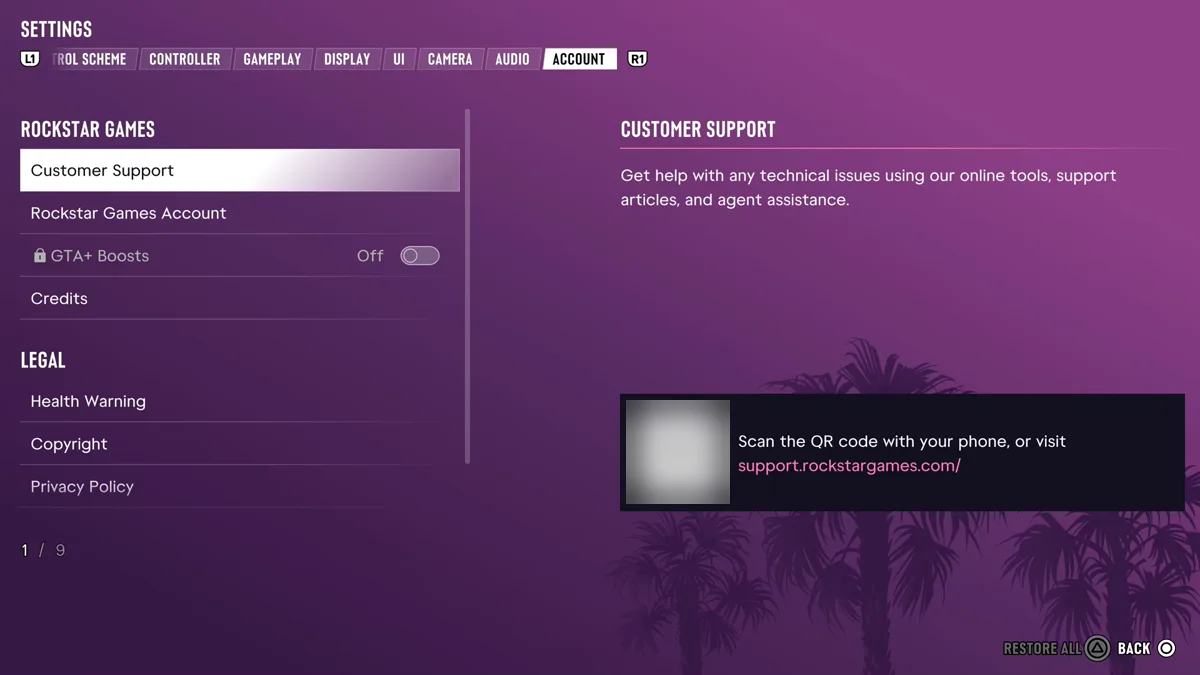
We’ve blurred the code in our screenshot, so scan the one on your own screen with your phone’s camera, or type the address into any browser. Our guide to scanning the QR code in GTA 6 walks through the scan itself. Either way you end up on Rockstar Support, the same site PlayStation’s own GTA VI page sends you to.
Rockstar Support or PlayStation Support?
Not every GTA 6 problem is Rockstar’s to fix. PlayStation’s Grand Theft Auto VI support page splits the jobs: it sends gameplay issues, patches and bugs to Rockstar Support, and keeps the rest for PlayStation Support.
| Problem | Who to contact |
|---|---|
| Gameplay issues and bugs | Rockstar Support |
| Patches and updates | Rockstar Support |
| Your PlayStation account | PlayStation Support |
| The game won’t launch, download or install | PlayStation Support |
| Code issues | PlayStation Support |
| Digital refunds | PlayStation Support |
| PlayStation suspensions | PlayStation Support |
| A code in the box that’s missing, damaged or needs a refund | The retailer you bought it from |
The boxed version gets its own page. PlayStation’s GTA VI code support page answers a missing or damaged code, and a refund for the boxed version, with the same line: “Please contact the retailer for help.” If the code says it has already been used, the page has you check your Order History first, in case it went to another account. Our guide to redeeming the code in the box covers the steps.
On Xbox Series X|S, we haven’t found an Xbox page that splits the jobs the same way, so for anything that happens inside the game, Rockstar Support is the place to start.
Check These Before You Contact Anyone
A lot of problems have a fix that’s faster than waiting on an agent:
- Is something down? Check Rockstar Games service status, PlayStation Network status and Xbox status. If one of them shows trouble, waiting is the fix.
- Is your game up to date? Rockstar posts its GTA 6 patch notes on Rockstar Support, and an update may already fix your problem. Our guides to the latest patch notes and checking your game version show whether you have it.
- Does it crash? Our guide to fixing GTA 6 crashing has the console-side fixes to try first.
- Won’t it start at all? A padlock or a game that refuses to launch is covered in our guide to GTA 6 not unlocking or launching.
- Is the problem part of the game? A wanted level that won’t clear, for example, often has a game reason, which our guide to a stuck wanted level explains.
What to Have Ready When You Contact Rockstar
A report an agent can act on saves you a back-and-forth. Before you write in, note:
- Your console. PS5 or Xbox Series X|S.
- Your game version. Our version guide shows where to find it.
- What happened and how to make it happen again. PlayStation’s own crash page asks for a detailed description, the steps that cause the problem, and a screenshot or video if you can get one, and that’s a good habit for any report.
- Your Rockstar Games account. It sits right below Customer Support on the same Account tab. The game’s store listings say some features may need Rockstar Games account registration, so know which account you play on.
Every other GTA 6 guide is on our GTA 6 hub.
Frequently Asked Questions
How do you contact Rockstar support about GTA 6?
Open the pause menu, go to Settings, press R1 to the Account tab and highlight Customer Support. Scan the QR code with your phone or visit support.rockstargames.com, Rockstar’s support site.
Where is Customer Support in GTA 6?
In Settings, on the Account tab. It’s the first line under the Rockstar Games heading.
What is Rockstar’s support website?
support.rockstargames.com. The game prints it beside the QR code, and PlayStation’s GTA VI support page links to the same site.
Should I contact Rockstar or PlayStation about GTA 6?
PlayStation’s GTA VI support page sends gameplay issues, patches and bugs to Rockstar Support. Your PlayStation account, launch, download and install problems, code issues, digital refunds and suspensions go to PlayStation Support.
Who do I contact if my GTA 6 code is missing or damaged?
The retailer you bought the boxed version from. PlayStation’s GTA VI code support page says to contact the retailer for a missing or damaged code and for a refund on the boxed version.
How do I check if GTA 6’s servers are down?
Rockstar has a service status page on its support site, and PlayStation Network and Xbox each have their own status pages. If any of them shows a problem, waiting is the fix.