
To scan a QR code in GTA 6, point your real phone’s camera at your TV: the QR code in the game is meant for the phone in your pocket, not the one Jason and Lucia carry. You’ll find it in Settings, on the Account tab under Customer Support, where the game says “Scan the QR code with your phone, or visit support.rockstargames.com/.”
That’s the QR code we found on our PS5 copy of Grand Theft Auto VI, and the screenshot in this guide is from our own PS5 recording. Below is how to reach it, how to scan it, the separate QR code that comes in the box, and what the in-game phone scans instead.
Where the QR Code Is in GTA 6
- Press Options to open the pause menu and select Settings, the last option on it.
- Press R1 until you reach Account, the last of the Settings tabs.
- Highlight Customer Support, the first line on the tab (the counter reads 1 / 9).
- Look to the bottom right. A panel shows the QR code, with Rockstar’s R in the middle, and the line “Scan the QR code with your phone, or visit support.rockstargames.com/.”
The description above it says what’s on the other end: “Get help with any technical issues using our online tools, support articles, and agent assistance.”
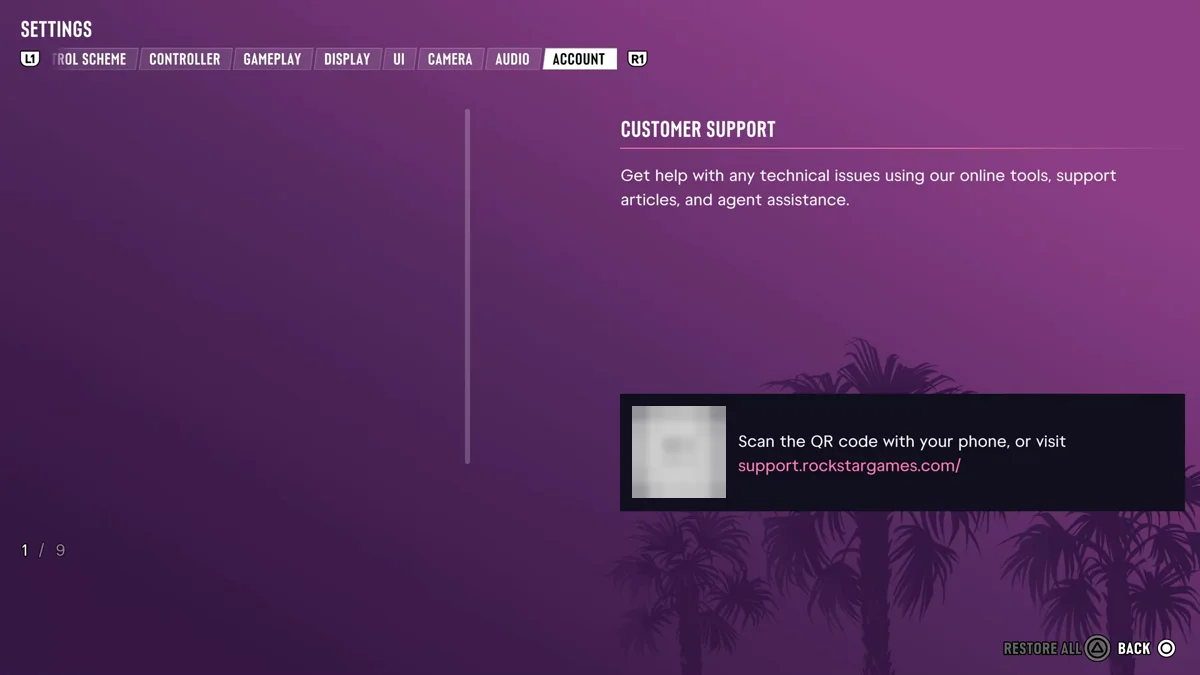
We’ve blurred the code in our screenshot, so scan the one on your own screen.
How to Scan It With Your Phone
- Leave the Customer Support screen up on your TV.
- Open your phone’s camera app and point it at the code. Most phone cameras read QR codes on their own and pop up a link.
- Tap the link to open Rockstar’s support site on your phone.
If your phone won’t read it, type the address shown beside the code into your phone’s browser instead. It’s the same place either way. Our guides to fixing GTA 6 crashes and the latest patch notes cover the most common problems before you need to contact anyone.
The QR Code in the GTA 6 Box
The boxed version has a QR code of its own, and it’s also for your phone. PlayStation’s GTA VI code support page says that after you enter the code from the box, “you can choose to upgrade to the Ultimate Edition by scanning the QR code in the box.” The box itself holds a download code, not a disc.
Our guides to redeeming the code in the box and upgrading to the Ultimate Edition cover both steps.
Can the In-Game Phone Scan QR Codes?
Not that we’ve seen. Scanning in Leonida is the WAiNK app’s job: hold up on the D-pad and point it at a car to see whether it has a tracker, or at landmarks, statues and art to add them to your collection. We haven’t come across a QR code out in the world on our copy, so if you’re hunting one for a scan, WAiNK’s targets are the ones that count. Our WAiNK app guide covers what it scans and the trophy tied to it.
What Else Is on the Account Tab
Customer Support is one of nine lines on the Account tab. Under Rockstar Games it sits above Rockstar Games Account, GTA+ Boosts and Credits, and a Legal section below holds the Health Warning, Copyright, Privacy Policy, Terms of Service and Subscription Terms. GTA+ Boosts showed a lock and read Off on ours, because the game says it “applies to active GTA+ members only”; our guide to GTA+ benefits explains the membership. Our guide to the best settings to change first covers the other tabs, and every GTA 6 guide is on our GTA 6 hub.
Frequently Asked Questions
Where is the QR code in GTA 6?
In Settings, on the Account tab. Highlight Customer Support, the first line, and the code appears in the bottom-right corner.
How do you scan a QR code in GTA 6?
With your real phone. Open its camera app, point it at the code on your TV and tap the link it shows.
Can you scan QR codes with the in-game phone in GTA 6?
Not that we’ve seen. The in-game phone’s scanner is the WAiNK app, which reads cars, landmarks, statues and art rather than QR codes.
What does the QR code in the GTA 6 box do?
PlayStation says scanning it lets you upgrade a boxed copy to the Ultimate Edition after you’ve entered the code from the box.
What does the GTA 6 Customer Support QR code open?
Rockstar’s support site, the same address the game prints beside it, where you can get help with technical issues.