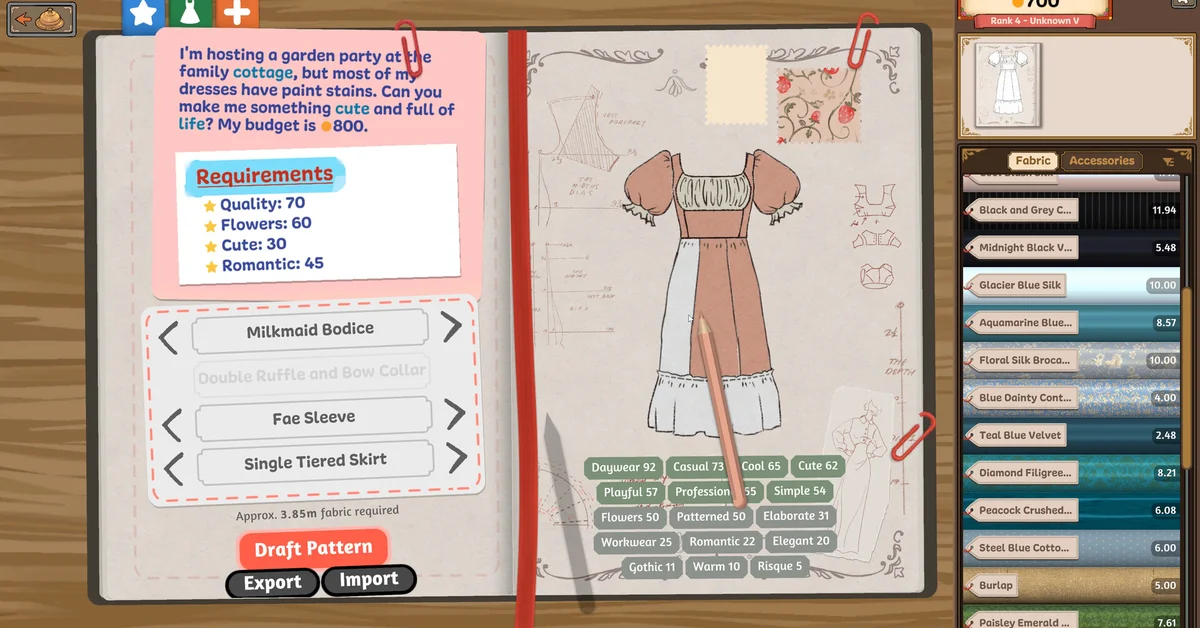
The best beginner tip for Dressmaker is to read the commission’s requirements before you buy a single meter of fabric, then design to them: every request lists the qualities the client wants and a budget, and fabric, pattern pieces and accessories all feed those scores. After that, the biggest gains come from cutting pieces along the grain and taking your time at the sewing machine, because how you cut and sew is what shows up on the finished dress.
Dressmaker, the sewing sim from developer Cozy Lives and publisher Free Lives, launched on September 21, 2026, and it does not hand-hold much. These tips come from the store page, the developers’ official Steam posts and patch notes, and, where marked, from what players report on the official Steam forum.
1. Read the Whole Commission First
Each client brings a request with a short brief, a list of requirements (in the official screenshots, things like “Quality: 70,” “Flowers: 60,” “Cute: 30” and “Romantic: 45”) and a budget. Those numbers are your target. Check them before you open the fabric shop, not after the dress is sewn.
The developers’ store page says clients want dresses tailored “to important events and their individual tastes,” and every character is measured, with patterns drafted to fit their body. You are making one dress for one person, so a generically pretty gown that misses the brief will not land.
Since patch Build 403, you ring the bell on the counter to summon the next customer, so new clients will not interrupt you mid-dress.
2. Design in the Sketchbook Before Buying
The sketchbook is where you pick each component (bodice, sleeves, collar, skirt) and colour the design. Patch Build 410 made the component names clickable there, which is the quickest way to swap a sleeve or skirt. The sketchbook also estimates how much fabric the pattern needs (the official screenshot shows “Approx. 3.85m fabric required”), so use it to buy the right amount.
3. Buy Fabric by Its Tags
In the fabric shop every fabric shows its type and tags with values, such as Silk, Formal, Simple or Romantic, and you buy it by the meter. Match those tags to the commission’s requirements. If a client wants Romantic and Cute, a fabric with both is worth more to you than a prettier one with neither.
The store page lists cotton, linen, wool, silk and velvet among the materials, and the developers say the game has over 450 fabrics, so the shop grows as you play. Keep an eye on the budget: spending it all on one luxury fabric leaves nothing for trims.
4. Cut on the Grain
In the cutting room you lay pattern pieces on your fabric and cut them out. Each piece shows a Grain Quality percentage. The store page is explicit that “whether your pattern is aligned to the grain or cut on bias, how you choose to arrange and cut out your fabric is what appears on the final dress.” Aim for 100% on every piece when quality matters.
The trade-off is fabric: rotating pieces to squeeze them into less cloth saves money but can cost grain quality. Buy a little extra fabric for high-quality commissions rather than cramming. Since Build 410, the mouse wheel no longer rotates pieces when your cursor is over the inventory, which used to knock careful layouts out of line.
Hovering a panel in your inventory also shows where it goes on the mannequin, another Build 410 addition that helps when two pieces look alike.
5. Slow Down at the Sewing Machine
You feed fabric through the machine yourself. The on-screen controls in the official screenshots show Space to sew, A and D to rotate, and W and S to change speed. Lower the speed on curves; there is no prize for finishing fast. Build 410 also lets you change the thread colour by clicking the spools, so match it to the fabric.
6. Accessories Come Last, and Trims in Sections
Once sewing is complete the game tells you that you “may add accessories, or click below when the dress is finished.” This is where buttons, bows, appliqué and lace trims go, and where you can push a requirement like Flowers over the line.
Players on the official forum say long lace trims are easier in sections rather than in one pass, and that spinning the mannequin with the mouse wheel helps you follow an edge.
7. Use Off-the-Rack Dresses for Money
After a dress is finished you can complete the commission, keep working, or sell it. You can also design your own dresses and sell them off the rack from your shop window. The developers say this lets you take a break from commissions or save up for an extra elaborate dress. Players on the forum suggest making cheap off-the-rack dresses (burlap, in one player’s advice) when you need coin quickly.
8. Know the Fixes and Where to Get Help
- Failed commissions now pay. Build 403 fixed failed commissions not giving money: if the client accepts the dress, you should be paid.
- Lost a commission? Players say an accepted commission should still show up in your journal.
- Stuck on a bug? Free Lives’ support asks players to email support@freelives.net and include the save file.
On October 1 the team said its small crew (about “1.5 programmers”) has stepped back from Discord chatter to keep up with bug reports, and that a new team is being brought up to speed, so fixes may take a little longer. Our Dressmaker launch story covers the roadmap: an online challenge mode, transparent fabrics, full controller support, and planned mobile and Switch ports.
Frequently Asked Questions
How long is Dressmaker? The developers say the story commissions take approximately 35 hours, not counting off-the-rack dresses.
Can you play Dressmaker with a controller? Partly. The developers say it runs well on Steam Deck but full controller support is still planned.
What happens if a client does not like the dress? Clients rate finished dresses out of five stars, as the official screenshots show, so missing the brief costs you stars. Since patch Build 403, a commission the client accepts still pays even when it falls short.
Is Dressmaker on Mac? Yes. It launched on Steam for Windows and Mac.
Are there microtransactions? No. The developers say there are no microtransactions and no ads, and more free content is coming.
What else is like Dressmaker? If you want another cozy game with a long to-do list, our Fields of Mistria guides and Stardew Valley guides are good places to start.