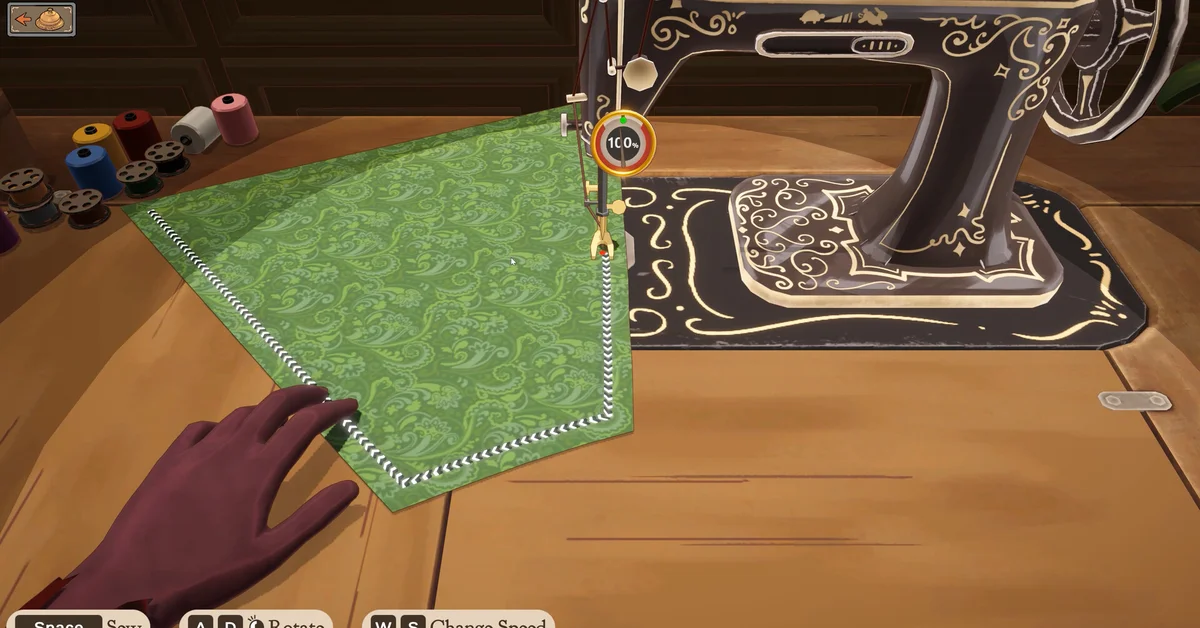
Dressmaker is played with mouse and keyboard: at the sewing machine, Space sews, A and D rotate the fabric, and W and S change speed, while the mouse does most of the work in the other rooms. It does not officially support controllers yet, though the developers say proper controller support is planned.
Below are the controls from the developers’ own screenshots and patch notes, then the extra keys players have found, then where controller support stands. Dressmaker‘s Steam page also lists a “Mouse Only Option,” so most of the game can be played with the mouse alone.
Official Controls
These come from the developers’ official screenshots and patch notes:
| Where | Action | Control |
|---|---|---|
| Sewing machine | Sew | Space |
| Sewing machine | Rotate the fabric | A / D or left mouse |
| Sewing machine | Change speed | W / S |
| Cutting room | Send a piece to your inventory | Right mouse |
| Cutting room | Rotate a panel | Mouse wheel |
| Sewing machine | Change thread colour | Click the spools |
| Shop counter | Call the next customer | Ring the bell |
Two of those came in patches. Build 403 made you ring the bell to summon each customer, and Build 410 added thread colours by clicking the spools and stopped the mouse wheel rotating panels while your cursor is over the inventory.
Keys Players Have Found
Players on the official Steam forum have mapped more of the game. These are player reports rather than an official list:
- Zoom: Z or middle mouse click. It zooms toward your cursor; tapping again cycles closer, then back out. On some European keyboard layouts it is Y.
- Rotate the mannequin: mouse wheel. A and D rotate when zoomed out and pan when zoomed in.
- Reset a seam: R at the sewing machine.
- Rotate accessories: Q and E.
- Duplicate an accessory: Shift.
- Options: Esc.
Players also mention a sewing assist option in the settings that makes seams easier, and a rotation tool setting for placing pieces.
Can You Rebind Keys?
Not in the game, as far as players have found: several have looked for a rebinding menu without success, and the developers have not mentioned one. A popular community mod loader adds keybind settings, but in the unmodded game the defaults above are what you get.
Controller Support
There is no official controller support yet. The game’s community manager said on September 24, 2026, in the official forum: “It isn’t officially controller supported at the moment, but it is something we’re looking into!” The developers’ launch post adds that they “want to give it proper controller support,” without a date.
Earlier, in June, the team explained why it is hard: “the gameplay is very mouse and keyboard specific.” Steam’s store data matches, with no controller support flags set.
In the meantime, you can still play with a controller through Steam Input by mapping buttons yourself, which the community manager has suggested for Steam Deck players. Players share community controller layouts on the official forum.
The controls matter most for quality, since clean cutting and slow sewing decide the score. Our guide to getting 100% quality explains how, and every guide is on our Dressmaker hub.
Frequently Asked Questions
What are the sewing controls in Dressmaker? Space sews, A and D (or the left mouse) rotate the fabric, and W and S change the speed, according to the developers’ official screenshot.
How do you zoom in Dressmaker? Players report Z or a middle mouse click zooms toward the cursor. On some European layouts it is Y.
Does Dressmaker support controllers? Not officially yet. The developers say proper controller support is something they are looking into.
Can you play Dressmaker with only a mouse? Largely, yes. Its Steam page lists a Mouse Only Option.
Can you change the keybinds? Players have not found a rebinding menu in the game.