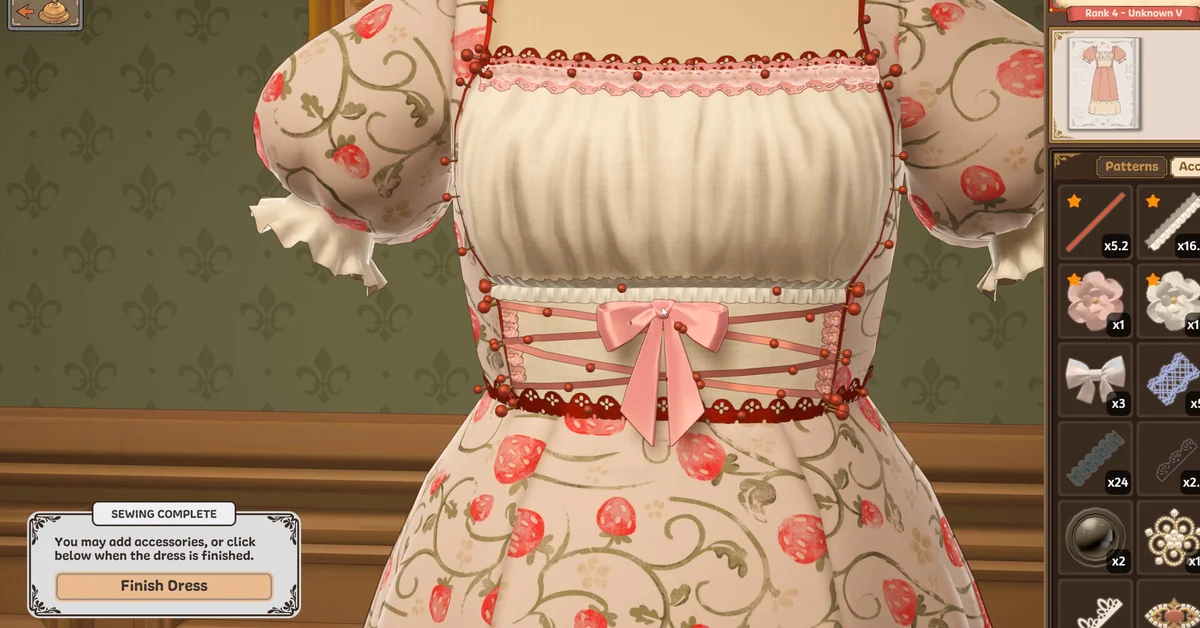
To finish a dress in Dressmaker, sew every pattern piece onto the mannequin until the game shows Sewing Complete, then click Finish Dress. On the Dress Complete screen that follows, choose Complete Commission to hand the dress to your client, or keep working on it or sell it instead.
If the Finish Dress button never appears, a piece is almost always still uncut, unsewn or hiding a seam you cannot see from the front. Below we cover the whole flow from a client’s request to the hand-in, what each final option does, and the fixes for when a dress refuses to finish.
The Full Flow, From Request to Hand-In
Dressmaker walks every dress through the same rooms, and you cannot finish until each step is done:
- Summon the client. Since the first patch, Build 403, “you now need to ring the bell to summon the next customer.” Read their request and its requirements.
- Design it in the sketchbook. Pick a bodice, sleeves, collar and skirt. The developers say patterns are drafted to the client’s measurements.
- Buy fabric in the shop, by the metre.
- Cut every piece. Lay the pattern pieces on your fabric in the cutting room and cut each one out.
- Sew it together at the sewing machine, piece by piece.
- Add accessories if you want them. When the last seam is sewn, the game says “You may add accessories, or click below when the dress is finished.”
- Click Finish Dress.
Our Dressmaker beginner tips cover how to read a request and cut and sew cleanly, which is what decides the final rating.
What the Dress Complete Options Do
After Finish Dress, the game shows the dress and a Dress Complete! panel. In the developers’ official screenshots it offers three choices:
- Complete Commission hands the dress to the client who ordered it. This is how you finish the job, earn reputation and get paid.
- Keep working takes you back to the dress, which is handy if you spot a missing trim.
- Sell dress sells it instead, and the button shows the price (869 gold in the official screenshot).
The current version also has a Gift option, which the October Build 443 patch notes say now unlocks a bit later in the game. You can sell a commission dress instead of completing it, but that does not complete the client’s request.
When the Finish Dress Button Will Not Appear
This is the most common finishing problem, and it comes down to a short list of causes. Work through them in this order:
- A seam is still unsewn somewhere you cannot see. Green requirement stats do not mean the dress is done. Every stat can be green long before the game counts the dress as finished, and nearly every time the cause is a bit of sewing you have missed. The sewing icon inside a sleeve is the easiest one to miss. At the sewing machine, rotate all the way around the mannequin with A and D, zoom in (with Z or a middle click), and check inside sleeves, under collars and along the back for a sewing icon that is still waiting.
- A piece is still on the fabric roll. Small pieces such as a collar, cuffs, a sliver of shoulder trim or a skirt tip are easy to miss. Check every roll of fabric in the cutting room for an uncut piece.
- A piece was cut but not sewn on. Every panel has to be attached. Since Build 410, hovering a panel in your inventory “displays a hint for where it goes on the mannequin,” which makes a stray panel easy to place.
- The game lost track of a piece. Save and Quit, then reloading, often makes missing pieces reappear so the dress can be finished. Dressmaker autosaves, so you will not lose your work by doing this.
Our controls guide lists every key for the sewing machine and camera, which helps when a seam is tucked behind the mannequin.
Do Not Ring the Bell to Escape a Stuck Dress
The bell summons the next client, as the Build 403 patch notes say, so do not ring it to get past a dress that will not finish: moving on can scrap the dress in progress. If your button is missing, leave the bell alone, try the checks above, and reload once more before giving up on the dress.
If none of that helps, Free Lives asks players to email support@freelives.net and include the save file. Bug reports have piled up since launch: the developers’ October 1 update says the small team is bringing in help to work through bug reports and suggestions, so a fix for these reports may take time.
If a Commission Seems to Disappear
An accepted commission still lives in your journal. If you cannot find an in-progress dress, open the journal, click the dress icon at the top left of the book and page back through it to find the project.
Also read requirements carefully before you finish. A requirement marked (Max) is a ceiling, not a target: a workwear request that wants quality at most 70, for example, will not be happier with a perfect dress.
After You Hand It In
Clients rate the finished dress with stars, as the official screenshots show, and the developers say handing in dresses earns “both reputation and coin.” A commission the client accepts still pays even if it falls short, since Build 403 fixed failed commissions not paying. If you cut pieces you no longer need along the way, our guide to recycling fabric explains what you can get back. Our Dressmaker launch story covers what the developers have planned next, and every guide is on our Dressmaker hub.
Frequently Asked Questions
Why can’t I finish my dress in Dressmaker? Usually a seam is still unsewn, often inside a sleeve or on the back, or a piece is still uncut on a fabric roll or cut but not sewn on. Save and Quit, then reloading, can also bring back pieces the game lost track of.
Why is there no Finish Dress button? The button only appears once every piece is cut, attached and sewn. Rotate the mannequin with A and D and look for a leftover sewing icon, then check each fabric roll for an uncut piece.
Why are all the stats green but the dress will not finish? Requirement stats can turn green before the dress is complete. The cause is almost always a bit of sewing that was missed, so search the whole mannequin for a sewing icon.
What happens if I ring the bell with an unfinished dress? The bell summons the next client, and moving on can scrap the dress in progress, so avoid it until the dress is handed in.
How do you hand in a commission in Dressmaker? Click Finish Dress once sewing is complete, then choose Complete Commission on the Dress Complete screen.
Can you sell a commission dress instead? Yes. The Dress Complete screen has a Sell dress option that shows the price, but selling does not complete the client’s request.
Can you add accessories after sewing? Yes. When sewing is complete the game lets you add accessories before you click Finish Dress, and Keep working takes you back afterwards.
Do you get paid if the client does not like the dress? Since patch Build 403, a commission the client accepts still pays even if it falls short of the brief.