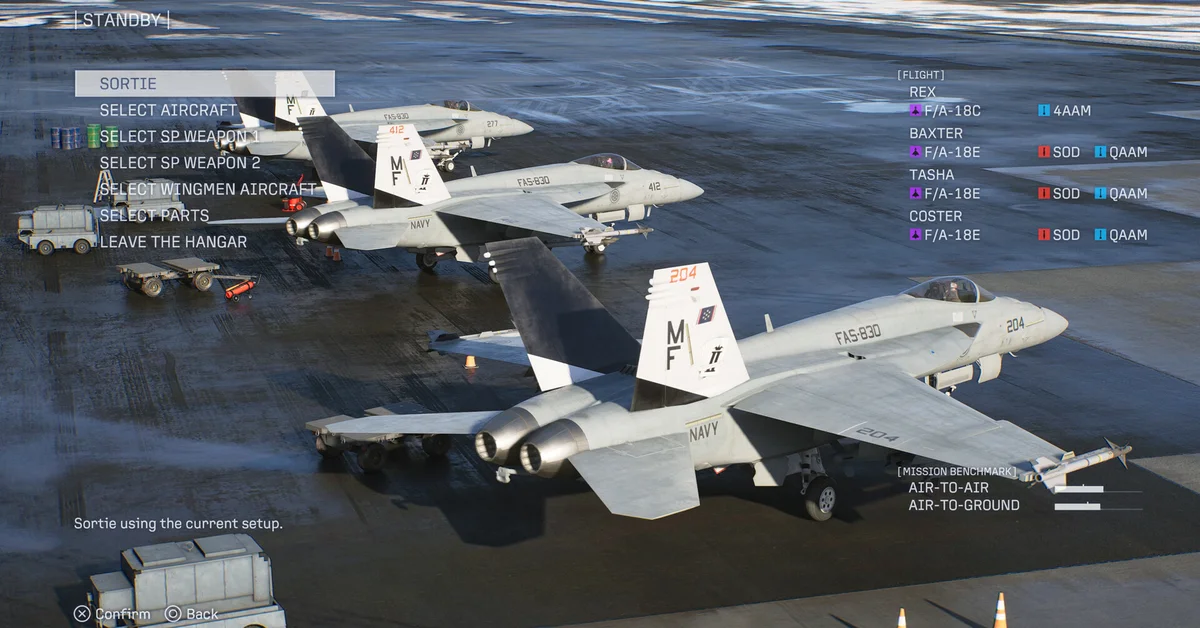
To change skins in the Ace Combat 8: Wings of Theve campaign, finish the story once, then open Aircraft Sets from the campaign’s mission menu, pick an aircraft slot, choose Edit Aircraft Set and then Select Skin. Aircraft Sets stays locked until the credits roll after Mission 30, which is why the option seems to be missing on a first run.
Below: why skins are locked on a first playthrough, the exact steps to change and equip them, every way to unlock more in the campaign, how the online mode handles skins separately, and the achievement tied to it. This covers PS5, Xbox Series X|S and PC, and it still holds after Bandai Namco’s October 23 update, Ver. 1.01.002, whose patch notes make no changes to skins, emblems or Aircraft Sets.
Why You Cannot Change Skins on Your First Run
Bandai Namco’s own store copy hints at the rule. The Deluxe Edition’s F-4E Mobius Squadron and F/A-18C Team Zvezda skins are, in the publisher’s words on its official EU overview, “available in Campaign Mode after the campaign is completed.” Every other campaign skin follows the same gate: skins you unlock through achievements, mission completions and campaign objectives only become usable once you finish the main campaign through Mission 30.
You still earn skins along the way, so nothing is wasted. They simply wait for you. Reviewers noted the same thing at launch: skin and emblem editing opens only after the campaign concludes, or in online play.
Step-by-Step: How to Change and Equip Skins in Campaign
- Finish the campaign once on any difficulty, through Mission 30 and the credits.
- Open the mission menu in Campaign Mode. A new Aircraft Sets entry appears there after the credits.
- Choose any aircraft slot to open the Edit Aircraft Set menu.
- Select Skin and pick any skin you have unlocked for that aircraft.
- Apply emblems from the same menu if you want.
Ace skins belong to a specific aircraft type, so expect to see only the options for the plane in that slot. If a skin you unlocked is missing from the list, check that the slot holds the right aircraft; our planes list shows how to unlock each one.
How to Unlock More Skins in the Campaign
- Shoot down named aces. Downing an enemy ace unlocks a unique paint scheme for that ace’s aircraft type, for use in campaign mode. Named aces only appear on Veteran or higher. That makes a post-game replay on Veteran or above the main skin hunt.
- Complete missions and objectives. Mission completions, campaign objectives and achievements also unlock skins.
- Deluxe Edition skins. The F-4E Mobius Squadron and F/A-18C Team Zvezda skins come with the Deluxe Edition or the separate Customizable Cosmetic Set, and unlock in the campaign after you complete it. Our editions guide breaks down which edition includes them.
Our Shadow 22 guide covers the leader of the Shadows unit, our S rank guide helps with the replays, and our ACE difficulty guide explains what else opens after the credits.
How Skins Work in Ace Combat Online
Online is a separate system. Bandai Namco’s multiplayer FAQ says Ace Combat Online features “its own progression and save data separate from Campaign Mode,” and its online mode page says you can customize each aircraft’s appearance, “including the skin, emblem, and weathering.” Because the two modes keep separate progress, skins you unlock in the campaign do not appear in the online hangar, and online rewards stay online. Reviewers at launch described online play as the place where skin and emblem editing is open before you finish the campaign.
Online skins come from the Ace Pass. Bandai Namco’s Season One post lists 12 aircraft skins on the free track and 13 more on the Premium track, plus a special skin collection for the season’s Premium aircraft, the ADFX-02 Morgan-PIXY. Each season lasts two months, and Premium rewards change every season. Bandai Namco’s overview adds that online missions earn currency “to purchase items” and that higher Ace Pass ranks unlock “customization items,” and the online lobby includes an Ace Combat Store. The Deluxe skins are listed “for online multiplayer aircraft,” so they work online without the campaign gate. Our multiplayer guide covers the rest of the online mode.
The Plane Coordinator Achievement
Plane Coordinator is a bronze trophy and achievement for having “customized an aircraft skin or emblem in campaign mode,” per the game’s Steam achievement list. By that description, applying any unlocked skin through Aircraft Sets, Edit Aircraft Set and Select Skin is enough, so it unlocks the first time you follow the steps above. Our trophy and achievement list has the rest, and every guide is on the Ace Combat 8 hub.
Frequently Asked Questions
Why can’t I change skins in Ace Combat 8? The Aircraft Sets menu stays locked until you finish the campaign once. Bandai Namco uses the same “after the campaign is completed” rule for its Deluxe skins.
How do you change skins in the Ace Combat 8 campaign? After the credits, open Aircraft Sets from the mission menu, pick a slot, choose Edit Aircraft Set, then Select Skin.
How do you equip skins in Ace Combat 8? Pick the skin under Select Skin in the Edit Aircraft Set menu for that aircraft’s slot. In the campaign that needs one finished playthrough. Ace Combat Online has its own customization for skin, emblem and weathering, and reviewers describe it as open without the campaign lock.
How do you unlock skins in Ace Combat 8? Shoot down named aces, complete missions and objectives, earn achievements, or own the Deluxe Edition’s cosmetic set. Online, skins come from the Ace Pass and in-game purchases.
Do campaign skins work online? No. Bandai Namco says online mode has separate progression and save data, and its skins come from the Ace Pass and the online store.
When can I use the Deluxe Edition skins? Online right away, and in the campaign after you complete it, per Bandai Namco.