
To anchor a boat in GTA 6, bring it to a stop where you want to stay, hold Left on the D-pad to open the Vehicle Menu, switch over to the vehicle’s options and select Anchor. The anchor goes down and the boat stays still instead of drifting, which is exactly what you want when you stop to fish or dive.
The button comes straight from the Control Scheme screen on our PS5 copy of Grand Theft Auto VI, and the screenshots in this guide are from our own PS5 recordings. Below is where the Anchor option lives, the steps in order, and the times it’s worth using.
Where the Anchor Option Is
There’s no anchor button. Anchor is an option inside the Vehicle Menu, and the Vehicle Menu is one of the held buttons on the Land / Water Vehicles controls, which boats share with cars.
You can see it for yourself in Settings, under Control Scheme. Pick Land / Water Vehicles in the Preview list, and the controller page flips between two sets of labels: what each button does when you tap it, and what it does when you hold it (the held ones have a circle around the icon). On the hold page, the D-pad’s left button reads Vehicle Menu.
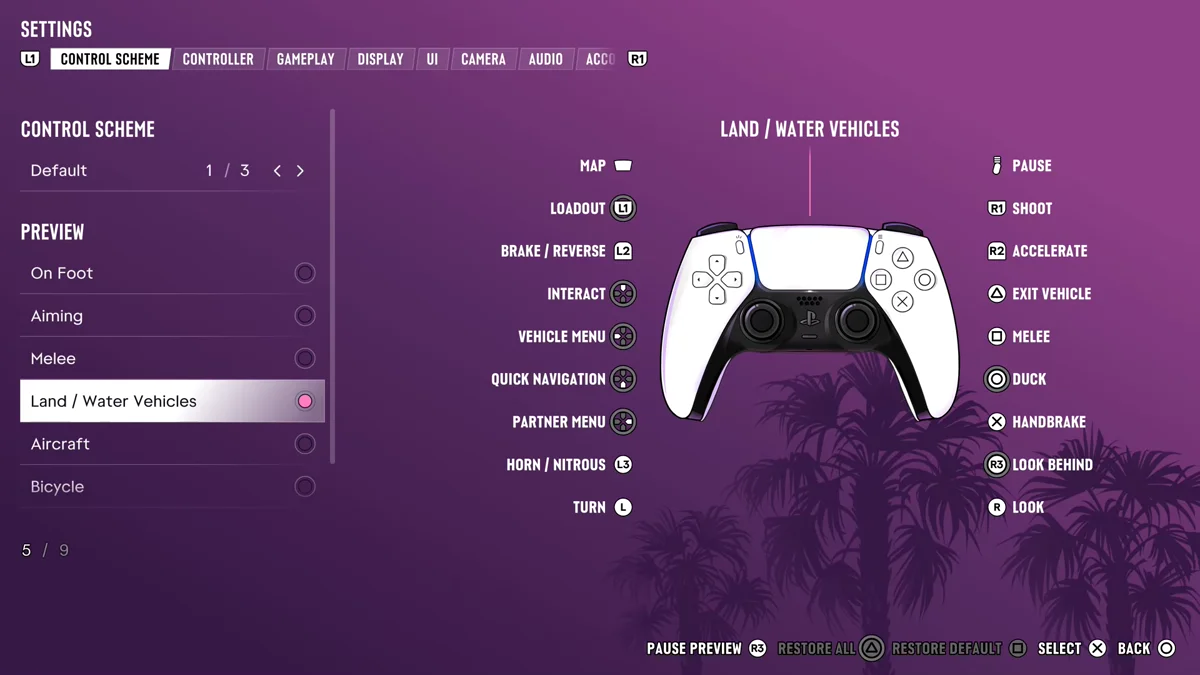
A quick tap of Left does something else entirely: it’s Indicate Left, the turn signal, which our turn signals guide covers. So if the menu doesn’t open, you let go too soon. Hold it.
Inside the Vehicle Menu, the boat’s own settings sit on their own page. Switch over to the vehicle options and the Anchor option is there.
How to Anchor a Boat, Step by Step
- Get to your spot. For a marked spot, such as Cal’s fishing challenge below, set its map marker as your destination first.
- Come to a stop. Ease off R2 (Accelerate) and use L2 (Brake / Reverse) so you’re not sliding past the spot when the anchor goes down.
- Hold Left on the D-pad to open the Vehicle Menu.
- Switch to the vehicle options in the menu.
- Select Anchor. The anchor lowers and the boat stops moving.
- Do what you came for. Pick up a rod, or go over the side to dive.
Do it in open water. An anchor is for staying put, and the beach is the one place you never want to park a boat; if you’ve already run aground, our guide to getting a boat unstuck gets you back afloat.
When to Drop Anchor
Cal’s fishing challenge
This is the big one. Early in the story Cal texts Jason a fishing challenge, and it shows on the map as Catch a Bigger Fish. Our card read: “Cal challenged you to catch a stoplight parrotfish larger than 2 lbs,” with the spot out in the water off Key Lento.
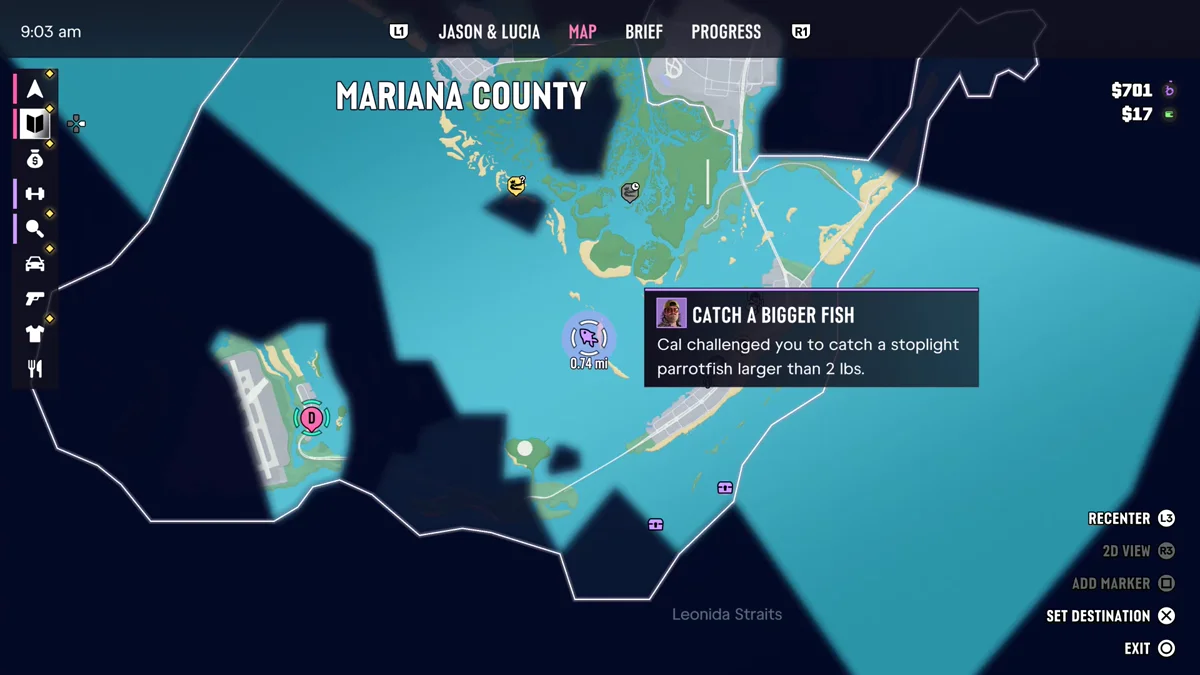
Sail out to the marker, stop over it and drop anchor so the boat doesn’t drift off the spot while you cast and reel. Beating Cal earns the Baited My Tackle trophy. Our fishing guide covers casting, reeling in and the rest of the challenge.
Diving
Diving spots work the same way. Anchor over the spot before you go into the water, and the boat holds its position while you’re underneath instead of drifting off. Our guide to diving underwater explains the controls once you’re under.
Any long stop at sea
Anything that keeps you aboard for a while, from waiting out a phone call to lining up a photo, goes better with the boat holding still.
Tips
- Learn the hold layer once. Hold Up is Interact, hold Down is Quick Navigation and hold Right is the Partner Menu on the same page, so the Vehicle Menu is easy to find next to them. Our driving controls guide has the full list.
- Stop first, anchor second. Dropping anchor at speed just means you end up past the marker.
- Check the map card first. Cal’s challenge card tells you what to catch before you set out, so you know when you’ve beaten it.
Every PS5 button in the game is in our GTA 6 controls guide, and every other guide is on our GTA 6 hub.
Frequently Asked Questions
How do you anchor a boat in GTA 6?
Stop where you want to stay, hold Left on the D-pad to open the Vehicle Menu, switch to the vehicle options and select Anchor.
What button is the vehicle menu in GTA 6?
Hold Left on the D-pad while you’re driving. A quick tap of Left is the left turn signal instead.
Why does my boat drift away while I’m fishing?
Because it isn’t anchored. Drop anchor from the Vehicle Menu before you cast, and the boat stays still.
Where is Cal’s fishing challenge spot?
In the water off Key Lento. It shows on the map as Catch a Bigger Fish, asking for a stoplight parrotfish larger than 2 lbs.