
If you can’t use weapons in GTA 6, check where you’re standing first: the game won’t let you equip a weapon near home, and it says so with “You can’t equip a weapon while in your neighborhood.” Going by that message, head away from your house before you reach for a gun, then hold L1 to open your loadout and pick one.
If you’re nowhere near home, the cause is usually one of three things: your loadout has no guns in it, the gun you were using was a found one that’s now gone, or you’re tapping L1 when you need to hold it. We ran into the neighborhood message on our PS5 copy of Grand Theft Auto VI, and the screenshots in this guide are from our own PS5 recordings. Below is each reason and its fix.
You’re in Your Neighborhood
On our copy the message came up in Jason’s yard at his stilt house in Key Lento, a few steps from the basketball hoop under the house, as he went after a loose ball. The location card had read “Jason’s House” as we rode in on a motorbike.
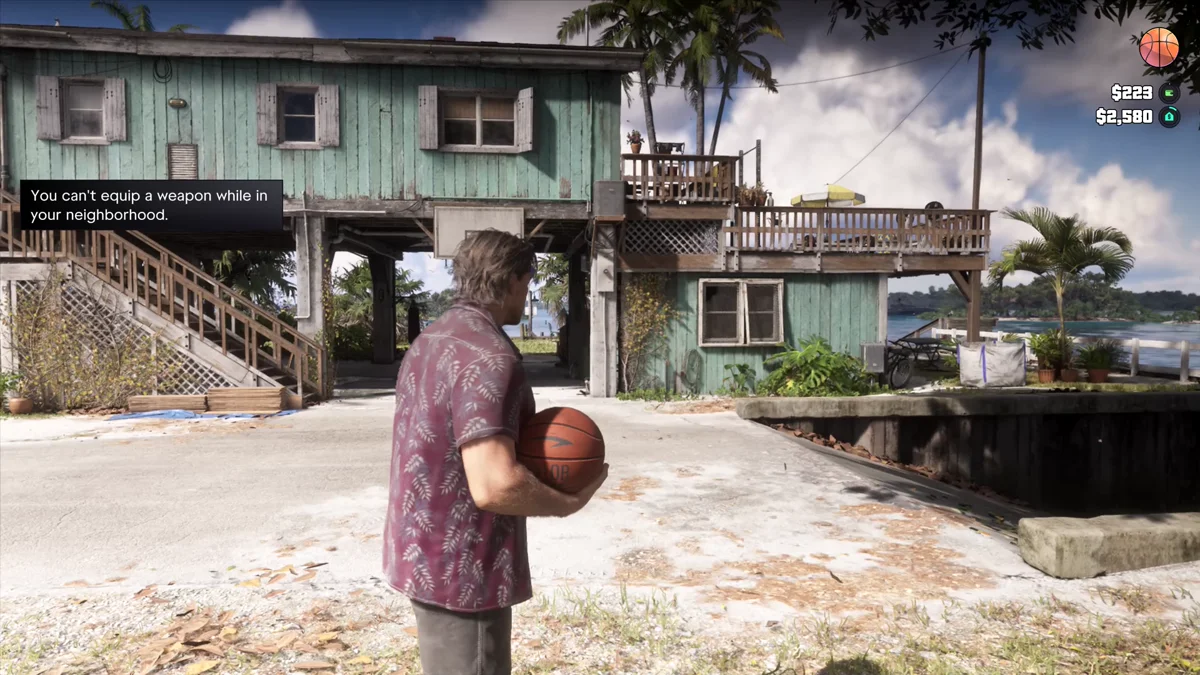
The game doesn’t mark “your neighborhood” on the map, and we only got the message at Jason’s house, so we can’t tell you exactly where the line is. The wording points to the streets around your home. It fits a wider pattern: Rob Nelson, co-studio head at Rockstar North, told Famitsu that you can’t steal cars around safehouses or at some story locations.
So if a gun won’t come out at home, that’s the reason, and nothing is wrong with your controls or your loadout. Arm yourself once you’ve left. Our guide to fixing up Jason’s house covers what there is to do there instead.
Your Loadout Has No Guns
Every weapon comes out of your loadout, and an empty one leaves you with fists. Hold L1 to open it: if the Weapons page shows only the fist slot, “Unarmed, In Hand,” there’s nothing to equip.
The game names the two ways to fill it. One of Lucia’s objectives on our copy read “Pick Up a Gun: Head to Gellhorn Outfitters to buy a gun or recover an owned weapon from the weapon locker.”
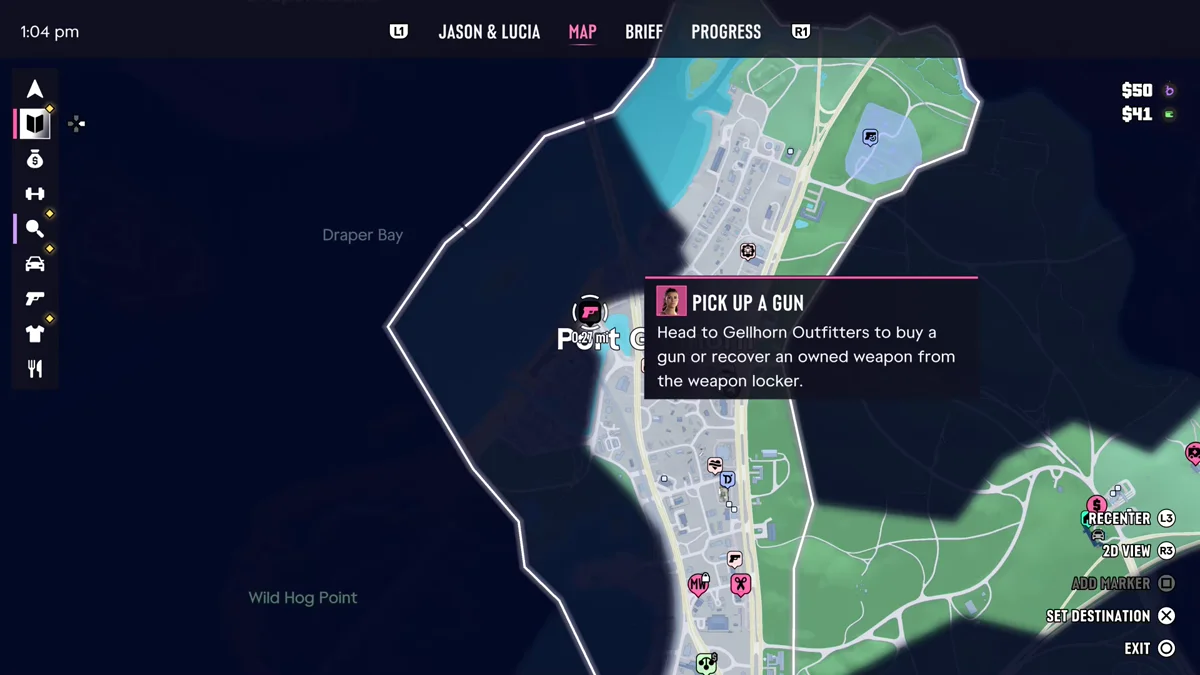
Those are the fixes for Jason too:
- Buy one at an Ammu-Nation. Our guide to buying guns walks through the shop menus.
- Take back one you own. Owned guns you aren’t carrying wait at any Ammu-Nation weapon locker and in your own car’s trunk. “Longarm weapons can be stored and retrieved from your trunk,” as one hint put it to us. Our guide to storing long guns in your trunk has every screen.
Remember the carry limit, too: two sidearms and two longarms at a time. Our guide to increasing your inventory explains it.
The Gun You Were Using Is Gone
Guns you take from enemies or find on the ground are unowned, and they don’t last. With our loadout open, the game spelled out one way they go: “Unowned weapons are lost after you die in combat or get arrested.”
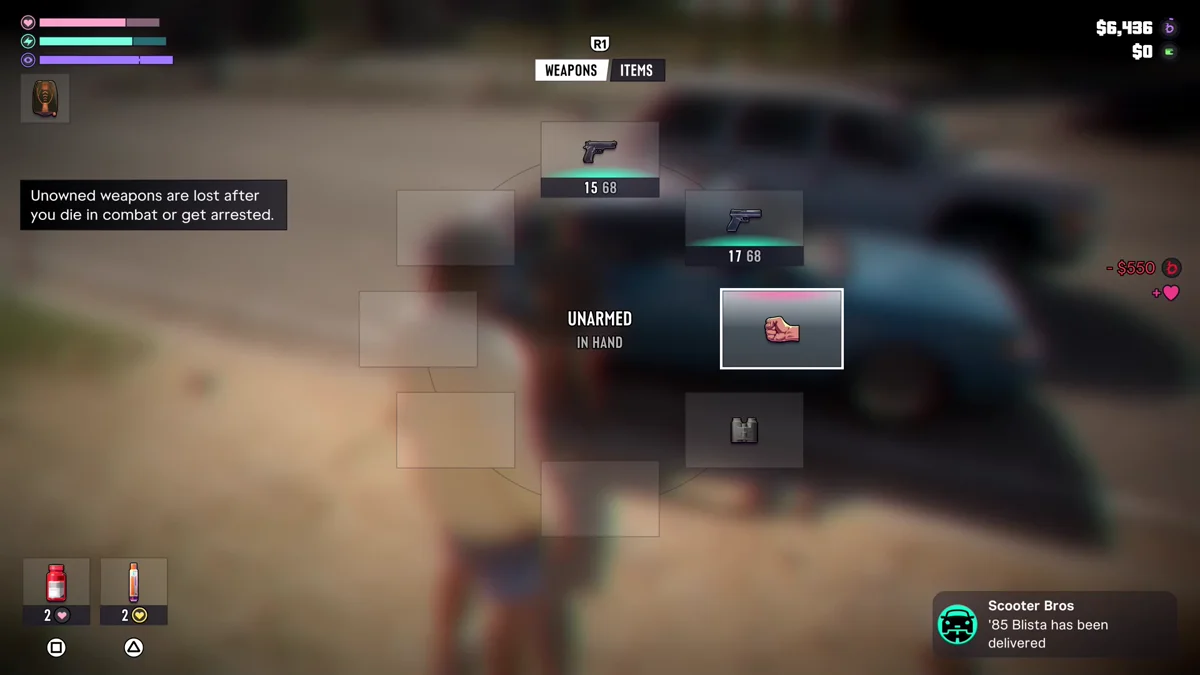
They’re also lost if you drop one, and when a session ends: the game opens the next one with “Unowned vehicles, weapons, or items that weren’t stored during your last session were lost.” Buying the same model at an Ammu-Nation is how you keep a gun you like. Our guides to keeping guns you find, owned, unowned and unique weapons, what happens when you die and what happens when you get arrested cover the rest.
You’re Tapping L1 Instead of Holding It
L1 does two jobs on the Default control scheme. A tap is Holster, which puts your gun away, and a hold opens the Loadout, which is where you choose a weapon. Tapping it will never bring a gun out.
- Hold L1 to open the loadout.
- Point the right stick at the gun you want, then let go of L1.
- Hold L2 to aim and press R2 to shoot.
L2 is the other trap. With no gun out, holding L2 locks on to the person in front of you to talk instead of aiming, as our guide to putting your gun away explains. If holding L1 is awkward, look at Settings, then the Gameplay tab: its Accessibility section has a Loadout row, set to Hold on ours, described as “Hold L1 to open your loadout,” with a second option beside it. Our guides to changing guns and the PS5 controls cover every button.
Your Gun Goes Away in the Car
If your gun keeps disappearing while you drive, that’s a setting. Under Settings, Gameplay, Combat, Holster in Vehicle was set to Automatic on our copy, the first of two choices. The game describes it as “Choose to automatically or manually holster drawn weapons after a short time while in a vehicle and not in combat.” Switch it to manual to keep a gun out. In a car, R1 shoots, and our guide to shooting while driving covers the rest.
Every other GTA 6 guide is on our GTA 6 hub.
Frequently Asked Questions
Why can’t I equip a weapon in GTA 6?
You may be in your neighborhood: the game blocks weapons near home and shows “You can’t equip a weapon while in your neighborhood.” If you’re elsewhere, your loadout may have no guns, or you may be tapping L1 instead of holding it.
What does “You can’t equip a weapon while in your neighborhood” mean?
It means you’re too close to home to draw a weapon. We got it in Jason’s yard at his house in Key Lento. Leave the area before you arm yourself.
How do you pull out a gun in GTA 6?
Hold L1 to open the loadout, point the right stick at a gun and let go. Hold L2 to aim and press R2 to shoot.
Why did my gun disappear in GTA 6?
If it was a gun you found, it was unowned, and those are lost when you die in combat, get arrested, drop them or end your session. A gun you bought waits in your trunk or at any Ammu-Nation weapon locker.
Why does my character put the gun away in the car?
The Holster in Vehicle setting was on Automatic on our copy. Change it under Settings, Gameplay, Combat.