
To store outfits in your trunk in GTA 6, highlight a saved outfit in a wardrobe or a store’s changing room and press Square for Add to Trunk. To store long guns, open your car’s trunk with Triangle, press L1 for Loadout, and use Stow Longarms (Square) on the Weapons tab. From then on, whatever you’ve stored is waiting at the back of your car.
We stocked and opened the trunk on our PS5 copy of Grand Theft Auto VI, and the screenshots in this guide are from our own PS5 recordings. Below is how to add outfits and caps, how the trunk menus work, where long guns and edition weapons fit in, and why a stocked trunk is worth the trouble.
Why the Trunk Matters
You can’t carry everything on you. A hint at Ammu-Nation spells it out: “You can carry and access up to two sidearms and two longarms from your loadout.” Another adds: “Openly carrying weapons can be dangerous in Leonida. Manage them at any weapon locker and your vehicle’s trunk.” Our guide to increasing your inventory has the full limits.
Clothes are the other half. The police remember what you’re wearing, and changing is one of the ways to shake them. Rockstar North’s Rob Nelson told IGN: “I can add changes of clothes to my trunk, so if I’m out, I have them in my personal vehicle.” Our Heat system guide explains what the police keep track of.
How to Put Outfits in Your Trunk
You stock outfits from a wardrobe, not from the car:
- Open a wardrobe. The one at your safehouse works, and so does the changing room in a clothing store. We used a store’s changing room as Jason.
- Stay on the Outfits tab and look under Saved Outfits.
- Highlight an outfit and press Square for Add to Trunk. The counter next to it counts up to five, so the trunk holds up to five outfits.
- Look for the car icon. A stored outfit gets a small car icon beside its name, and the bottom-left corner shows how many are in the trunk. Ours read “1/5 outfits in trunk.”
To take an outfit back out, highlight it in the same list: the Square button changes to Remove From Trunk.
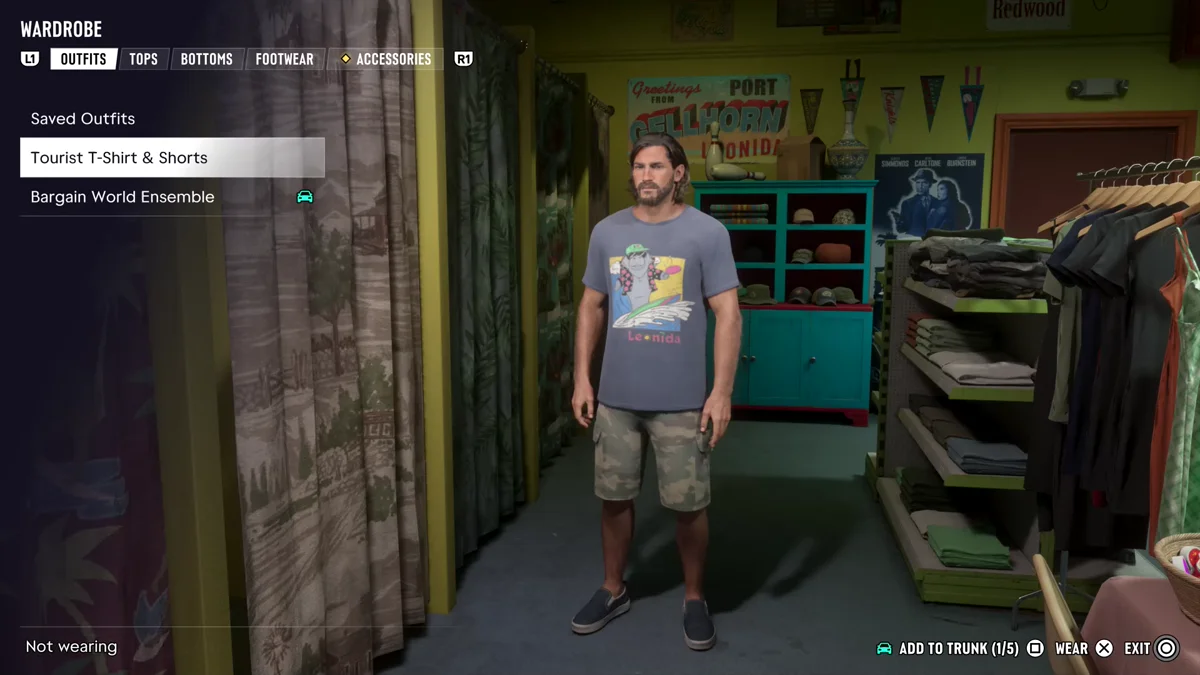
Our guide to changing and getting clothes covers buying outfits and saving looks in the first place.
How to Put Caps in Your Trunk
Headwear has its own space. In the wardrobe, go to Accessories, then Headwear, and highlight a cap. With the PG Fire Service Cap on Jason, the prompt read Add to Trunk (1/3) on Square, next to Wear Style on the D-pad and Remove on Cross. The trunk’s own menu has slots for headwear and eyewear too, which our guide to what glasses, masks and hats do explains.
How to Open the Trunk and Use What’s Inside
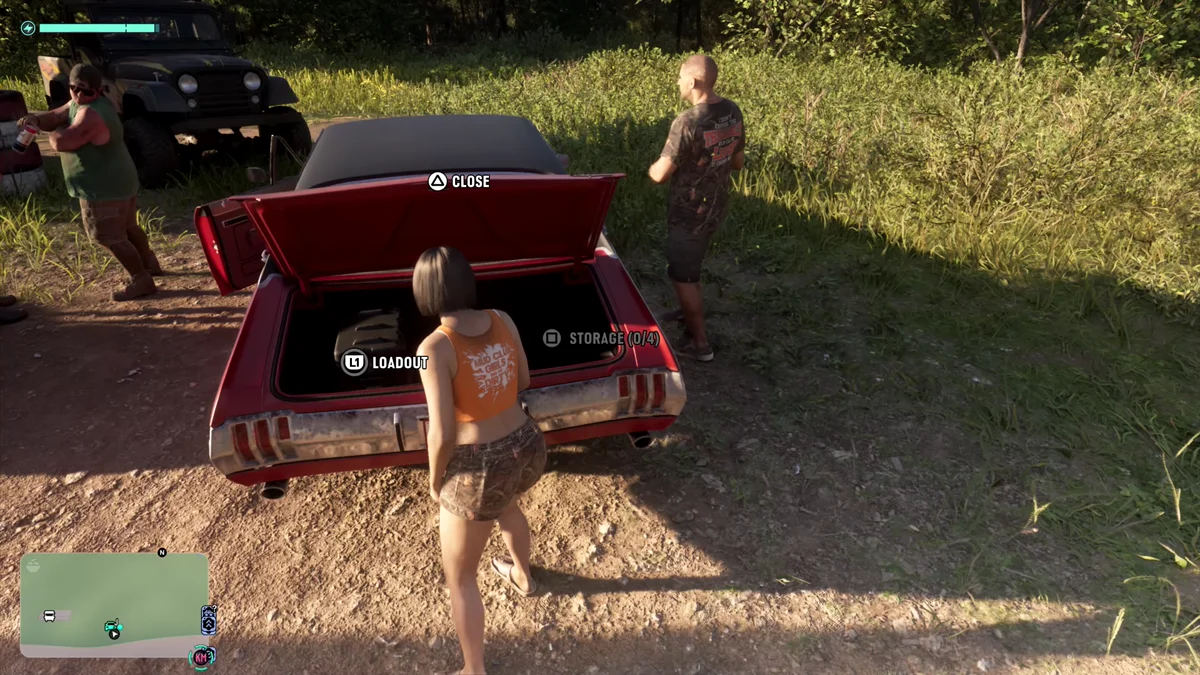
- Walk to the back of your car and press Triangle to open the trunk.
- Choose what you need. The open trunk offers Close (Triangle), Loadout (L1) and Storage (Square).
- Press L1 for Loadout. It has two tabs, Weapons and Items, and R1 switches between them.
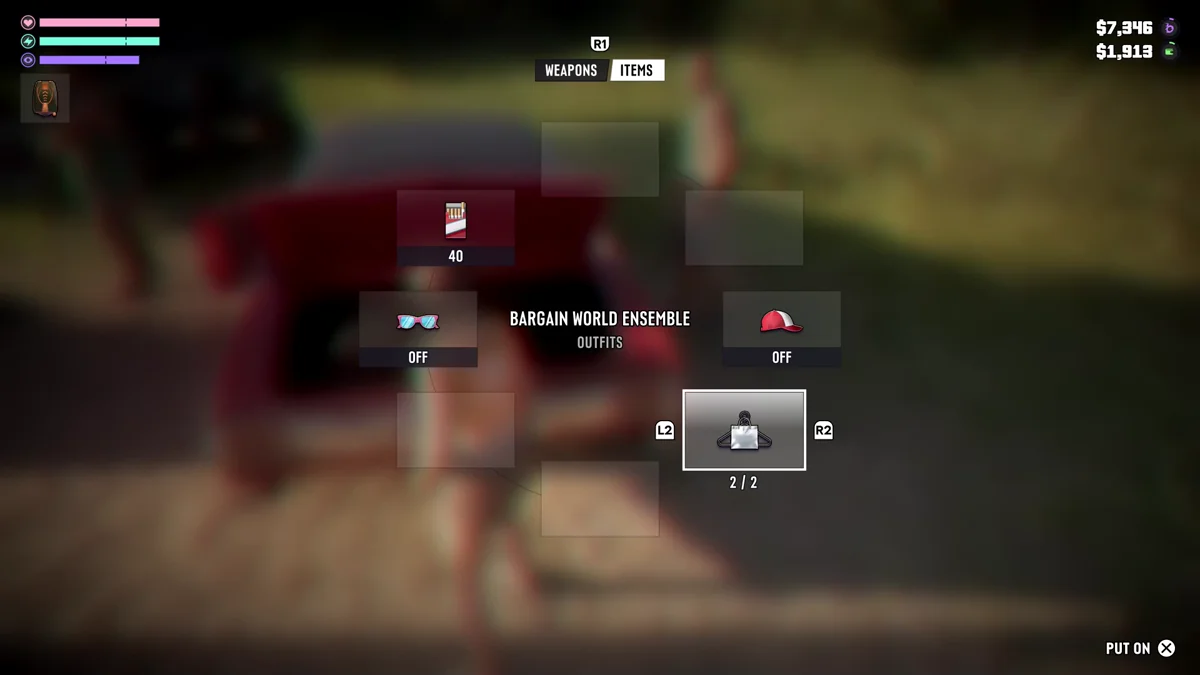
The Items tab is where your stored clothes live. When we opened it as Lucia at the Thrillbilly Mud Club, the middle slot showed an outfit, the Bargain World Ensemble, with L2 and R2 to flip through the outfits and a counter under it that read 2/2. Eyewear and headwear slots sat on either side, both marked Off, and Cross was Put On.
Storage is separate from Loadout. Its counter read 0/4 on ours, so it was empty, and we didn’t need it on that trip.
How to Store Long Guns in Your Trunk
Long guns are handled from the Weapons tab of the trunk’s Loadout:
- Open the trunk (Triangle) and press L1 for Loadout.
- Make sure you’re on the Weapons tab. Press R1 if Items is showing.
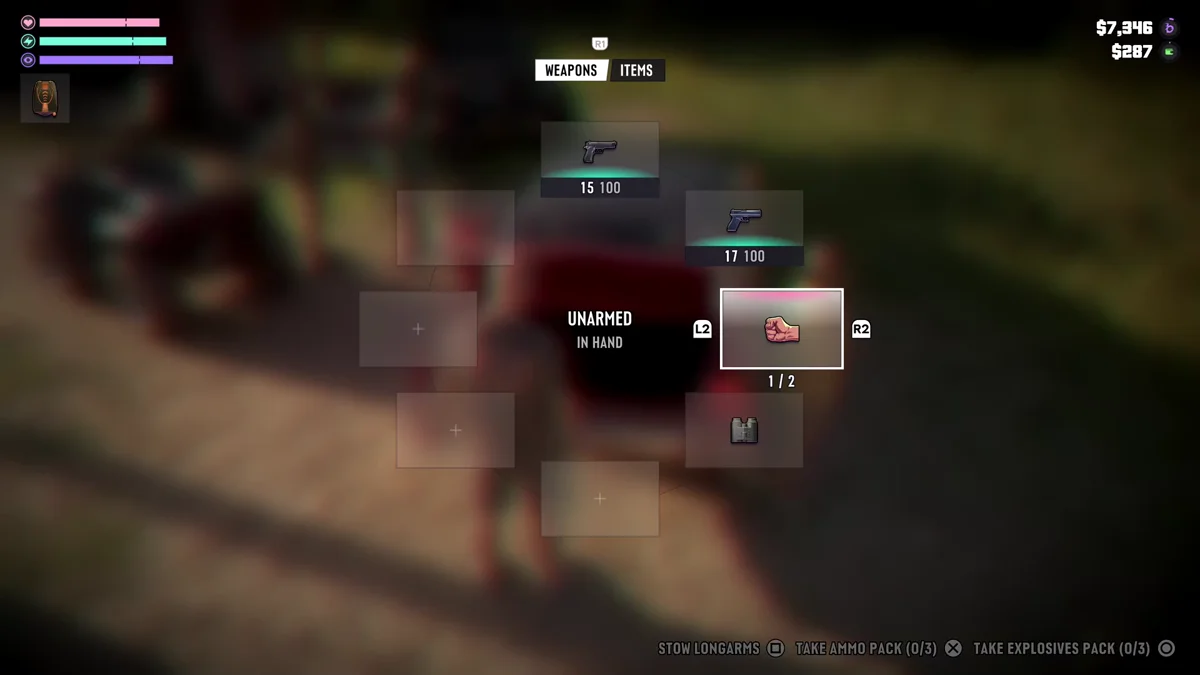
- Press Square for Stow Longarms.
The same screen shows your current loadout as a wheel. Ours had two handguns and Unarmed in hand, plus binoculars, so we had no longarm to stow on that trip. The bottom of the screen also lists Take Ammo Pack (0/3) on Cross and Take Explosives Pack (0/3) on Circle. Our guide to getting more ammo covers the rest of your options.
The trunk is also where edition weapons turn up. On our copy, a notice read: “Ultimate Edition weapons are now available. Pick them up from your trunk or at an Ammu-Nation weapon locker.” Our Ultimate Edition items guide has the full list.
Tips for Using Your Trunk
- Stock it before a job. Add a spare outfit or two at home or in a store, so a change of clothes is waiting when things go wrong.
- Keep your own car close. We used the trunk of Jason’s own car, his ’72 Tulip. If yours is far away, our guide to calling your car shows how to bring it to you.
- Leave long guns behind in busy places. A longarm is on show when you carry it, so stow it before you walk into a crowd.
Frequently Asked Questions
How many outfits can you store in your trunk in GTA 6?
Five. The Add to Trunk counter in the wardrobe counts up to five, and ours read 1/5 with one outfit stored.
How do you put clothes in your trunk in GTA 6?
At a wardrobe or a store’s changing room, highlight a saved outfit and press Square for Add to Trunk. A small car icon then marks it as stored.
How do you store long guns in your trunk?
Open the trunk with Triangle, press L1 for Loadout, stay on the Weapons tab and press Square for Stow Longarms.
How do you change clothes at your car?
Open the trunk, press L1 for Loadout, switch to the Items tab with R1, pick the outfit with L2 and R2, and press Cross for Put On.
Where are the Ultimate Edition weapons?
In your trunk or at an Ammu-Nation weapon locker, according to the notice the game shows when they become available.