
To disable store alarms in GTA 6, get into the back office and shut off the security system, a panel on the office wall, before you smash a display case or force a door. Do it before anything loud happens, because a forced door or a smashed case sets the alarm off and brings the police.
The snap gun makes the whole job easier, because it gets you through a locked back door without tripping the alarm in the first place. Below is where the panel is, what sets an alarm off, the order that keeps a robbery quiet, and how car alarms differ in Grand Theft Auto VI. The screenshots in this guide are from our own PS5 recordings.
Why the Alarm Matters
An alarm brings the police even if nobody saw you. “The Wanted system in GTA 6 requires that someone witness the crime, or an alarm needs to be set off,” Rockstar North co-studio head Rob Nelson told IGN. With the alarm off and the staff kept calm, a robbery can end without a wanted level at all, and if one does start, our guide to losing a wanted level covers the escape.
It also shapes how the game sees you. Robbing a place without an alarm and getting away before the police arrive pushes your Criminal Profile toward Professional, and our guide to the Heat system explains what happens once the police are on the way.
Where the Alarm Panel Is
The alarm is controlled from the back office, the staff-only room behind the counter. Look for a panel on the wall: that’s the security system. The same back room usually holds the recorder for the store’s cameras, and in pawn shops and jewelry stores it’s where the safe is too, so one trip covers all three.
Walk up to the panel and use the prompt on it to shut the system down. Once it’s off, you can smash the display cases out front without the alarm going off.
What Sets a Store Alarm Off
- Forcing a locked door. Breaking a door open is loud, and doors in shops and banks are wired to the alarm.
- Smashing a display case while the system is still on.
- The staff. An employee can raise the alarm during a hold-up, so keep everyone out front covered while one of you heads to the back.
- Cloud CCTV. During a store robbery on our copy, the game warned: “CCTV footage can be destroyed if it’s on site. Cloud CCTV can’t be destroyed and will eventually raise an alarm.” So destroy the footage when it’s in the store, and don’t hang around where the cameras upload it.
How to Rob a Store Without the Alarm, Step by Step
- Scope the store first. Walk in, find the staff-only door and the cameras, and check for armed guards. Some stores have a back entrance; many don’t.
- Cover your face. A mask, hat and sunglasses keep you from being identified. Our mask guide shows how to put one on.
- Bring your partner. One of you keeps the staff and customers under control at the front while the other goes to the back. Our guide to giving your partner orders covers the menu.
- Get to the back office. Use the back door if there is one. Pick it with the snap gun rather than forcing it.
- Shut off the alarm panel on the wall.
- Destroy the camera footage at the recorder in the same room.
- Open the safe if there is one. Our guide to opening safes covers codes and keypads.
- Smash the display cases out front, now that the alarm is off.
- Leave with a car ready. Park a getaway car close by before you start, and change clothes once you’re clear.
Our guides to robbing pawn shops, robbing jewelry stores and robbing banks walk through each kind of target.
The Snap Gun: Getting In Without the Alarm
The snap gun is the tool that makes quiet robberies possible. It picks a locked door instead of forcing it, so the door opens without setting off the alarm. You get it from Yasmani in Chapter 3, after his first jewelry job; our snap gun guide covers the unlock.
It only gets you through the door, though. The alarm is still live once you’re inside, and a smashed case, another forced door or a panicking employee can still set it off. That’s why the panel in the back office comes first. Our lockpicking guide explains the lock minigames.
Car Alarms Are Different
If you landed here because a car alarm keeps going off, that’s a separate system. Scan a parked car with the WAiNK app first: its card has a Security line, and the Montagne Pickup we scanned outside a Gun and Pawn Shop read Alarmed.
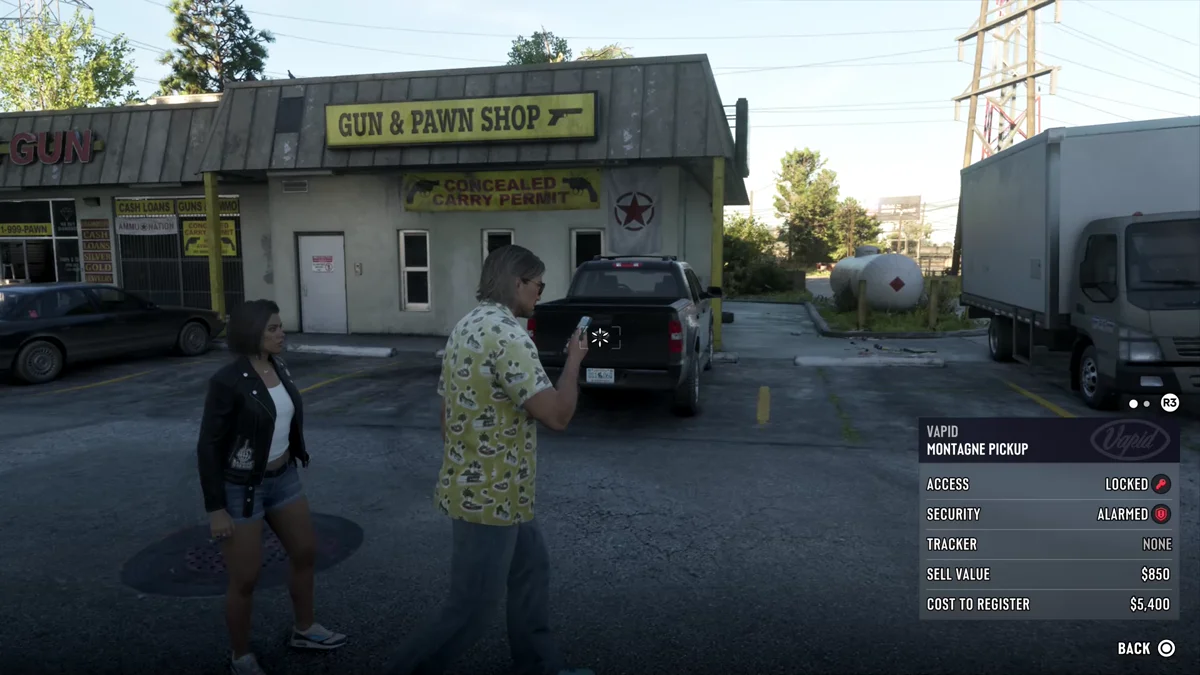
Smashing the window of an alarmed car sets it off. The slim jim opens the lock instead, and the game’s own tip says so: “Using a slim jim can avoid setting off a vehicle’s alarm.”
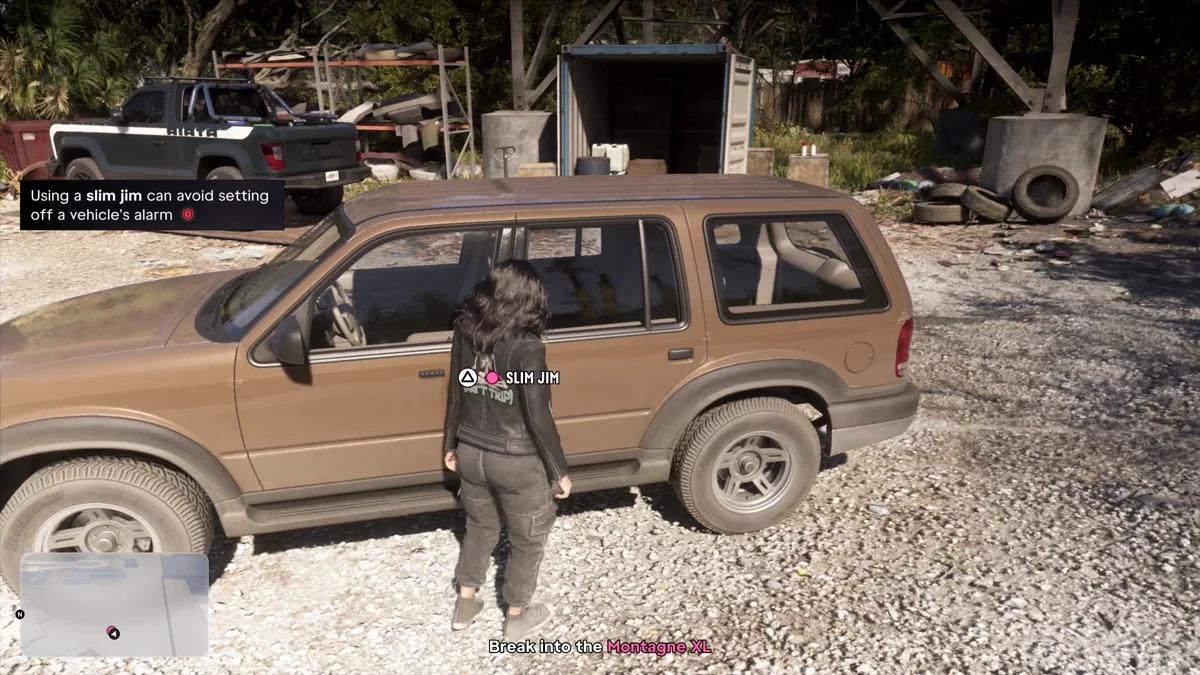
Our guides to the slim jim, the WAiNK app and stealing cars cover the rest, and every other guide is on our GTA 6 hub.
Frequently Asked Questions
How do you turn off a store alarm in GTA 6?
Go to the back office and shut off the security system, a panel on the wall, before you smash any display cases or force any doors.
Where is the alarm in a GTA 6 store?
In the back office behind the counter, usually in the same room as the camera recorder and, in pawn shops and jewelry stores, the safe.
What sets off alarms in GTA 6?
Forcing a locked door open, smashing a display case while the system is on, staff raising it during a hold-up, and cloud CCTV, which the game says will eventually raise an alarm.
Does the snap gun turn off the alarm?
No. It picks a door lock without setting the alarm off, but the alarm stays live until you shut it off at the panel.
How do you stop a car alarm in GTA 6?
Avoid setting it off. Scan the car with WAiNK to see if it’s alarmed, then use the slim jim instead of smashing the window.