
The fastest money in The Sims 4 is the cheat console: press Ctrl + Shift + C (or hold all four shoulder buttons on console), type motherlode and press Enter for §50,000, or type kaching or rosebud for §1,000. To set an exact balance instead, type testingcheats true first and then Money followed by the amount. Below we cover how to open the console on every platform, exactly what each money cheat does, free real estate, the bills cheat, what cheating costs you on PlayStation and Xbox, and the fixes when a code does nothing.
Every code here is verified against EA’s official cheats FAQ and official patch notes through the September 22, 2026 update. For every other cheat group, see our Sims 4 cheats guide.
Our video at the end of this guide shows us using money cheats on PS4. The screenshots in this guide come from the same recording.
How to Open the Cheat Console
Load your save first, then:
- PC: press Ctrl + Shift + C.
- Mac: EA lists Ctrl + Shift + C here too, using the Control key.
- PlayStation: hold L1 + L2 + R1 + R2 together.
- Xbox: hold LB + LT + RB + RT together.
A text bar opens. Type the cheat, press Enter, and your household funds update on the spot. Close the bar with the same buttons, or Esc on a keyboard. EA notes that a keyboard plugged into a console uses Ctrl + Shift + C as well, which is much faster than the on-screen keyboard when you are typing a long number.

Every Money Cheat
These are the money cheats EA documents, and what each one does:
-
rosebudadds §1,000 to the active household.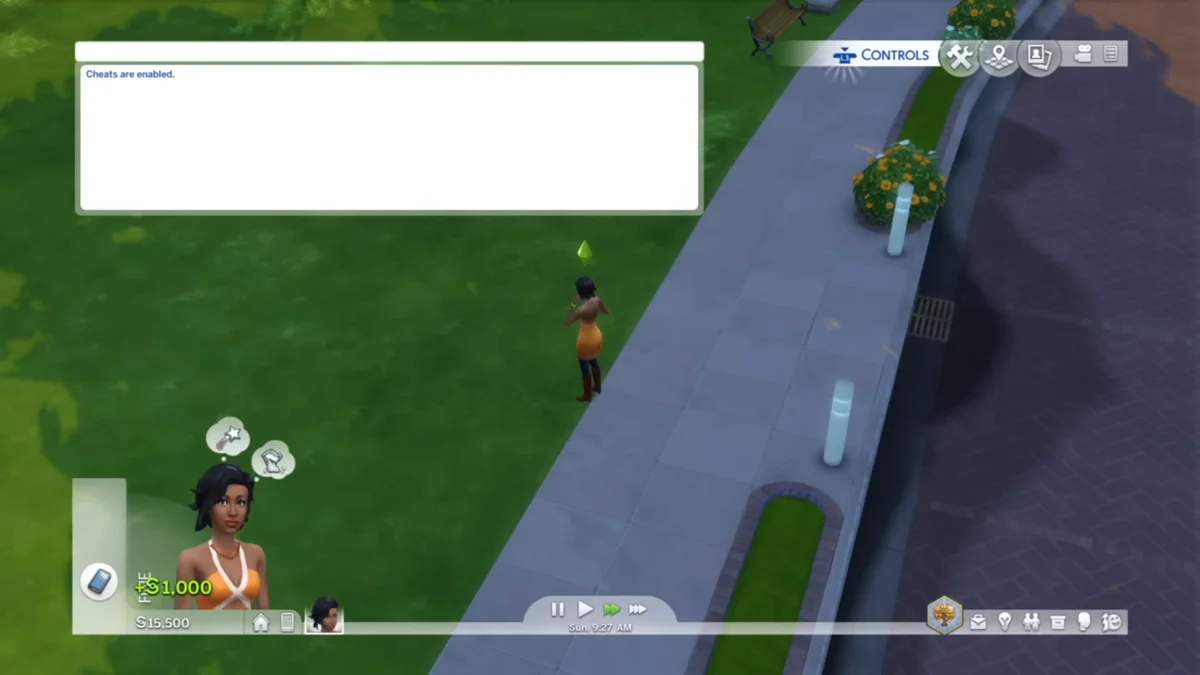
kachingdoes exactly the same as rosebud.motherlodeadds §50,000. Enter it as many times as you like; each use stacks.Money 145897sets household funds to exactly that number. EA’s example: “typing in Money 145897 will make the household funds 145,897 exactly”. EA’s instructions turn ontestingcheats truebefore this one, so do that first.
Two details about Money matter. It replaces the balance rather than adding to it, so Money 500 on a rich household leaves it with §500; that makes it the quickest way to start a rags-to-riches challenge or undo an accidental motherlode spree. And type digits only, with no commas, spaces or § sign inside the number.
sims.modify_funds followed by a positive or negative amount adds or subtracts an exact sum. EA’s FAQ does not list it, so if it fails on your build, use Money with the total you want.
Free Real Estate and Bills
FreeRealEstate. Type FreeRealEstate On to make every residential lot free, then move a household in at no cost. EA’s one condition is location: it “must be entered at world or neighborhood screen”, so leave the lot and open the world map before typing it. Type FreeRealEstate Off once you have moved to switch it back off. EA lists no testingcheats step for it.
Bills. EA’s FAQ lists household.autopay_bills with true or false as switching bills on or off for the household. Bills are otherwise paid from the mailbox or the phone, which our guide on how to pay bills in Sims 4 walks through.
The Trophy Catch on PlayStation and Xbox
EA’s rule is that “any of the cheat codes that require you to input testingcheats true” disable Trophies and Achievements for the current save. Other saves are unaffected, and Build Mode cheats are fair game.
For money, that splits the list. EA’s PC instructions show rosebud, kaching and motherlode with no testingcheats step, while Money sits behind it, so Money is the one that certainly costs you trophies. EA’s console page does not spell out the plain money cheats either way, so if a trophy run matters, keep your money cheating on a separate save.
What Changed Since 2024
The money codes themselves have not changed: none of the official patch notes we checked through the September 22, 2026 update touches them. What changed is everything you can spend the money on. Businesses and Hobbies (March 2025) added small businesses that run from a home lot, and EA’s early 2025 content season was even named “The Sims 4 Motherlode”, built around money-making gameplay. If you would rather earn the Simoleons, our guides to making money fast and starting a business cover the legitimate routes.
When a Money Cheat Does Nothing
Moneyis ignored: testingcheats is off. Typetestingcheats true, then the Money line again. Re-enter it after restarting the game if it stops responding.- FreeRealEstate is ignored: you typed it inside a lot. Go to the world or neighborhood screen.
- Nothing happens at all: check the spelling and the space between Money and the number.
- The wrong household got the money: cheats pay the household you are currently playing, so switch to the right one first.
Skills and relationships use the same console: see our skill cheats and relationship cheats guides, and the Sims hub for everything else.
Frequently Asked Questions
How much does motherlode give in The Sims 4? §50,000 per use. Kaching and rosebud give §1,000 each, and all three can be repeated.
Is there an unlimited money cheat? Not a single one, but with testingcheats on, the Money cheat sets the balance to the number you type, so one line replaces dozens of motherlodes.
Does the Money cheat add to my funds or replace them? It replaces them. EA’s example sets the household to exactly the number typed.
Do money cheats work on PS5 and Xbox? Yes. Hold all four shoulder buttons to open the console and type the same codes.
Do money cheats disable trophies? Any cheat that needs testingcheats true does, for that save only. Money needs it; for motherlode, kaching and rosebud, cheat on a separate save if you want to be certain.