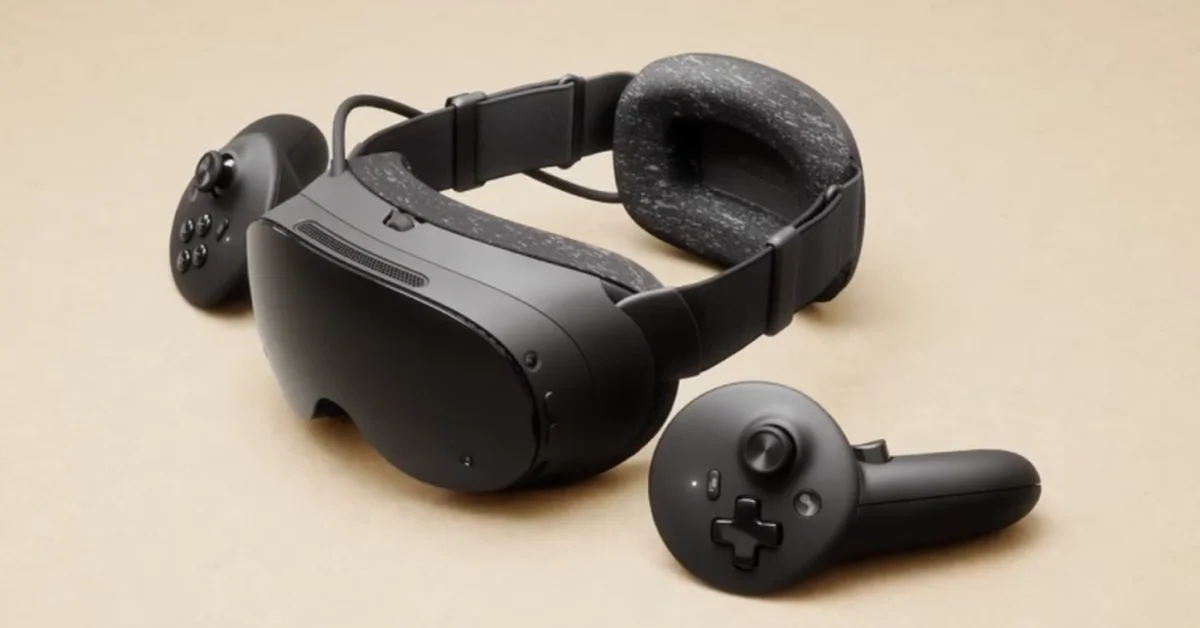
No, Valve Index controllers do not work with Steam Frame out of the box. Steam Frame tracks its own controllers with cameras on the headset, while Index controllers can only be tracked by Lighthouse base stations, and Valve has said base station support “is not something we’re working on.” The only way to use them is an unofficial workaround, which needs a PC, your base stations and extra tracking software, and never works when the headset is running games on its own.
Below is why the two do not mix, what the workaround involves, what Steam Frame’s own controllers do instead (including the hand straps that come closest to the Index grip), and what Valve says about your Index going forward. Valve’s statements are verified against its Steam Frame product page, Steam Hardware blog posts and Steamworks documentation.
Why Index Controllers Do Not Pair With Steam Frame
It comes down to tracking. Valve’s spec sheet describes Steam Frame’s tracking as “Inside-out camera based tracking,” using “4x outward facing monochrome cameras for controller and headset tracking,” with infrared illuminators for dark rooms. The headset watches its own controllers, and Valve’s product page says “Steam Frame controllers are tracked in space by the headset.”
Index controllers work the other way around. They are tracked by Lighthouse base stations mounted around the room, and Valve’s own October note on the Valve Index says “a full set of components is required to use Valve Index, including the headset, controllers, and base stations.” Steam Frame cannot see an Index controller’s position on its own, so it has nothing to track.
Valve addressed base stations directly in a Steam Hardware FAQ on February 4. Asked “Will Steam Frame work with lighthouse base stations?”, Valve answered: “It’s not something we’re working on, but we built Steam Frame to be modular and extensible so that the community and 3rd parties can build out the features and accessories that are important to them.”
The Unofficial PC Workaround
Because Steam Frame streams to SteamVR on a PC, unofficial PC tools can mix the two tracking systems there, the same way Index controllers are already used with other inside-out headsets. Space Calibrator, a free SteamVR tool, says it lets you “Use Valve Index Controllers with Meta Quest / Pico VR headsets.” The setup looks like this:
- Your base stations, mounted and running as they were for the Index.
- The Index controllers paired to the PC rather than to the headset, each with its own USB receiver, since the receivers that normally pair them are built into the Index headset.
- A SteamVR tracker on Steam Frame’s headstrap, so the base stations can see where the headset is.
- Space calibration software on the PC that lines up the base station tracking with Steam Frame’s camera tracking, so the controllers appear in the right place.
It can only work in PC VR games streamed through SteamVR, and the limits are clear: it does nothing for standalone games running on the headset, it needs extra hardware, and it is unsupported, so a SteamVR or SteamOS update can break it. Treat it as a hobby project, not a recommendation.
What Steam Frame Controllers Do Instead
Most people who want Index controllers want two things: finger tracking and a grip that lets go. Steam Frame’s controllers cover the first. Valve’s spec sheet lists “Capacitive sensing for all input surfaces” and “Capacitive finger tracking,” and its developer input documentation says they support finger tracking through SteamVR’s Skeletal Input API, the same system games use for Index finger tracking.
| Steam Frame Controllers | |
|---|---|
| Tracking | Tracked by the headset’s cameras, full 6-DOF |
| Finger tracking | Capacitive sensing on all input surfaces |
| Buttons | ABXY (right), D-pad (left), bumpers, analog triggers, dual-stage grip buttons |
| Thumbsticks | Full-size magnetic (TMR) sticks with capacitive touch |
| Power | One AA battery each, about 40 hours, per Valve |
| Weight | 130 g each with battery |
Game support should not be a worry. Valve’s product page says the controllers “are fully backwards compatible and support the full SteamVR catalog.” When a game has no Steam Frame controls, SteamVR looks for a generic OpenXR layout first, then an Oculus Touch layout, and maps it to the Frame controllers automatically, per Valve’s documentation. If a game’s controls feel wrong, update the headset: SteamOS 0.4 fixed controller bindings failing to load in some games, including Google Earth VR and Thumper.
Hand Straps: The Closest Thing to the Index Grip
What Steam Frame’s controllers do not have in the box is the Index’s hand strap. Valve sells it separately. The Ergonomic Accessories Kit ($59) includes two controller hand straps with battery doors, a headset top strap and an extended light blocker, according to Valve’s launch announcement. Valve says its first-party accessories are only available as an add-on at checkout, when you complete a Steam Frame purchase, and its Getting Started page has a video on installing the hand straps.
With straps fitted, you can open your hand in games without dropping the controller, which is the feature Index owners tend to miss most.
What About Your Index Headset?
Valve stopped making the Index. Its October note says “Valve Index is no longer being produced” and that remaining headsets, controllers and accessories are on sale at new prices while supplies last. It also says: “If you already own an Index, nothing changes – it is still supported on Steam and SteamVR.”
So your Index setup keeps working as a wired PC VR headset alongside Steam Frame. If you are weighing the two, the trade is simple: Steam Frame drops the base stations, the cable and the Index’s built-in hand straps, and adds wireless streaming, eye-tracked Foveated Streaming and standalone play. Our guide to whether Steam Frame is standalone explains what it runs without a PC, our Steam Frame vs Quest 3 comparison covers the other headset most buyers consider, and our guide to the best Steam Frame settings covers what to change first.
Could Third Parties Add Base Station Support?
Valve has left the door open. Steam Frame has a user-accessible front expansion port, which Valve’s spec sheet describes as a dual high-speed camera interface or a PCIe Gen 4 interface, and on October 9 Valve released Steam Frame CAD files and electrical interface information for non-commercial use. That is the kind of access an accessory maker would need, but no base station accessory has been announced.
For now, if you are streaming PC VR, our guide to connecting Steam Frame to your PC is the place to start, and our list of the best Steam Frame games has plenty that play well on Steam Frame’s own controllers.
Frequently Asked Questions
Can you use Valve Index controllers with Steam Frame? Not natively. Steam Frame tracks controllers with its own cameras, and Index controllers need Lighthouse base stations. There is an unofficial PC-only workaround with base stations, a tracker and calibration software, but Valve does not support it.
Does Steam Frame work with base stations? No. Valve said base station support “is not something we’re working on,” while noting that Steam Frame is modular enough for third parties to build accessories.
Do Steam Frame controllers have finger tracking like Index controllers? Yes. Valve lists capacitive finger tracking on all input surfaces, and its documentation says the controllers support SteamVR’s Skeletal Input API.
Do Steam Frame controllers have hand straps? Not in the box. Valve’s Ergonomic Accessories Kit adds two controller hand straps, and it is offered as an add-on at checkout.
Will games built for Index controllers work on Steam Frame? Valve says Steam Frame’s controllers support the full SteamVR catalog. SteamVR maps other controller layouts to them when a game has no Steam Frame controls.
Is Valve still supporting the Index? Yes. Valve says the Index is no longer being produced, but owners are still supported on Steam and SteamVR.