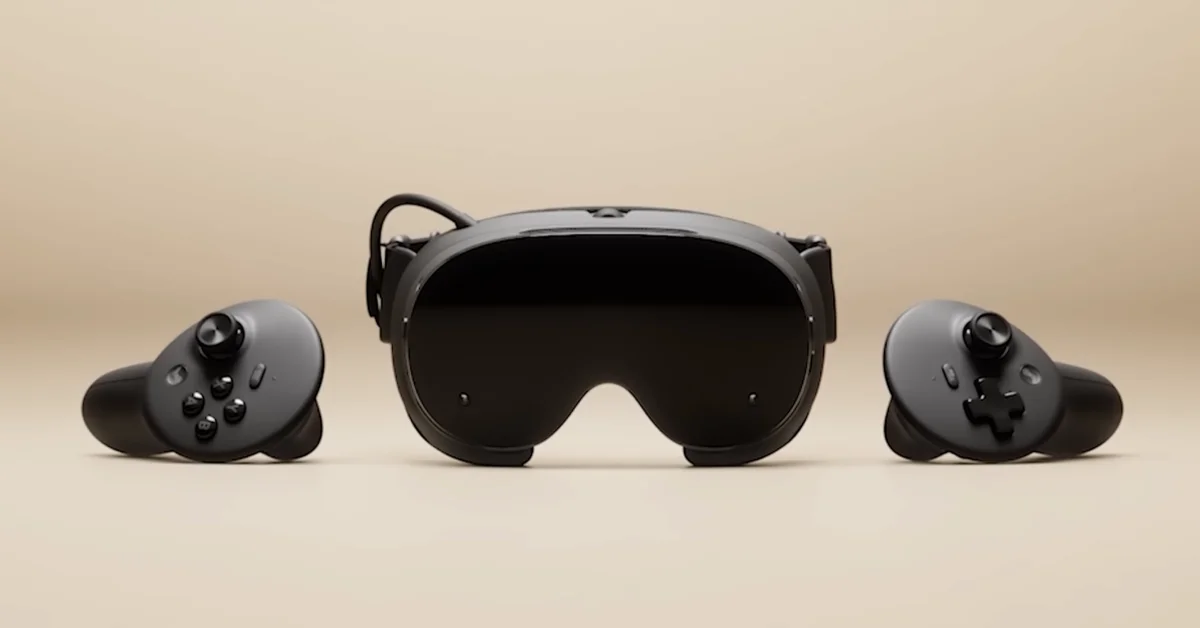
Inside the Steam Frame box you get the headset, a pair of controllers, an eye relief spacer, a wireless adapter, an information booklet and a USB-C cable, the list Valve reads out in its own “Unboxing & Turning On” video. A power supply is not on that list: Valve sells its 45W charger separately for $29.
Below is every item and what it is for, what you have to buy separately, how to turn the headset on the first time, and the details Valve leaves out. It comes from Valve’s Getting Started videos, the Steam Frame product page, its launch post and its safety manual, with prices checked November 8, 2026.
Everything in the Steam Frame Box
| Item | What it is for |
|---|---|
| Steam Frame headset | The core module plus a headstrap with the battery and speakers built in |
| Two Steam Frame Controllers | Tracked by the headset’s cameras, with ABXY on the right and a D-pad on the left |
| Two AA batteries | One per controller. Valve’s manual says each controller runs on “a single disposable (included) or rechargeable (not included) AA battery” |
| Two wrist lanyards | Valve’s manual says they are “provided to help prevent accidentally dropping or throwing the Controllers” |
| Eye relief spacer | Gives your eyes more room, “particularly useful if you wear glasses,” per Valve |
| Wireless adapter | A 6GHz Wi-Fi 6E stick that plugs into your PC for streaming |
| USB-C cable | Connects the headset to a power source |
| Information booklet | Printed information. Valve’s safety manual also refers to a “Setup Guide included in your VR Kit” |
The headset also comes with its magnetic face gasket and a standard light blocker. Valve’s accessory video says that light blocker “comes packaged with the Steam Frame,” so you only buy those parts again as replacements.
Half-Life: Alyx is included too, but as a copy you redeem rather than anything physical. Valve says you are prompted to redeem it in Settings when you log in, and our guide to redeeming Half-Life: Alyx has the steps.
What the Smaller Items Do
The eye relief spacer is the one most people have not seen on another headset. Valve’s “Fit and Comfort” video says to try it “if your glasses don’t quite fit or your eyes feel too close to the lens.” It attaches with magnets: remove the face gasket, insert the spacer, then put the face gasket back on. If the display starts switching off with the spacer fitted, Valve’s SteamOS 0.4 update added a VR Settings > Startup / Shutdown > Presence Sensor setting for that. Our Steam Frame glasses guide has more on frame widths.
The wireless adapter gives the headset a direct link to your PC. You can stream over home Wi-Fi without it, but Valve recommends using it. Our guide to connecting Steam Frame to your PC walks through pairing.
The USB-C cable goes into the port on the rear of the headstrap. Valve’s spec sheet lists that port for charging and data, and Valve does not give the included cable’s length. It is not a video cable for your graphics card: our guide to playing Steam Frame wired explains why.
The lanyards tie to the controller grips. If you add Valve’s hand straps later, its strap video tells you to untie and remove the lanyard first.
What Is Not in the Box
| Not included | What it adds | Price | Where to get it |
|---|---|---|---|
| Valve power supply | 45W charger with a 2.5m cable | $29 | Add-on at checkout |
| Ergonomic Accessories Kit | 2 controller hand straps with battery doors, 1 headset top strap, 1 extended light blocker | $59 | Add-on at checkout |
| Accessory Replacement Kit | 1 face gasket, 1 head cushion, 1 standard light blocker | $49 | Add-on at checkout |
| Prescription inserts by Zenni | Lenses made to your prescription | $67.95 | Zenni |
| Arcturus Vision Camera | Color passthrough and spatial video capture | Not on Valve’s page | Linked from Valve’s product page |
| microSD card | Extra game storage | Varies | Any retailer |
The checkout point matters. Valve’s store FAQ says its first-party accessories “will only be available to customers purchasing their Steam Frame as part of the add-to-cart process,” so decide on them when you get your purchase email.
The power supply is the one to think about first. Valve’s support guide estimates about 1.5 hours for a full charge with a compatible 45W power supply, and about 3.5 hours over USB from a PC or other adapter. Our guide to playing while charging covers which chargers keep up.
Two more things worth knowing. Valve’s list names no carrying case. And one item is unclear: Valve’s safety manual tells you to use “the included microfiber cloth,” but the unboxing video’s list does not name a cloth. Check your box, and if there is none, any clean, dry microfiber cloth is what Valve asks for. Our guide to cleaning the lenses has the rest.
For storage, our Steam Frame storage guide explains which microSD cards Valve supports.
How to Turn It On the First Time
The headset ships in a power-saving mode and will not start until it has been plugged in. Valve’s unboxing video gives these steps:
- Plug the headset into a power source using the supplied USB-C cable, through the port on the rear headstrap.
- Hold the power button until the LED turns white.
- Press the Steam buttons to turn on the controllers. Valve says they should pair automatically the first time.
- Unplug the headset and carry on with setup.
From there, Valve’s support guide says a Guided Tour takes you through logging into Steam, pairing the controllers and getting comfortable in the headset, and you will be asked to join your Wi-Fi network to download updates. Then set your lenses with our guide to IPD on Steam Frame, and work through the best settings to change first.
The 256GB and 1TB Kits
| Kit | Built-in storage | US price |
|---|---|---|
| Steam Frame 256GB Kit | 256GB | $1,059 |
| Steam Frame 1TB Kit | 1TB | $1,299 |
Valve gives one box list in its video, with no split by model, and the only difference it names between the kits is the storage.
Box Size, Weight and Keeping the Box
Valve does not publish the box’s dimensions or shipping weight. It does give the hardware’s:
| Part | Size | Weight |
|---|---|---|
| Core module and facial interface | 175 x 95 x 110 mm | Not listed |
| Core module and headstrap | Not listed | 440 g |
| Core module alone | Not listed | 185 g |
| Headstrap | Not listed | 245 g |
| Each controller | 126 x 73 x 87 mm | 130 g with battery |
Hold on to the box. Valve’s support guide says, “For longer term storage, we recommend packing your Steam Frame back into the original box for maximum protection.”
Frequently Asked Questions
Does Steam Frame come with a charger? It comes with a USB-C cable but no power supply. Valve sells a 45W power supply with a 2.5m cable for $29 as an add-on at checkout.
Does Steam Frame come with batteries? Yes. Valve’s safety manual says each controller runs on a single AA battery, and that a disposable one is included.
Does Steam Frame come with a glasses spacer? Yes. Valve’s unboxing video lists an eye relief spacer, “particularly useful if you wear glasses.”
Is the wireless adapter included? Yes. Valve’s spec sheet says “Wireless adapter included in the box,” and it is on the unboxing video’s list.
Does Steam Frame come with hand straps? No. It comes with wrist lanyards. Hand straps are part of Valve’s $59 Ergonomic Accessories Kit.
Does Steam Frame come with a case? Valve’s list names no case. For long-term storage, Valve suggests putting the headset back in its original box.
Do both Steam Frame kits come with the same things? Valve gives one list for the box, and the only difference it names between the 256GB and 1TB kits is the storage.