
To drive in GTA 6 on PS5, accelerate with R2 and brake with L2, and keep holding L2 to reverse: the game lists the trigger as Brake / Reverse. The handbrake is Cross, you steer with the left stick, and nitro shares L3 with the horn on cars that carry it.
We read every button below off the Control Scheme screen on our PS5 copy of Grand Theft Auto VI, on its Land / Water Vehicles page, so they apply to boats as well as cars, and the screenshots in this guide are from our own PS5 recordings. The handling details come from Rockstar North co-studio head Rob Nelson’s on-record interviews.
Driving Controls on PS5
| Action | PS5 |
|---|---|
| Accelerate | R2 |
| Brake and reverse | L2 |
| Handbrake | Cross |
| Steer | Left stick |
| Horn, or nitro if fitted | L3 |
| Headlights | Circle |
| Indicate left or right | Left or Right on the D-pad |
| Shoot from the car | R1 |
| Look behind | R3 |
| Get out | Triangle |
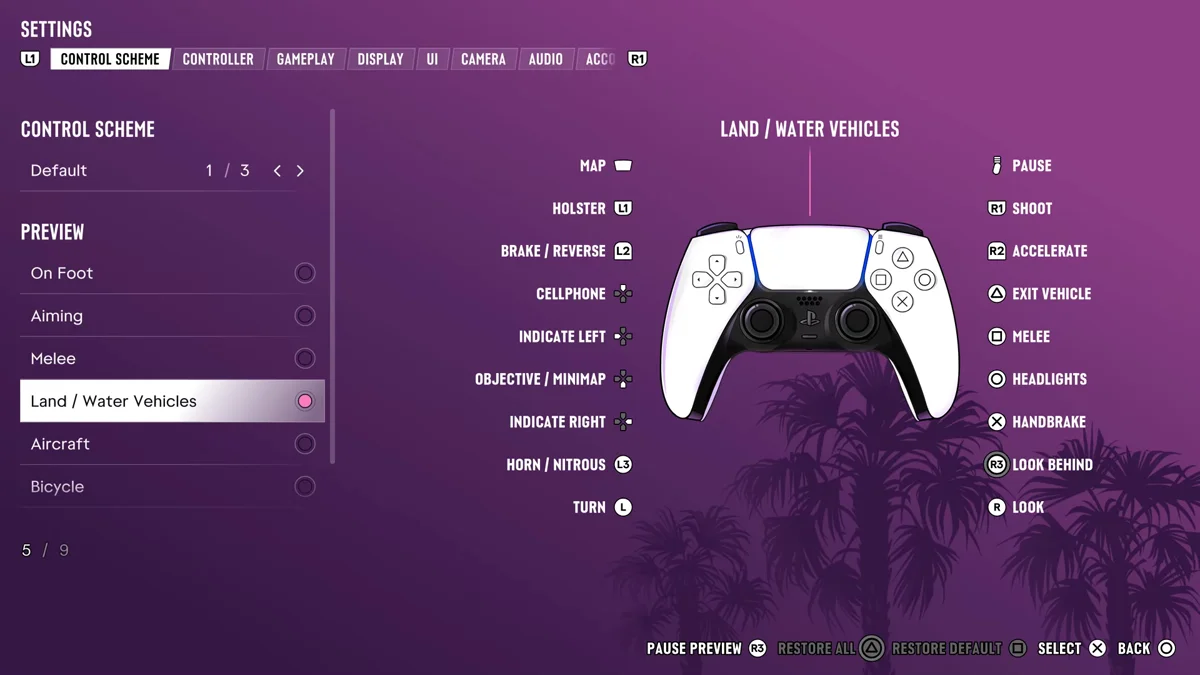
The preview on that page flips to a second set of labels for buttons you hold rather than press:
| Hold | What it does |
|---|---|
| L1 | Opens your loadout |
| Up on the D-pad | Interact |
| Left on the D-pad | Vehicle menu |
| Down on the D-pad | Quick navigation |
| Right on the D-pad | Partner menu |
| Circle | Duck |
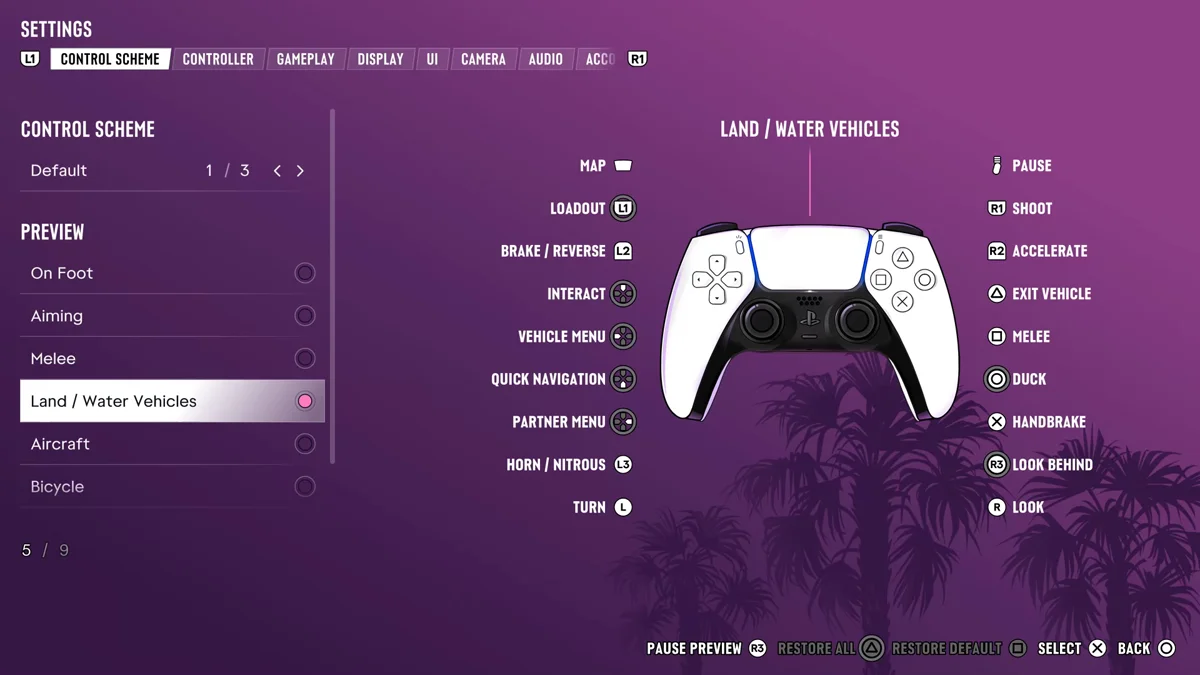
That’s why the D-pad and Circle need a light touch: a tap of Left signals left and a tap of Circle flips the headlights, while holding them opens the vehicle menu or ducks you down in your seat.
Braking, Reversing and the Handbrake
L2 does both jobs, which the game labels Brake / Reverse. Squeeze it to slow down, and keep it held once you’ve stopped to back up. The handbrake is its own button, Cross, for tight turns. Our guide to drifting covers using it in corners.
If your hands learned GTA 5, the triggers will feel familiar, since that game also used R2 and L2. The handbrake is the one to relearn: GTA 5 put it on R1, and in GTA 6 R1 shoots from the car.
How Driving Feels Different in GTA 6
Rockstar rebuilt the driving for this game. “It has all been built up from scratch on this hardware,” Nelson told the YouTube creator TGG, adding that the team has “much more control over tuning drivetrain, tyres, suspension, steering.” Nelson described the result as a middle ground: “The team has worked hard to maintain some of the best parts of the weightiness and feel of GTA 4, but has the accessibility of GTA 5.”
The city is tighter, too. “The streets in this game are narrower and more realistic in terms of scale,” Nelson told IGN, and with denser traffic that “makes driving slightly more challenging and requires a bit of skill.” In practice, brake earlier in Vice City than you would have in Los Santos.
Nitro
Nitro sits on L3, the same button as the horn, and only boosts on a vehicle that carries it. Settings let you choose how it fires: under Gameplay, the Nitrous option reads “Choose whether you hold or press L3 when using the vehicle nitrous,” and it was set to Hold on ours. Our guide to using nitro boost covers it in more detail.
Fuel, Trackers and Repairs
- Fuel. Cars need fuel in GTA 6, and a car with an empty tank stops. Our guide to the fuel system covers filling up.
- Trackers. Some stolen cars carry a tracker that reports you if you drive slowly. “If I drive slow, it pings and the police will know where I am. So you have to drive the car fast,” Nelson told IGN. Our guide to removing trackers explains how to get rid of one.
- Repairs. A Pay ‘n’ Spray or a gas station fixes the damage, as our guide to repairing your car explains.
Let Your Partner Drive
You don’t always have to be the driver. Hold Right on the D-pad next to your car with your partner and choose You Drive, and they take the wheel; while they drive, the same menu has Speed Up and Pull Over. Our guide to giving orders to your partner covers it, and our guide to auto drive covers letting the game steer for you.
Frequently Asked Questions
What are the driving controls in GTA 6?
R2 accelerates, L2 brakes and reverses, Cross is the handbrake and the left stick steers. L3 is the horn, or nitro on a car that carries it.
How do you reverse in GTA 6?
Hold L2. The game lists the trigger as Brake / Reverse, so once you’ve stopped, keep holding it to back up.
What is the handbrake button in GTA 6?
Cross on PS5. In GTA 5 it was R1, which now shoots from the car.
How do you use nitro in GTA 6?
Press or hold L3 in a vehicle that carries nitrous. Settings > Gameplay has a Nitrous option to choose between holding and pressing.
Can your partner drive in GTA 6?
Yes. Hold Right on the D-pad near your car and pick You Drive, and Jason or Lucia takes the wheel.