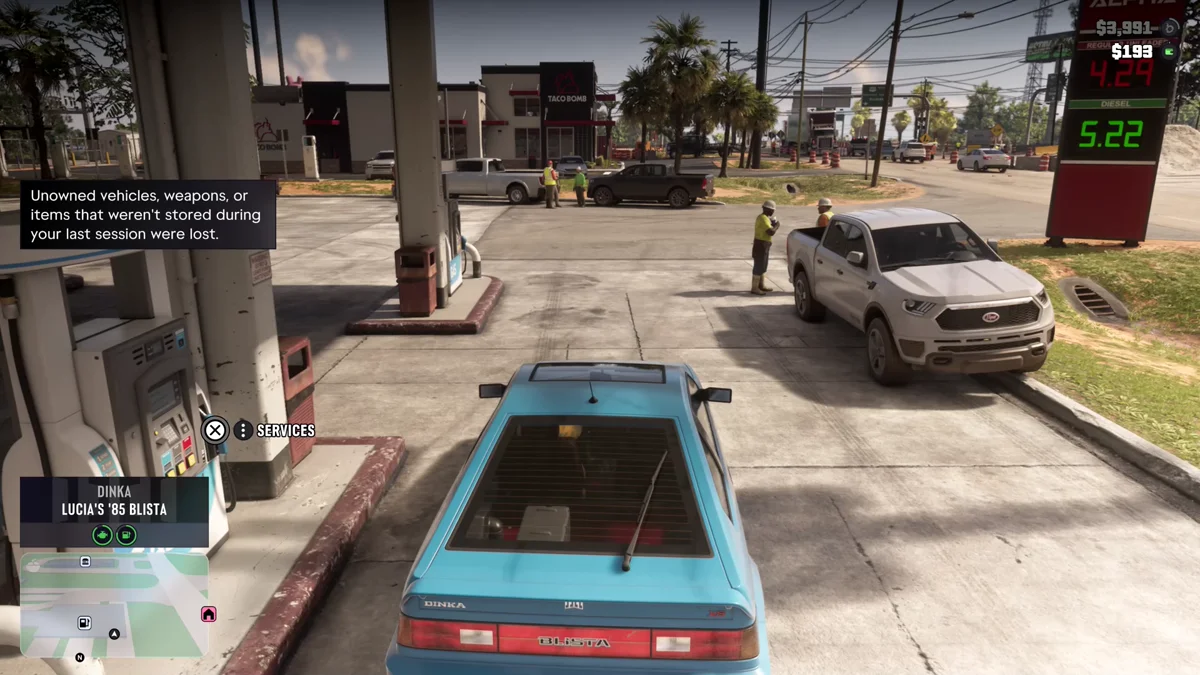
Your car most likely disappeared in GTA 6 because it wasn’t yours: the game only keeps owned vehicles from one session to the next, and when you load back in it says “Unowned vehicles, weapons, or items that weren’t stored during your last session were lost.” If the missing car was one you own, the police have probably impounded it, and the Scooter Bros app on your phone lists it under Impounded Vehicles.
We lost cars both ways on our PS5 copy of Grand Theft Auto VI, and the screenshots in this guide are from our own PS5 recordings. Below is what counts as your car, how to make a stolen car yours, how to park one you can’t register yet, and the other places a car can go.
Why Unowned Cars Vanish Between Sessions
The message above comes up as soon as a session loads. We got it at the start of two different days: once with Jason waking up at home, and once with Lucia sitting at a gas station pump in her own car. That second time shows the rule at work. Her registered ’85 Blista was right there with her, its name card reading “Lucia’s ’85 Blista,” while anything unowned from the session before was gone.
So a car you stole and drove around all evening doesn’t carry over unless you made it yours or stored it. The same goes for what’s in its trunk. When Jason picked up a bag of Lucia’s clothes, the game warned that they “may be lost if kept in an unowned vehicle.” Our guide to what to do with Lucia’s clothes covers that errand.
Saving before you stop doesn’t change this. Your manual save and the autosave keep your story progress, but not everything around you, as our guide to quitting to the main menu explains. Our guide to saving in GTA 6 covers the save slots.
Owned vs Unowned: What Counts as Your Car
An owned car is a personal vehicle the game has put in your name, and the name card that shows when you get in tells you which kind you’re in. Owned cars carry the character’s name: “Jason’s ’70 Ganado” for Jason’s pickup, “Lucia’s ’85 Blista” once we’d registered hers. The ’82 Ruiner we stole and never registered showed only its make and model, “Imponte ’82 Ruiner.”
At the start of the game, Jason’s own car is the only personal vehicle you have. Everything else you drive is borrowed until you register it.
How to Make a Stolen Car Yours
Registering turns a stolen car into an owned one, and it opens up in Chapter 2, when you meet Moses at Watkins Auto Parts in Port Gellhorn:
- Scan before you steal. Hold Up on the D-pad to open the WAiNK app and hold R1 over a car. Its card shows whether it has a tracker and its Cost to Register. Our WAiNK app guide explains the readout.
- Take a car with no tracker and drive it into Moses’s garage.
- Hold L2 on Moses and press Square for Services, then pick Register. Its description reads “Swap plates and register this vehicle as yours.”
- Pay the fee. Moses does the first one free.
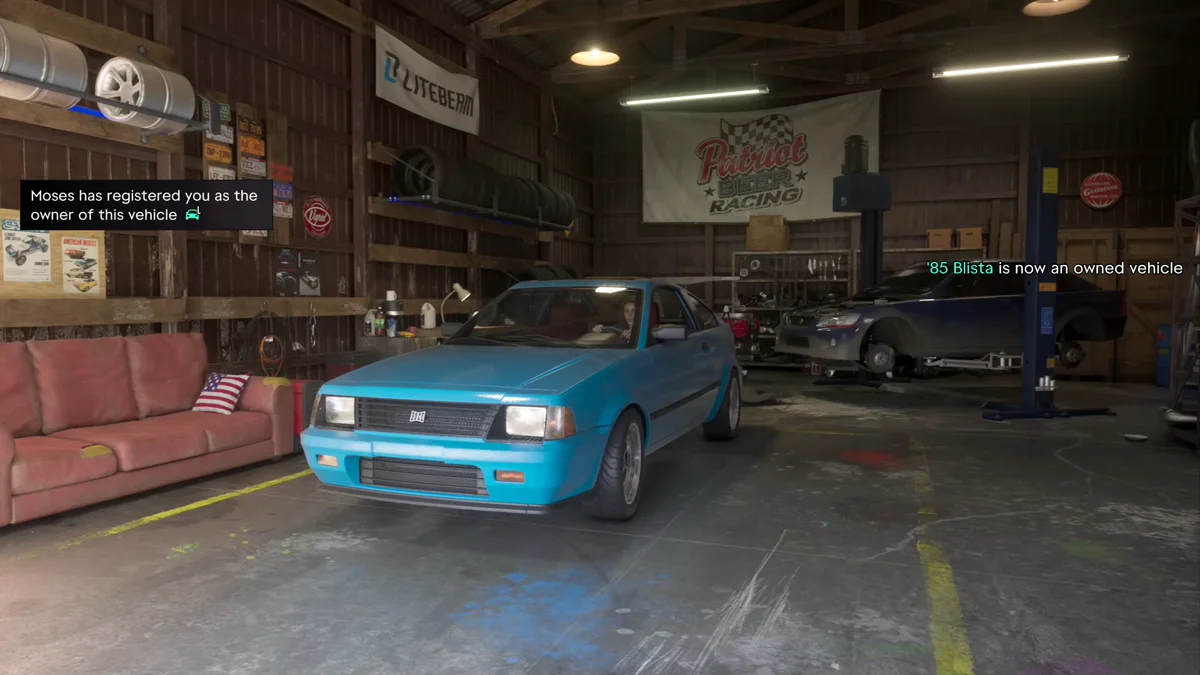
When we registered Lucia’s ’85 Blista, two messages confirmed it: “Moses has registered you as the owner of this vehicle” and “’85 Blista is now an owned vehicle.” That’s the same car that was still with her on a later load-in.
After the free one, registering costs real money. Moses wanted $6,400 to register an ’82 Ruiner we brought him later, and with $2,846 in our account the menu marked it “Not enough money.” Every registered car also needs a free garage space, and later in the story a Pay ‘n’ Spray registers cars with a standard tracker too. Our guide to registering cars has the full rules, and our guide to stealing cars explains why a car with an advanced tracker can’t be registered or kept in a garage at all.
How to Keep a Car You Can’t Register Yet
If you can’t afford the fee yet, park the car in a garage space. Moses lends you one in Chapter 2, the Port Gellhorn Station Garage, which the map listed with “+1 Empty Parking Spot” on our copy.
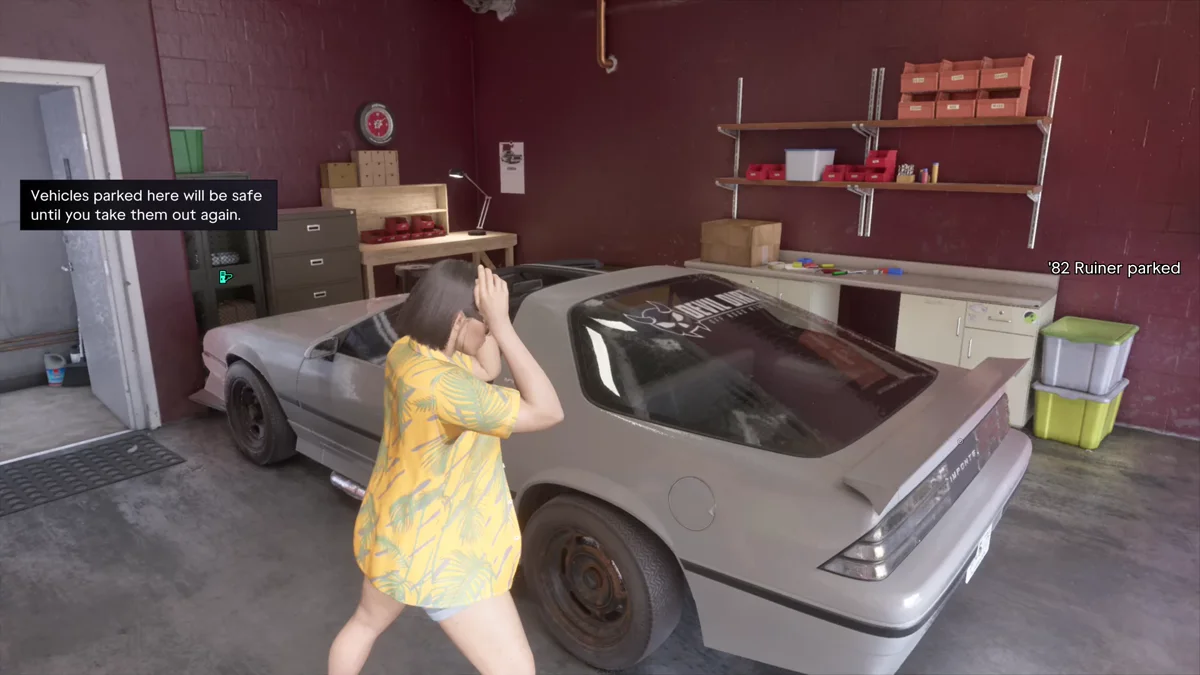
That’s what we did with the ’82 Ruiner when we couldn’t pay to register it. Pulling up to the garage door, the game said: “Park within the space and exit the vehicle to temporarily store it.” Once Lucia stepped out, a second message read “Vehicles parked here will be safe until you take them out again,” and a notice confirmed “’82 Ruiner parked.”
Note the word “temporarily.” The game doesn’t say how long an unregistered car keeps its spot, and we haven’t recorded going back for the Ruiner, so treat the garage as a holding spot while you save up for the fee rather than a permanent home.
Moses’s Services menu also has a Stored Vehicles tab (R1) that shows your garage spots. Ours listed Lucia’s ’85 Blista and an Empty spot marked “Garage parking spot available.” Our guide to every garage location lists the garages you can buy for more room.
If Your Own Car Is Gone, Check the Impound
An owned car doesn’t vanish with the session, but the police can take it: they impound a car you own when you leave it behind while they’re searching for you. The game tells you when it happens. “Jason’s ’70 Ganado impounded” popped up on our screen while Jason was out on an airboat in the wetlands.
To get it back:
- Take out your phone with Up on the D-pad and open Scooter Bros.
- Look under Impounded Vehicles. Ours listed Lucia’s ’85 Blista there, below the ’72 Tulip under My Vehicles.
- Choose Retrieve and pay. We paid $550 for the Blista, and moments later a notification said “’85 Blista has been delivered.”
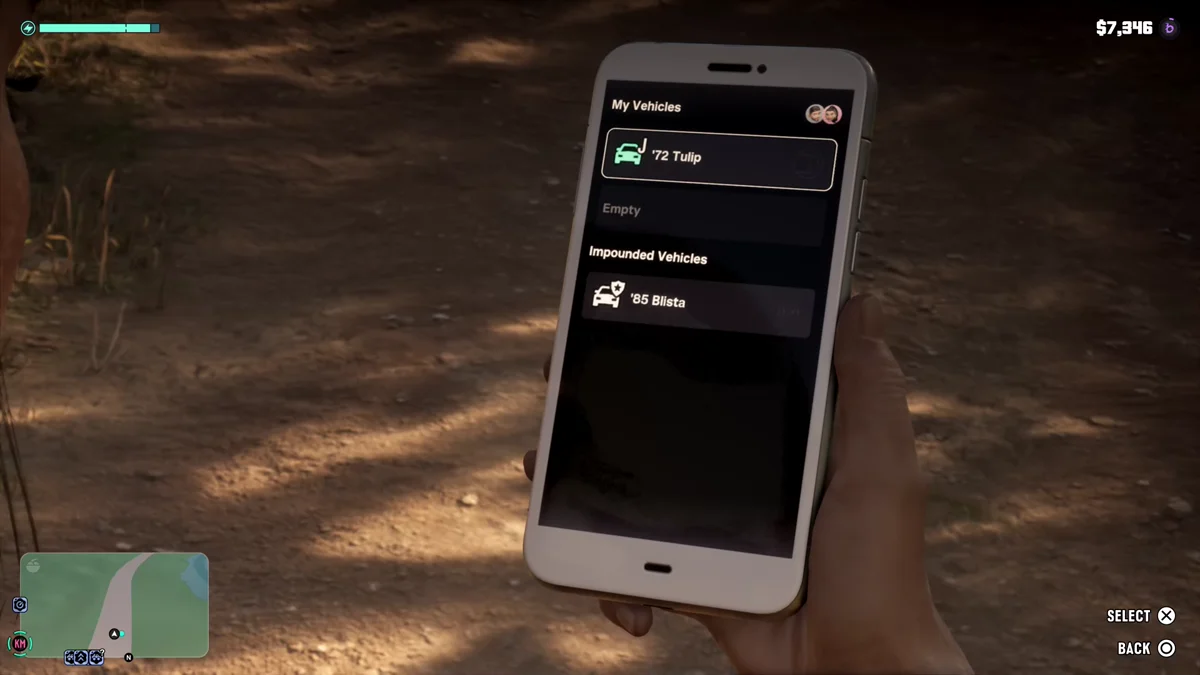
An impounded car also shows on the map as an Impounded Vehicle, and you can break it out of the lot yourself instead of paying. Our guide to getting your car back from the impound covers both ways, and our Scooter Bros guide covers the rest of the app. Our guide to how the Heat system works explains the search area the police use.
Other Reasons a Car Goes Missing
- You lost track of where you left it. Press the touch pad to open the map and look for the car icon. Our guide to finding your car shows what it looks like.
- It’s too far away. Scooter Bros delivers any registered car to you for a fee, and early in Chapter 1 Joey at Coastal Auto Care brings Jason’s pickup instead. Our guide to calling your car covers both.
- It was wrecked. Scooter Bros can recover a registered car that’s been destroyed too, at a price.
How to Stop Losing Cars
- Register anything you want to keep. It’s the only way a car becomes yours.
- Park an unregistered car in a garage space before you stop playing, if you can’t register it yet.
- Keep your gear in your own car’s trunk, not a stolen one. Our guide to storing outfits and long guns in your trunk shows how.
- Use stolen cars for crimes. Leave your own car out of chases so it doesn’t end up in the impound.
Every other GTA 6 guide is on our GTA 6 hub.
Frequently Asked Questions
Why did my car disappear in GTA 6?
It was probably unowned. GTA 6 loses unowned vehicles between sessions and tells you so when you load in. If it was a car you own, check the Impounded Vehicles list in the Scooter Bros app.
How do you save an unowned car in GTA 6?
Register it with Moses, or later at a Pay ‘n’ Spray, to make it yours. Until you can, park it inside a garage space: the game says vehicles parked there “will be safe until you take them out again.”
How do you keep a stolen car in GTA 6?
Register it. Drive a car with no tracker into Moses’s garage, hold L2 on him, press Square for Services and pick Register. The first one is free.
Do registered cars disappear in GTA 6?
Not between sessions: Lucia’s registered ’85 Blista was still with her when we loaded in. The police can impound one, though, and Scooter Bros can get it back for a fee.
What happens to things in a stolen car’s trunk?
They can go with the car. When Jason carried a bag of Lucia’s clothes, the game warned they “may be lost if kept in an unowned vehicle,” so use your own car’s trunk.