
To crouch in GTA 6 on PS5, tap Circle while you’re on foot. That’s on the Default control scheme; on the Classic scheme, crouch moves to L3, a click of the left stick.
We read both layouts off the Control Scheme screen on our PS5 copy of Grand Theft Auto VI, and the screenshots in this guide are from our own PS5 recording. Below is the button on each scheme, crouching while you aim, what happens if you hold the button, and how a crouch sets up a quiet takedown.
Crouch Button on PS5
| Control scheme | Crouch | Run |
|---|---|---|
| Default | Circle | L3 |
| Classic | L3 | Cross |
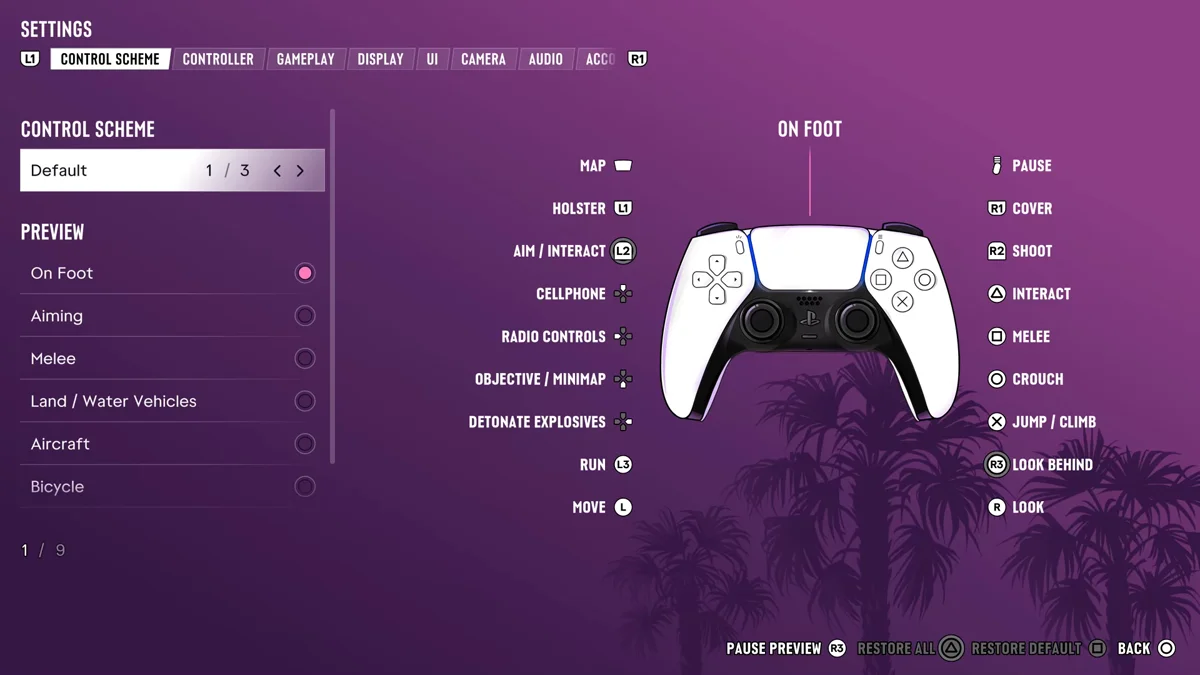
Default is the scheme the game starts on. Classic swaps several buttons back toward the GTA 5 layout: crouch goes to L3, running to Cross, jumping to Square and melee to Circle.
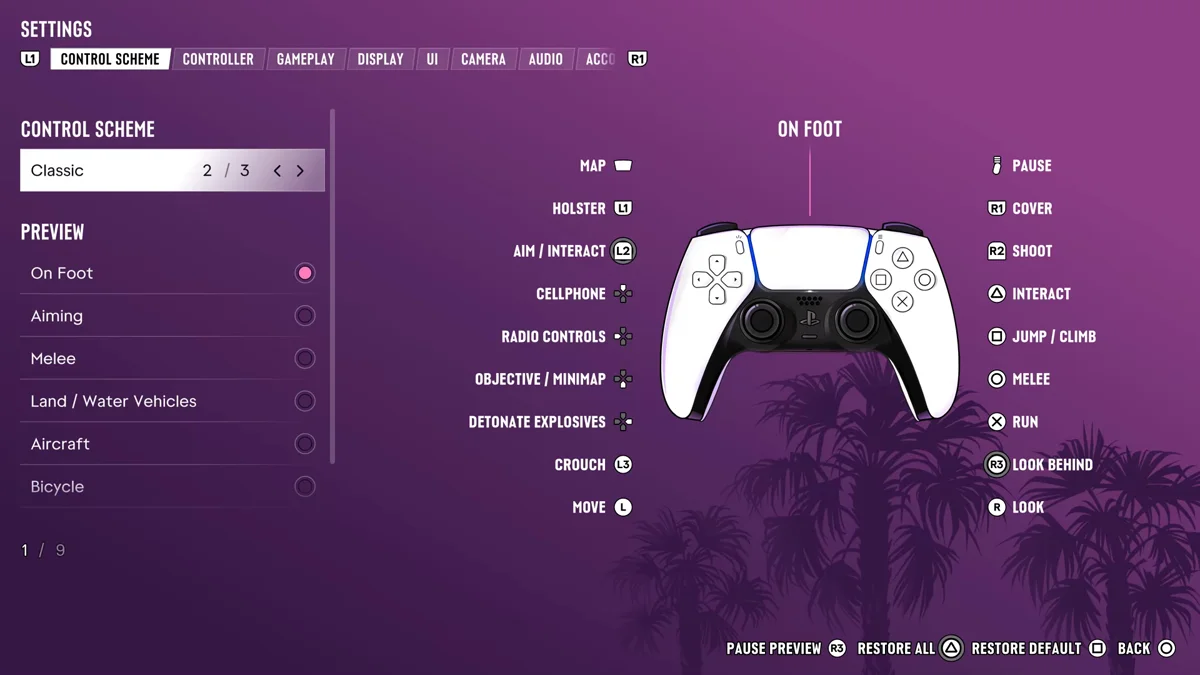
To switch, press Options, open Settings, and pick a preset at the top of the Control Scheme tab. Our guide to sprinting explains why the run button moved in the first place.
Crouching While Aiming
The Aiming page of the Control Scheme keeps Crouch on Circle, so you can drop down without letting go of L2. That helps when cover is low and you want a smaller profile while you line up a shot. Our guide to taking cover covers R1, the button that snaps you to a wall.
Tap, Don’t Hold
On the Default scheme, the On Foot page flips to a second layer for held buttons, and there Circle is listed as Rest. So a quick tap crouches, and a press that lingers does something else. If you keep getting the wrong one, use a shorter tap.
The same idea carries into vehicles: tap Circle for the headlights, hold it to duck down in your seat.
Sneaking Up for a Takedown
Crouching is how you get close without being noticed. To knock someone out quietly, sneak up behind them in a crouch, grab them with R2 and press Square, as our guide to fighting explains. Our guide to using Focus covers lining up targets before you move in.
Crouch and Sprint
If you sprint from a crouch, you’ll want to stand up first. Settings > Gameplay has a Stand & Sprint switch, off by default, that stands you up automatically when you start sprinting from a crouch, as our sprint guide explains.
Our PS5 controls guide has the full on-foot layout.
Frequently Asked Questions
What is the crouch button in GTA 6?
Circle on PS5 with the Default control scheme, or L3 with the Classic scheme.
Can you crouch while aiming in GTA 6?
Yes. The Aiming controls keep Crouch on Circle, so you can drop down while holding L2.
How do you change the crouch button in GTA 6?
Press Options, open Settings and choose the Classic preset on the Control Scheme tab. It moves crouch from Circle to L3.