
To turn on the light bar in GTA 6, press Options, choose Settings, press R1 to move to the Controller tab, and set Light Bar Effect to On; it’s the very last option on that tab. The game says the setting “activates the light bar on your DualSense wireless controller in various situations, such as when you’re wanted.”
On our PS5 copy of Grand Theft Auto VI it was already On, so if your light bar isn’t reacting, check this setting first and then the PS5’s own brightness option further down. The screenshot in this guide is from our own PS5 recording. Xbox Series X|S controllers have no light bar, so this one is for PS5 players.
Where the Light Bar Setting Is
- Press Options to open the pause menu and select Settings, the last option on it.
- Press R1 to reach the Controller tab. It’s the second tab, right after Control Scheme; L1 and R1 move between tabs.
- Scroll to the bottom. Past the Inverted Controls options is a section called DualSense Wireless Controller Features.
- Highlight Light Bar Effect, the last line on the tab (the counter reads 19 / 19), and flip its switch to On.
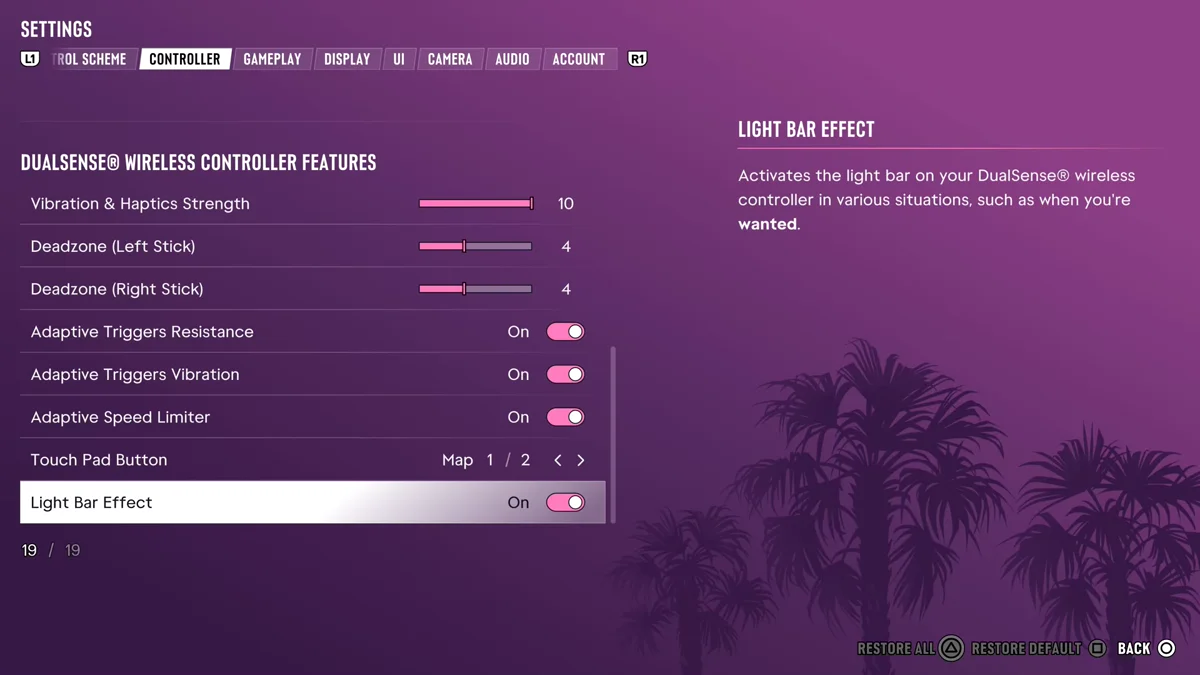
If you’ve been changing things and want the game’s own value back, the bottom of the screen offers Restore Default on Square and Restore All on Triangle.
What the Light Bar Does in GTA 6
The setting’s description is all the game tells you: the light bar comes on “in various situations, such as when you’re wanted.” So the clearest time to see it is with the police after you. The menu doesn’t list the other situations or the colors it uses.
If you’d rather the controller didn’t give away your wanted level to the room, switch Light Bar Effect off. Our guides to losing a wanted level and the Heat system cover the police side of things.
The Other DualSense Settings Beside It
Light Bar Effect shares its section with the rest of the controller’s features. On our copy they read:
| Setting | What we saw |
|---|---|
| Vibration & Haptics Strength | 10, the top of the slider |
| Deadzone (Left Stick) | 4 |
| Deadzone (Right Stick) | 4 |
| Adaptive Triggers Resistance | On |
| Adaptive Triggers Vibration | On |
| Adaptive Speed Limiter | On |
| Touch Pad Button | Map |
| Light Bar Effect | On |
Two of them are worth knowing about. The deadzone sliders set “how far you have to move” a stick before it registers, and the game suggests a higher value “can help with controllers experiencing stick drift.” Adaptive Triggers Resistance “applies simulated resistance to L2 and R2” for actions “such as shooting and driving,” so switch it off if the stiff triggers tire your fingers. Our guide to the best settings to change first covers the rest of the menu, and our guide to inverting the camera covers the options above this section.
Too Bright or Too Dim? The PS5 Setting
GTA 6’s switch decides when the game uses the light bar. How bright the controller’s lights are is a console setting. From the PS5 home screen, go to Settings > Accessories > Controller (General) and pick Brightness of Controller Indicators, which PlayStation’s support page describes as the place to “set the brightness of the indicators on your wireless controller.” It applies to every game, not just GTA 6.
If you play on one of the limited-edition GTA VI DualSense controllers, the same settings apply. Our guide to the GTA 6 DualSense controllers covers where to buy them.
Looking for a Police Car’s Lights?
Some searches for a light bar are about the lights on a police car, not the controller. The game’s Control Scheme screen lists no separate siren or emergency-lights button for cars: on the Land / Water Vehicles page, L3 is Horn / Nitrous, and the rest of the buttons are the usual driving ones. A car’s own features, such as its lights, live in the Vehicle tab you open by holding left on the D-pad, which our guide to turning on headlights walks through. Stealing a police car does come up in the game, in the Cop Car Theft challenge in our GTA 6 challenges guide. Our GTA 6 controls guide lists every vehicle button, and every GTA 6 guide is on our GTA 6 hub.
Frequently Asked Questions
How do you turn on the light bar in GTA 6?
Press Options, select Settings, use R1 to reach the Controller tab, scroll to the bottom and switch Light Bar Effect to On.
Why isn’t my controller’s light bar working in GTA 6?
Check that Light Bar Effect is On in the Controller tab of Settings. If it is, check Brightness of Controller Indicators in the PS5’s own Settings > Accessories > Controller (General).
Does the light bar flash when you’re wanted in GTA 6?
The setting’s description names being wanted as one of the situations that turn the light bar on. It doesn’t list the colors.
Is the light bar a PS5-only feature in GTA 6?
Yes. Xbox Series X|S controllers don’t have a light bar, and the setting sits in the DualSense Wireless Controller Features section of the PS5 version’s Controller tab.