
To kick in GTA 6 on PS5, press Square in a fistfight. The game’s own Melee control page labels Square as Punch / Kick, so there’s no separate kick button: the same press that throws your punches throws your kicks too.
Hold L2 first to lock on to one opponent, and keep Cross handy to block, dodge and parry. Below is the full melee layout from the Control Scheme screen of our PS5 copy of Grand Theft Auto VI, the parry tip the game gives later on, and what to check if Square isn’t kicking. The screenshot in this guide is from our own PS5 recording.
How to Kick
- Put your weapon away. Tap L1 to holster whatever is in your hands. With a gun out, Square does other jobs, such as reloading. Our guide to changing and holstering weapons covers L1.
- Lock on with L2. Hold it to stay squared up to one person while you move around them.
- Press Square. It’s the Punch / Kick button, so every strike, kicks included, comes from here.
- Defend with Cross between strikes. Hold it to block and tap it to dodge, then go back to Square.
Every Melee Control
The Control Scheme screen has a page just for melee (Settings, Control Scheme, Preview, Melee). On the Default scheme it reads:
| Action | PS5 button |
|---|---|
| Punch / Kick | Square |
| Block / Dodge | Cross |
| Grapple | R2 |
| Lock-On / Strafe | L2 |
| Move | Left stick |
| Look | Right stick |
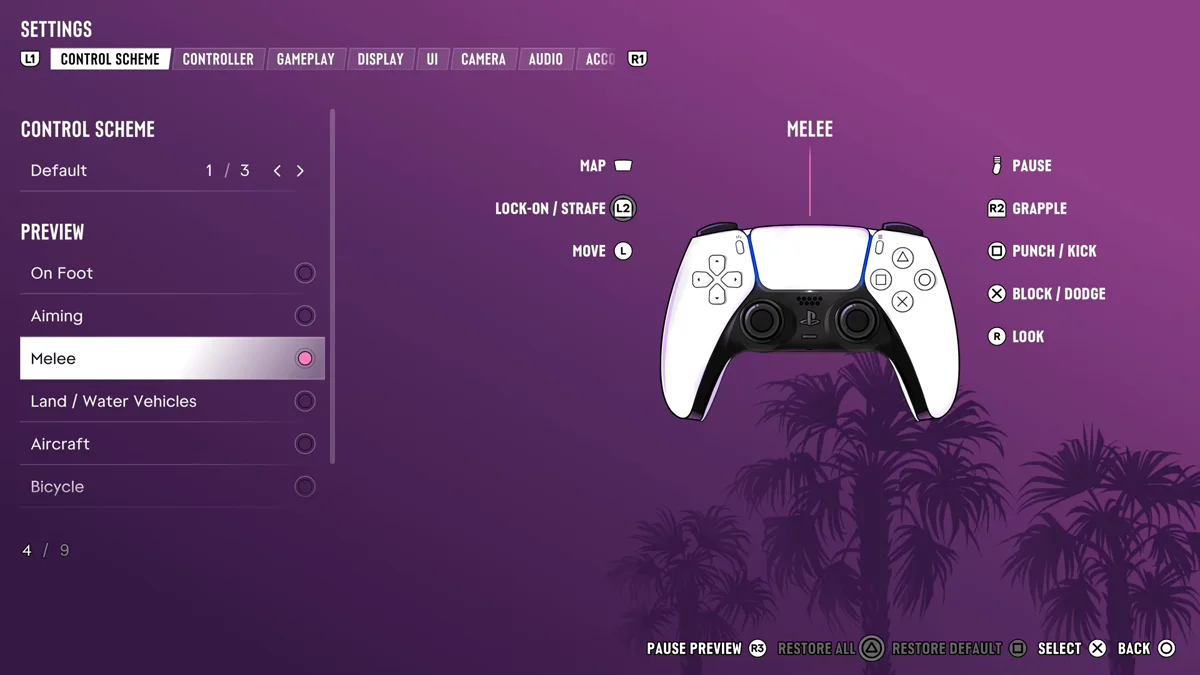
Grapple is the other half of the kit. Grab someone with R2, and from behind, after creeping up in a crouch, Square knocks them out. Our guides to fighting, blocking and dodging and crouching go deeper on each part.
How to Parry and Counter
Later in the story, the game added a tip on our run that turns defense into offense: “Press Cross before an incoming attack to parry, then follow up with Square to counterattack.” So time a tap of Cross just before their swing lands, then hit Square straight away.
If Square Doesn’t Kick
- You’re on the Classic control scheme. It moves on-foot melee from Square to Circle. Check Settings, Control Scheme for the Melee page on your preset, and our guide to the Classic control scheme lists the rest of its buttons.
- You still have a weapon out. Tap L1 to holster it first, so your hands are free. Our guide to getting brass knuckles covers a weapon made for fistfights.
Every other button is in our GTA 6 controls guide, and every GTA 6 guide is on our GTA 6 hub.
Frequently Asked Questions
What button is kick in GTA 6? Square on PS5. The Melee control page labels it Punch / Kick.
Is there a separate kick button in GTA 6? No. Punches and kicks share Square on the Default control scheme.
How do you lock on in a fistfight in GTA 6? Hold L2. The Melee page lists it as Lock-On / Strafe.
How do you parry in GTA 6? Press Cross just before an incoming attack, then press Square to counterattack.
Why can’t I kick in GTA 6? Check whether you’re on the Classic control scheme, which puts melee on Circle, or still holding a weapon. Tap L1 to holster it.