
No, not that we’ve found. We couldn’t roll in GTA 6 on PS5. The game’s Control Scheme screen lists the buttons for every situation, and none of them is a roll or a dive. We also tried the GTA 5 combat roll, adjusted to GTA 6’s buttons: aim with L2, push the left stick to one side and press Cross, the jump button. Nothing happened.
Below we cover what the controls screen shows, what we tried, and the moves that do a roll’s job in a gunfight in Grand Theft Auto VI. The screenshots in this guide are from our own PS5 recordings.
What the Controls Screen Shows
Press Options, open Settings, and the first tab is Control Scheme. Its Preview list has eight pages (On Foot, Aiming, Melee, Land / Water Vehicles, Aircraft, Bicycle, Swimming and Parachute), and each one labels every button. We went through all of them on the Default scheme, and no button on any page says Roll, Dive or Evade.
The Aiming page is the one that matters, because that’s where GTA 5 hid its roll. On it, Triangle is Quick Swap Weapon, Square is Melee, Circle is Crouch, R1 is Cover (hold it for Quick Throw) and R3 is Zoom / Throw Path. Cross isn’t listed at all. On the On Foot page, Cross is Jump / Climb.
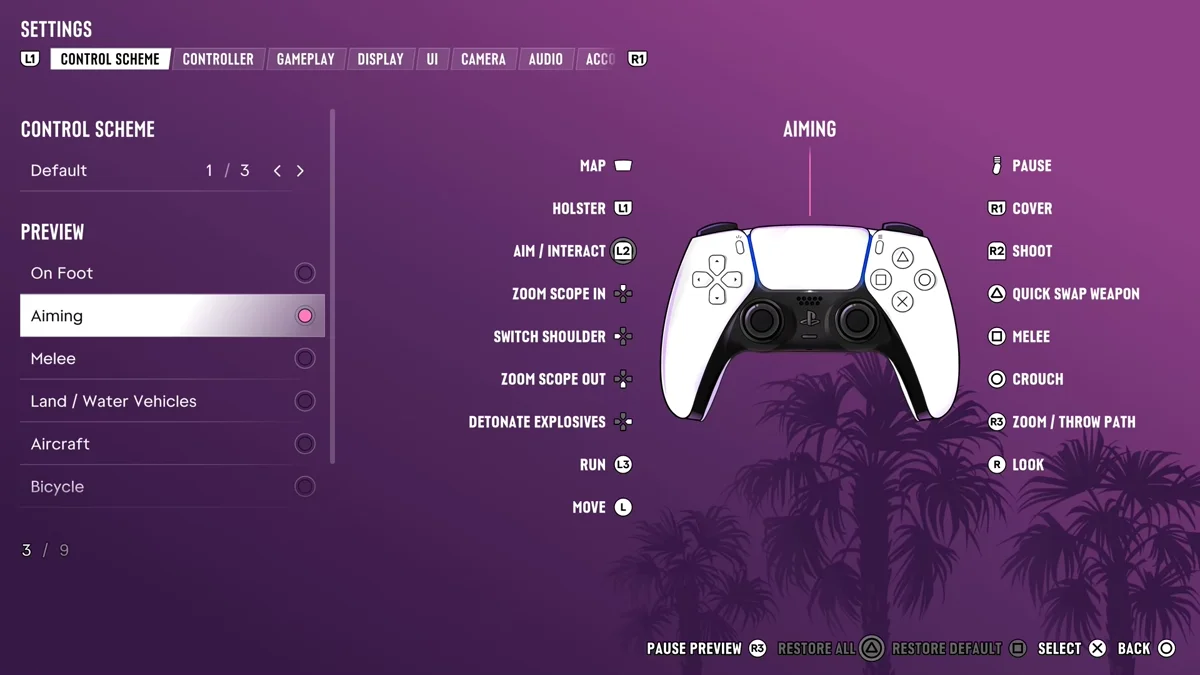
A move can work without a label, though. Reloading isn’t on any page either, yet Square reloads when you have a gun out that needs it, as our reload guide explains. That’s why we tried the old input by hand instead of going by the screen alone.
What We Tried
In GTA 5, you rolled by aiming, then pressing the jump button with a direction on the left stick. GTA 6’s Default scheme puts jump on Cross, so on our PS5 copy we held L2 to aim, pushed the left stick left or right and tapped Cross. The character stayed put and kept aiming. No roll, no dive, no sidestep.
We only tried this on the Default scheme. Classic, the second of the three schemes, moves Jump / Climb to Square, and we haven’t tested aiming with that layout.
What to Do Instead of Rolling
Without a roll, getting out of a line of fire comes down to a few moves that are on the controls screen:
- Crouch while you aim. Circle stays Crouch on the Aiming page, so you can drop low without lowering your gun. Our crouch guide covers it.
- Get into cover. R1 is Cover on both the On Foot and Aiming pages, and it’s the safest place to trade shots. Our guide to taking cover in GTA 6 explains how it works.
- Peek from the other side. Left on the D-pad is Switch Shoulder while aiming, which lets you shoot around the other edge of a wall. Our shoulder switch guide has the details.
- Run for it. L3 is Run on the Aiming page too. Rockstar North co-studio head Rob Nelson told IGN the game encourages “this hit-and-run style of gameplay,” and that “if you hit and move, you should be able to get away.”
Dodging in a Fistfight
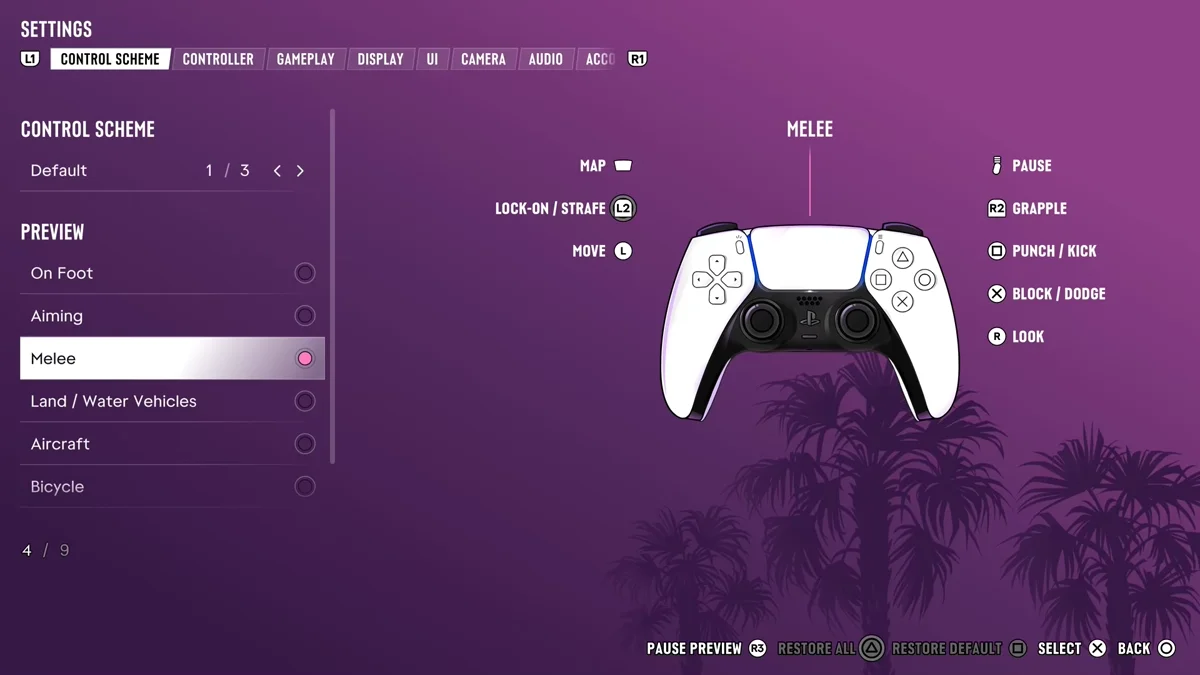
GTA 6 does have a dodge, just not with a gun out. On the Melee page, Cross is Block / Dodge, beside Punch / Kick on Square, Grapple on R2 and Lock-On / Strafe on L2. Our guide to blocking and dodging punches walks through it, and our fighting guide covers the rest of hand-to-hand combat.
Rolling a Plane
If you came here for aircraft, that kind of roll is in the game. On the Aircraft page of the Control Scheme screen, the left stick is labelled Pitch / Roll. Our PS5 controls guide lists the rest of the flying buttons, along with every other page of the screen.
Every other GTA 6 guide is on our GTA 6 hub.
Frequently Asked Questions
Can you roll in GTA 6?
Not that we’ve found. No button on the Control Scheme screen is a roll, and aiming with L2, pushing the stick sideways and pressing Cross did nothing on our PS5 copy.
Can you roll while shooting in GTA 6?
We couldn’t. The Aiming page gives Cross no job, and the GTA 5 combat roll input doesn’t work on the Default scheme. Crouch (Circle) and Cover (R1) both work while you aim.
Is there a dodge in GTA 6?
In fistfights, yes. Block / Dodge is Cross on the Melee page of the Control Scheme screen.
How did you roll in GTA 5?
You aimed, then pressed the jump button (Square on PlayStation) with a direction on the left stick.
How do you roll a plane in GTA 6?
With the left stick. The Aircraft page of the Control Scheme screen labels it Pitch / Roll.