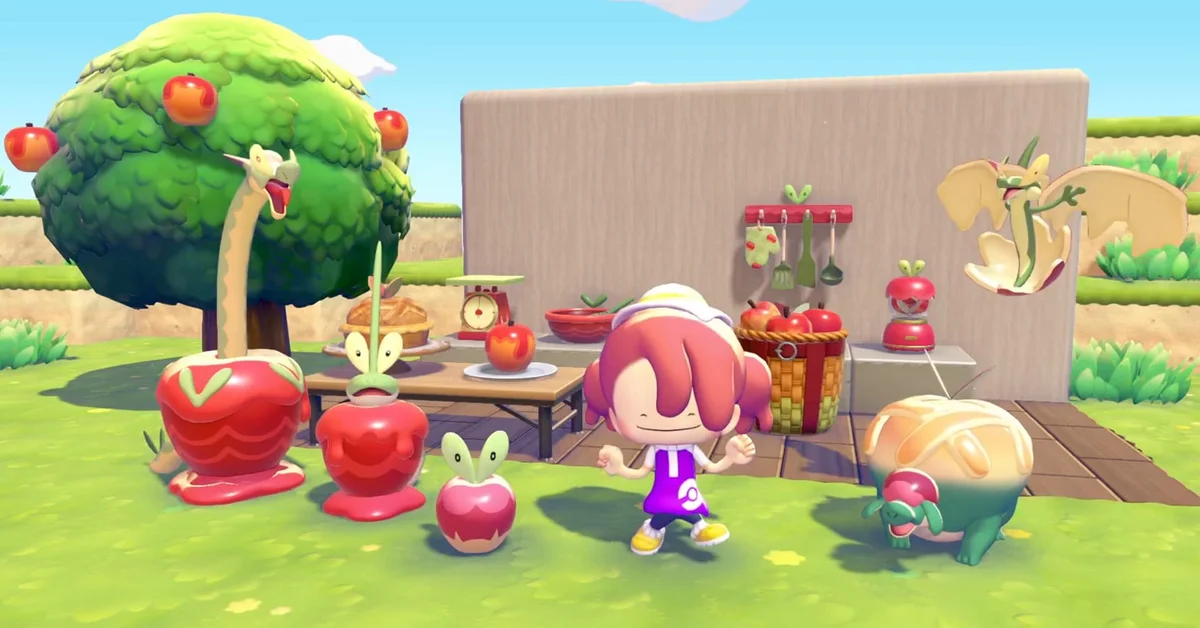
To get Applin in Pokemon Pokopia, talk to it near your rebuilt Pokemon Center during the Apples to Applin event, which runs until December 1, 2026 at 4:59 AM. Flapple, Appletun, Dipplin and Hydrapple come after that: collect Syrupy Apples from special trees on Dream Islands, trade them at the Pokemon Center for apple-themed furniture, and build habitats with those pieces to befriend each one.
The event is free with the Version 2.0.1 update, and every Pokemon you befriend during it stays in your town after it ends, according to Nintendo’s event post. Below are the requirements, each step of the event, where the Syrupy Apples are, and the limits worth knowing before the window closes.
When the Apples to Applin Event Runs
Nintendo lists the window as November 16, 2026 at 5:00 AM to December 1, 2026 at 4:59 AM. The post gives no time zone. What it does say is that the event will not appear if your Switch 2’s date is set outside the event period, so keep the console clock on the real date and time.
That is a little over two weeks. Syrupy Apples only come from Dream Islands, and you get one Dream Island a day, so every day you skip is one fewer trip. Starting early is the simplest way to make sure you can afford every habitat before December 1.
Before You Start: The Requirements
Nintendo lists four things the event needs:
- Version 2.0.1. From the HOME Menu, open the game’s Options and check the software version, or look for 2.0.1 on the title screen.
- A rebuilt Pokemon Center. Finish a town’s important requests and rebuild its Pokemon Center. Nintendo says meeting this even on the final day of the event still counts.
- The real date and time on your Switch 2.
- An internet connection the first time you play the event.
If you meet the requirements while the event is already running, Nintendo says you need to move to another town once, or choose Save & Quit from the main menu, before the event starts for you.
The apple hunt happens on Dream Islands, so you also need Drifloon befriended and a doll to show it. If you have not unlocked Dream Islands yet, our guide to how Dream Islands work covers Drifloon, the doll you need and which doll leads to which island.
Step 1: Befriend Applin
Go to your Pokemon Center. Once the requirements are met, Applin waits nearby: talk to it to befriend it and hear what the event is about. That is all Applin itself takes, and it starts the rest of the event.
Step 2: Collect Syrupy Apples on Dream Islands
Syrupy Apples are the event’s currency. Examine a doll so Drifloon takes you to a Dream Island, then explore it and pick Syrupy Apples from the special trees you find there. In Nintendo’s screenshots those trees carry red apples with a golden, syrupy swirl, which sets them apart from ordinary fruit trees.
A few habits make the hunt faster:
- Go every day. Drifloon gives you one Dream Island a day, and you can return to that day’s island as often as you like, so a daily trip keeps the apples coming.
- Sweep the whole island. Nintendo does not say how many special trees an island holds, so check every corner before you head home.
- Switch islands if one comes up empty. The doll you show decides the island, and Nintendo does not say whether every kind of island grows the special trees. If a day’s island has none, show a different doll the next day. The table in our Dream Islands guide lists every doll and its island.
Step 3: Trade Syrupy Apples at the Pokemon Center
Take your Syrupy Apples to the Pokemon Center and trade them for the event’s special items, which include apple-themed furniture. Nintendo’s screenshots show the stock set out on the counter, with pieces such as an apple pie, a basket of apples, a mixing bowl and a kitchen scale.
Nintendo has not published what each item costs in Syrupy Apples. Since the habitats built from these items are what bring in the other four Pokemon, put your first apples toward furniture and leave small decorations for later.
Step 4: Build Habitats for Flapple, Appletun, Dipplin, and Hydrapple
The other four Pokemon come through habitats. Use the items you traded for to build a habitat, and the Pokemon it suits moves in and can be befriended, the same way the rest of your residents arrived. Nintendo confirms that Flapple, Appletun, Dipplin and Hydrapple can all be befriended this way during the event, along with Applin.
Nintendo’s post does not list which items each habitat needs. Like the rest of Pokopia’s habitats, each one is a particular set of items placed together (Drifloon’s, for example, is three lit campfires), so the more of the apple stock you own, the more combinations you can set out. Once all four have moved in, our list of the best Pokemon to attract explains what Specialties mean for the jobs your new residents can do.
Where the Event Does Not Run
Nintendo lists a few limits:
- No event on Cloud Islands or in Bubbly Basin. Play it in your main towns.
- Link Play only in Palette Town. Talk to Applin there first and receive the event details before you start multiplayer. Our guide to playing with friends covers how Link Play works.
- Not in Spectator Mode.
What Happens When the Event Ends
Applin, Flapple, Appletun, Dipplin and Hydrapple all stay in your town after December 1, per Nintendo. The post does not say whether leftover Syrupy Apples can still be traded once the event is over, so trade them all in before the deadline.
The event works much like October’s Halloween event, which our guide to Pumpkaboo and pumpkin candy walks through, and Part 2 of the Expansion Pass, Dazzling Decorations, has a release date of its own. Every other Pokopia guide is on our Pokemon hub.
Frequently Asked Questions
How do you get Applin in Pokemon Pokopia? Talk to Applin near your rebuilt Pokemon Center during the Apples to Applin event, which runs from November 16, 2026 at 5:00 AM to December 1, 2026 at 4:59 AM. You need Version 2.0.1, a rebuilt Pokemon Center and an internet connection the first time you play the event.
How do you get Hydrapple in Pokopia? Collect Syrupy Apples on Dream Islands, trade them at the Pokemon Center for the event’s apple items, and build a habitat with those items. Flapple, Appletun and Dipplin are befriended the same way.
Where do you find Syrupy Apples in Pokopia? On Dream Islands. Examine a doll so Drifloon takes you to one, then pick Syrupy Apples from the special trees on the island.
Do Applin and the others leave after the event? No. Nintendo says Pokemon you befriend during the event remain in your town after it ends.
Why is the Applin event not showing up? Check that the title screen shows Version 2.0.1, that you have rebuilt a Pokemon Center, that your Switch 2 clock is on the real date and time, and that you are online. If you met those conditions during the event, move to another town once or use Save & Quit. The event also does not run on Cloud Islands or in Bubbly Basin.
Is this the same Syrupy Apple as in Pokemon GO? No. In Pokopia it is an event currency you trade for furniture. Pokemon GO’s Syrupy Apple is a separate item in a separate game, covered in our guide to getting a Syrupy Apple in Pokemon GO.