
To use your turn signals in GTA 6 on PS5, tap Left on the D-pad to indicate left and tap Right on the D-pad to indicate right while you’re driving. Tap, don’t hold: holding Left opens the Vehicle Menu and holding Right opens the Partner Menu instead.
We read the buttons off the Control Scheme screen on our PS5 copy of Grand Theft Auto VI, and found the D-pad setting in its Gameplay menu. The screenshots in this guide are from our own PS5 recordings. Below are the indicator buttons, the tap-or-hold catch, and the setting that changes it.
Turn Signal Controls on PS5
| Action | PS5 |
|---|---|
| Indicate left | Tap Left on the D-pad |
| Indicate right | Tap Right on the D-pad |
| Headlights | Tap Circle |
| Horn | L3 |
The Control Scheme screen lists these on its Land / Water Vehicles page, which covers cars, motorbikes and boats alike.
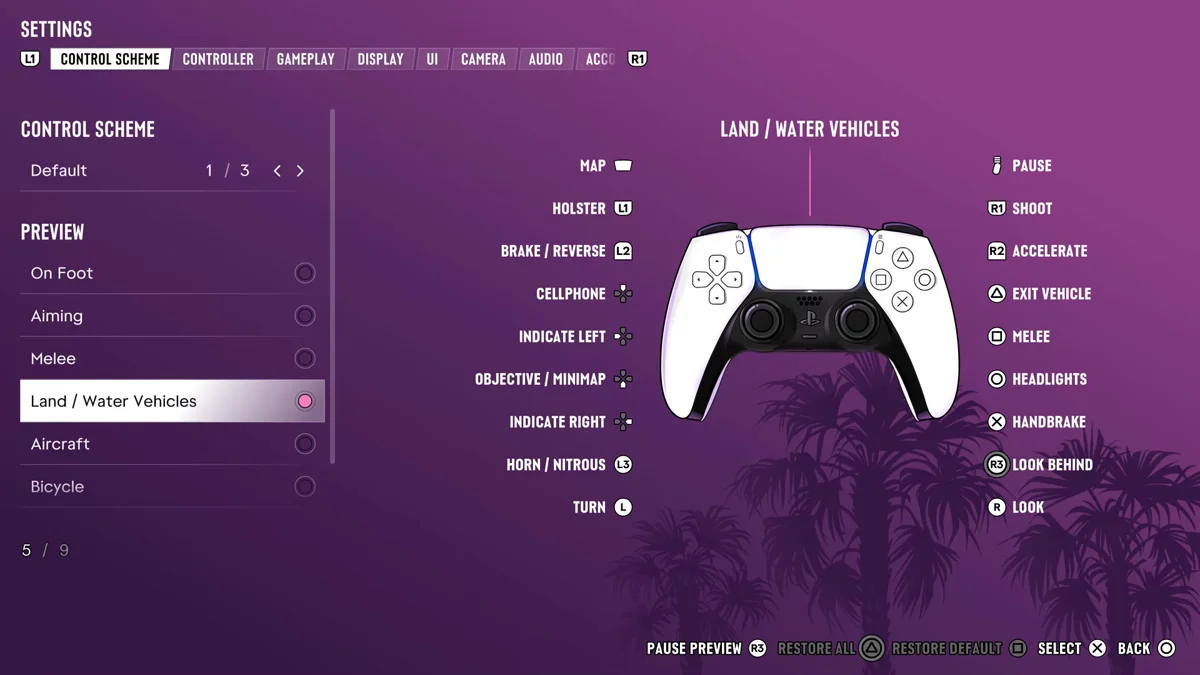
Why Holding the D-pad Opens a Menu
Each page of GTA 6’s Control Scheme preview flips between buttons you tap and buttons you hold, and in a vehicle the D-pad does double duty:
| Button | Tap | Hold |
|---|---|---|
| Up on the D-pad | Cellphone | Interact |
| Left on the D-pad | Indicate left | Vehicle Menu |
| Down on the D-pad | Objective / Minimap | Quick Navigation |
| Right on the D-pad | Indicate right | Partner Menu |
| Circle | Headlights | Duck |
So a quick tap signals, and a press that lingers opens a menu. If a menu keeps popping up when you meant to signal, let go of the button sooner.
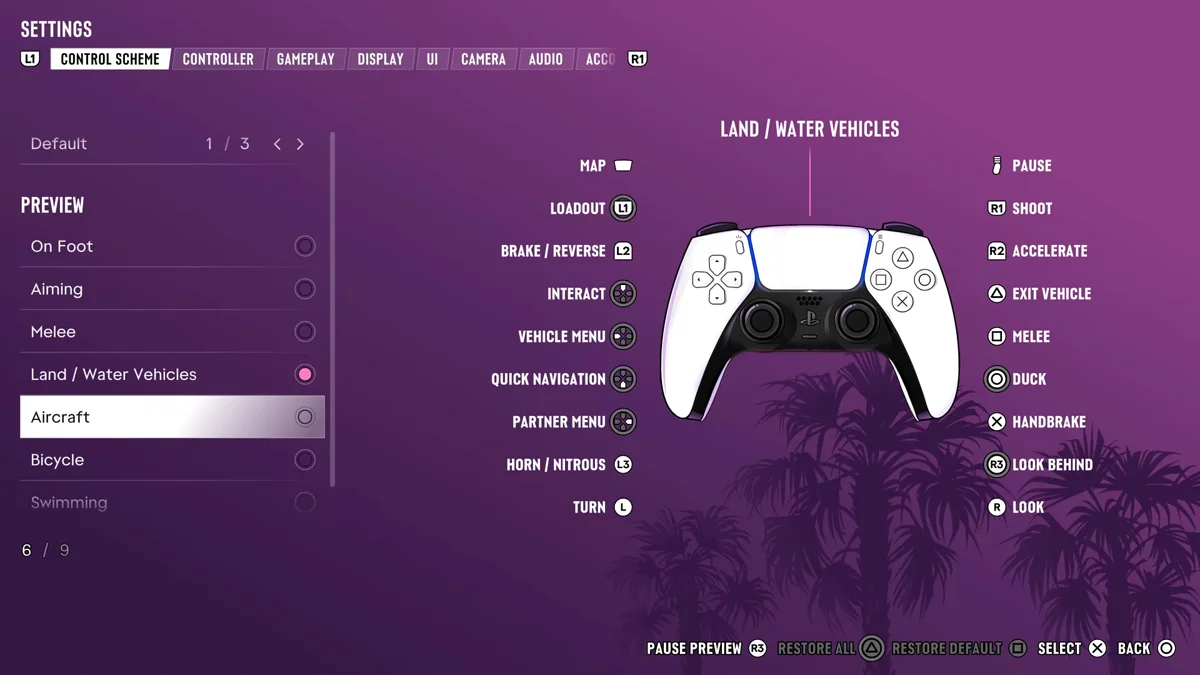
Holding Right is how you give your partner orders from the car, such as asking them to pull over when they’re driving. Our guide to giving orders to your partner covers that menu.
The Setting That Changes D-pad Holds
Settings > Gameplay has an option called Directional Button Actions in its Accessibility group. Its description reads: “Choose how to perform directional button hold actions, such as using quick navigation or the radio.” It was set to Hold on ours, the first of two choices. If you keep opening menus by accident, or you find holding a direction tiring, this is the option to try.
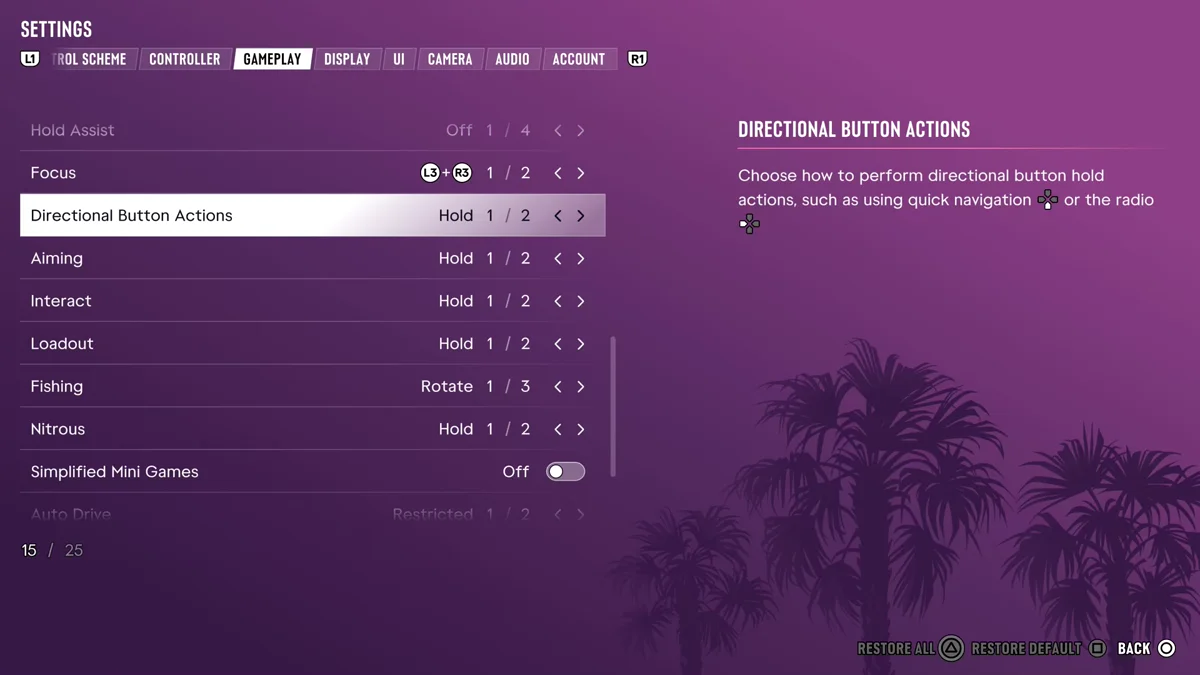
Signals on Other Vehicles
Indicators are a Land / Water Vehicles control. The Bicycle page has no indicator buttons, and on the Aircraft page a tap of Left on the D-pad is Radio Controls instead. Our guides to flying a plane and honking the horn cover what the other buttons do there.
Other Light and Sound Controls
- Headlights: tap Circle. Holding it ducks you down in your seat instead. Our guide to turning on headlights has more.
- Horn: L3, which also fires nitro on a car that carries it. Our guide to using nitro boost explains the overlap.
Our guide to drifting covers the handbrake and throttle side of the driving controls, and our PS5 controls guide has the on-foot layout.
Frequently Asked Questions
How do you use turn signals in GTA 6?
Tap Left on the D-pad to indicate left and tap Right on the D-pad to indicate right while driving a car, motorbike or boat.
Why does a menu open when I try to signal in GTA 6?
You held the button. Holding Left on the D-pad opens the Vehicle Menu and holding Right opens the Partner Menu, so tap it instead.
Can you change how the D-pad works in GTA 6?
Yes. Settings > Gameplay has a Directional Button Actions option that sets how the D-pad’s hold actions are performed.