
The Adaptive Speed Limiter in GTA 6 is a PS5 setting that keeps your car at a sensible speed for the road when you squeeze R2 only as far as the trigger’s resistance point, the spot partway down where the DualSense trigger stiffens. The game’s own description reads: “Maintains the vehicle at a reasonable speed for the road you’re on when you hold R2 to the resistance point.”
We read that description on our PS5 copy of Grand Theft Auto VI, where the setting was already switched On, and the screenshot in this guide is from our own PS5 recording. Below is how the trick works, where the setting is, when it’s worth using, and why it’s a PS5 feature.
How the Adaptive Speed Limiter Works
R2 is Accelerate when you’re driving on the default controls, and the DualSense’s adaptive triggers can push back against your finger. With Adaptive Speed Limiter on, the trigger gives you a resistance point partway through its travel. Hold R2 at that point and the game keeps the car at what it calls “a reasonable speed for the road you’re on,” so you can cruise without watching the speedometer.
The description ties the limit to holding R2 at that point, so think of it as an easy cruising speed you keep on the trigger. It doesn’t say what counts as reasonable, give any speeds, or mention the police, so treat it as a driving comfort, not a way around a wanted level; our guide to losing a wanted level covers that.
Where to Find the Setting
- Press Options to open the pause menu and select Settings.
- Press R1 to reach the Controller tab, the second tab, right after Control Scheme.
- Scroll down to DualSense Wireless Controller Features, the last section on the tab.
- Highlight Adaptive Speed Limiter. It’s the third switch in that section, after Adaptive Triggers Resistance and Adaptive Triggers Vibration, and the counter reads 17 / 19.
- Flip the switch to On or Off. The description appears on the right as soon as you highlight it.
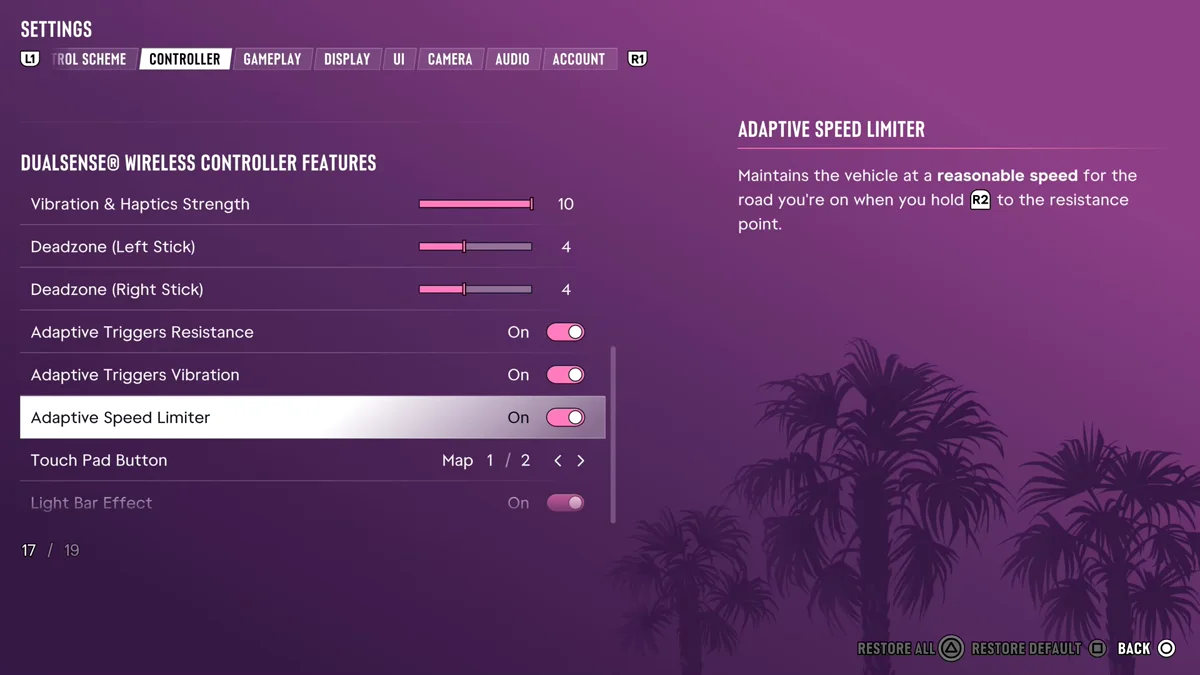
If you’ve been changing things, the bottom of the screen offers Restore Default on Square for the highlighted setting and Restore All on Triangle.
When It’s Worth Using
We’d leave it on if you do a lot of plain driving, since it saves you feathering the trigger on long trips across Leonida. It’s handy when you’re tailing someone, threading through traffic in Vice City, or delivering a car you want to arrive without a scratch. If you’d rather the trigger behaved the same all the way down, switch it off.
If you want the car to do the steering too, that’s a different feature: our guide to using Auto Drive covers the mode that drives for you from the cinematic camera. Our guide to making driving easier covers the other settings that help behind the wheel.
The Trigger Settings Beside It
Adaptive Speed Limiter sits with the other DualSense options, and two of them work on the same triggers:
- Adaptive Triggers Resistance “applies simulated resistance to L2 and R2” for actions “such as shooting and driving.”
- Adaptive Triggers Vibration “applies a vibration response to L2 and R2 on your DualSense wireless controller for actions that use the adaptive triggers, such as shooting and driving.”
If you can’t feel the stiff point at all, check the PS5’s own Settings > Accessories > Controller (General) > Trigger Effect Intensity, which PlayStation’s support page describes as setting “the intensity of the DualSense wireless controller trigger effect.” It applies to every game that supports it. The same section of GTA 6’s Controller tab also holds Light Bar Effect, which our guide to turning on the light bar covers, and our guide to the best settings to change first goes through the rest of the menu.
Is the Adaptive Speed Limiter on Xbox?
No. It lives in the DualSense Wireless Controller Features section and depends on the DualSense’s adaptive triggers pushing back at the resistance point, and Xbox Series X|S controllers don’t have triggers that push back. On Xbox you manage your speed with the throttle alone.
Every driving button is in our guide to driving in GTA 6, and every GTA 6 guide is on our GTA 6 hub.
Frequently Asked Questions
What does the Adaptive Speed Limiter do in GTA 6?
It keeps your vehicle at a reasonable speed for the road you’re on while you hold R2 at the trigger’s resistance point, the place partway down where the DualSense trigger stiffens.
Where is the Adaptive Speed Limiter setting in GTA 6?
Press Options, select Settings, press R1 to reach the Controller tab, and scroll down to the DualSense Wireless Controller Features section. It’s the setting after Adaptive Triggers Vibration.
Should you turn off the Adaptive Speed Limiter?
Leave it on if you like an easy cruising speed without watching the speedometer. Turn it off if you want R2 to feel the same all the way down.
Is the Adaptive Speed Limiter on Xbox?
No. It’s a DualSense feature that relies on the PS5 controller’s adaptive triggers, which Xbox Series X|S controllers don’t have.
Does the Adaptive Speed Limiter stop the police chasing you?
The setting’s description doesn’t mention the police. It only promises a reasonable speed for the road while you hold R2 at the resistance point.