
In GTA 6, how fast Jason or Lucia moves when you push the left stick all the way is a setting: Press Options, open Settings, go to the Gameplay tab and change Movement Speed under Movement. On our PS5 copy it was set to Walk, so a full push of the stick only walks, and you press L3 (clicking the left stick) to run and sprint.
There’s a second, separate setting for gunfights, Combat Movement Speed, and a switch for what happens when you sprint from a crouch. We read all three off the Settings screens on our PS5 copy of Grand Theft Auto VI on launch day, and the screenshots in this guide come from that recording. Below are the controls, the settings, when to walk and when to run, stamina, and moving as a pair.
Walking and Running Controls on PS5
| Pace | PS5 |
|---|---|
| Walk slowly | Ease off the left stick |
| Walk | Push the left stick all the way (with Movement Speed on Walk) |
| Run and sprint | Press L3 while you move |
| Crouch | Circle |
The Control Scheme screen’s On Foot page puts Run on L3, and the first time you start the game it tells you so: “The default controls for GTAVI now use L3 to run and sprint, but can be changed at any time.” The Classic control scheme puts running back on Cross. Our guide to sprinting in GTA 6 covers that switch and how to run for longer.
How to Change Movement Speed
- Press Options to open the pause menu, then choose Settings.
- Go to the Gameplay tab. Use L1 and R1 to move between tabs.
- Scroll down to Movement, just below the Combat settings.
- Highlight Movement Speed and use left and right to change it. It has four options.
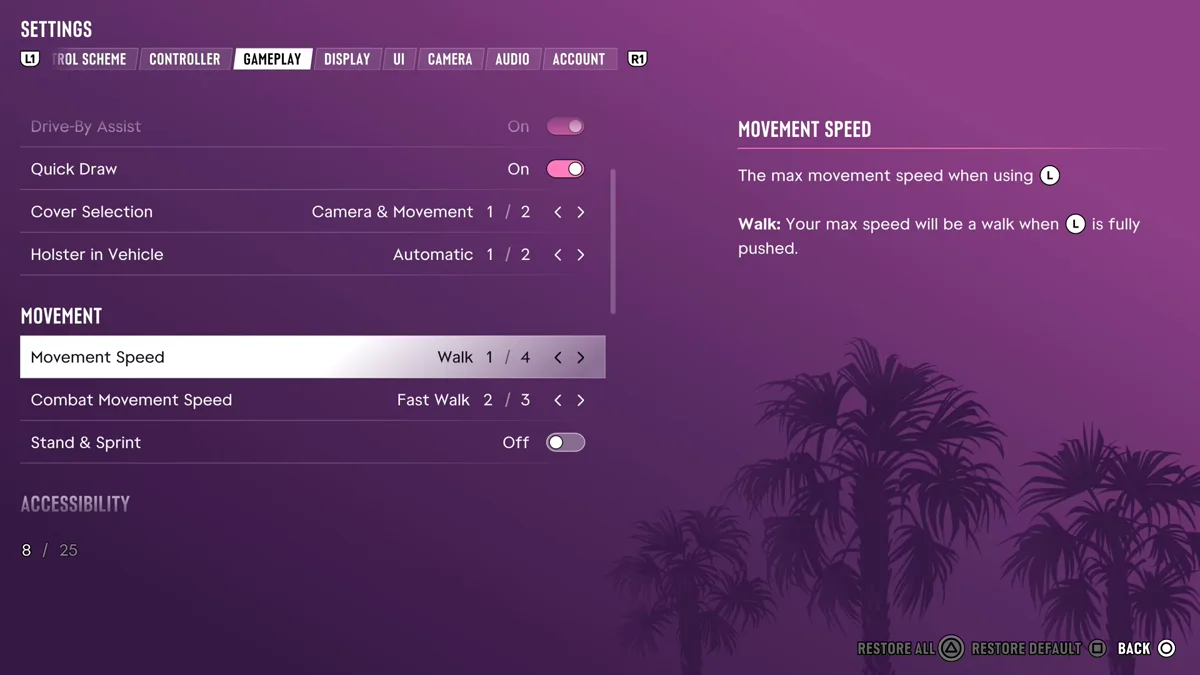
The game describes it as “the max movement speed when using” the left stick. For Walk, the description reads: “Your max speed will be a walk when [the left stick] is fully pushed.” Walk was the first of the four options on our copy. If you’d rather the stick alone carried you faster, step through the others: the description on the right explains whichever option is selected.
Combat Movement Speed
Right under it, Combat Movement Speed sets your top speed on the stick during a fight. In the game’s words, it’s “the movement speed when using [the left stick] during combat,” and “your default movement speed will override this setting if it’s faster.”
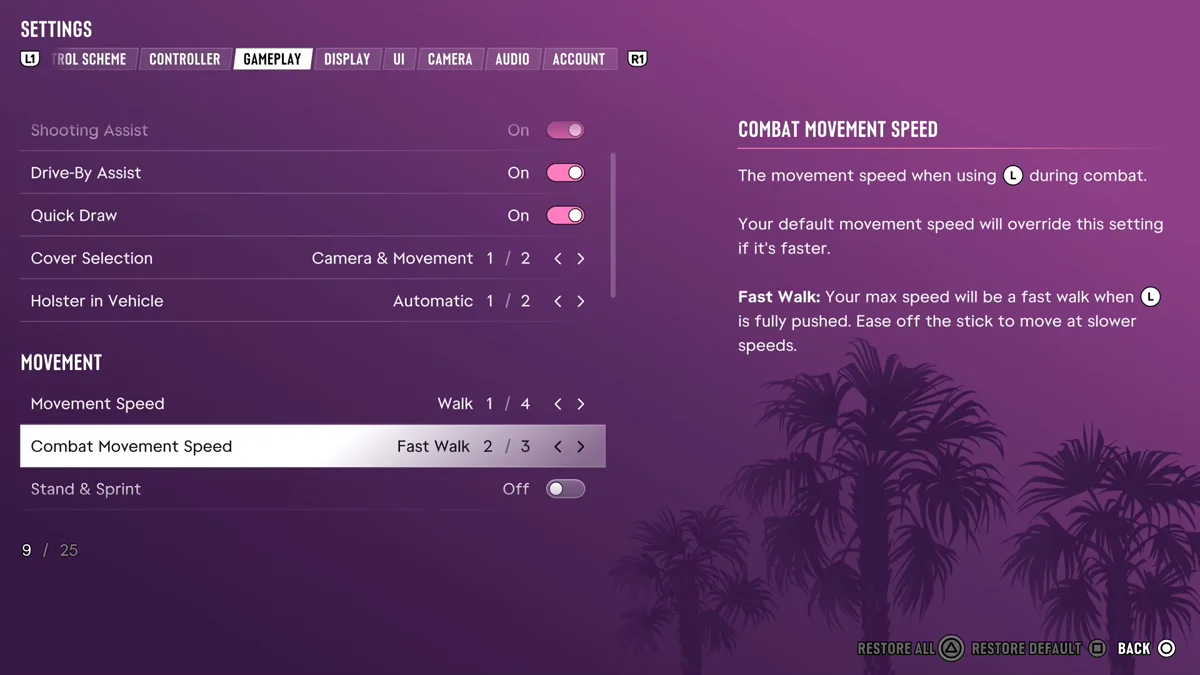
Ours was on Fast Walk, the second of three options: “Your max speed will be a fast walk when [the left stick] is fully pushed. Ease off the stick to move at slower speeds.” So in a gunfight a full push moves you a little quicker than Walk would, without having to run. Our guide to taking cover in GTA 6 covers the rest of a fight.
Below it, the Stand and Sprint switch “stands you up automatically when activating sprint instead of staying in a crouch.” It was off on our copy.
When to Walk
Walking matters more in GTA 6 than in earlier games, for two reasons.
The police are looking for a description. GTA 6’s Heat system tracks what Jason and Lucia look like and what they’re wearing, and Rockstar North co-studio head Rob Nelson’s advice for staying out of trouble is simple: “as long as you try not to draw too much attention to yourself, you should be fine.” A character walking calmly down a street is less noticeable than one sprinting past a patrol car. Our guide to the Heat system explains what the police remember.
The city talks, and it notices you. Nelson told IGN that the people of Vice City carry on their own conversations, and “you can just walk around and listen to the NPCs.” There’s a limit: “if you stand too close to a group, they should notice you and notice that you’re eavesdropping,” and if you follow someone “for too long and too close,” they may turn on you or try to get away.
When to Run
Running is for escapes. Nelson described the on-foot movement as built for getting away: “running and getting out of the car. Jumping and climbing fences.” His advice for a three-star chase in the city: “get off the streets and get on foot into the alleys,” because a car can struggle to shake the police there “unless it’s a very fast vehicle or a sports bike.” Our guide to losing a wanted level covers the rest of the escape.
Running also makes sense for long trips when you don’t want to call a car. Our guides to ordering a taxi and fast travel cover the quicker options.
Stamina and Your Pace
How long you can keep up a run depends on your character. Nelson told the YouTube creator TGG that side activities raise stamina, along with “specific cardio exercises,” and told IGN that gyms let you “go up in levels of muscularity or strength.” Our guides to working out and the fitness system cover how training works.
Weight is tracked too: “If you overeat, you will put on weight,” Nelson told IGN. Our guide to gaining and losing weight covers what changes it.
Moving as a Pair
When Jason and Lucia are together, your partner comes along with you. Nelson admitted to a habit of walking with the other character: “I don’t generally like, unless we’re running away from cops or running to do something, jogging ahead of the other character. I like them to be together.” Keeping to a walk keeps the pair side by side, which is also when you can hold R2 to hold hands. Our guides to holding hands and Jason and Lucia’s relationship cover why that matters.
How GTA 5 Did It
In GTA 5 on console, how far you pushed the left stick set your pace: a gentle tilt walked, a full push jogged, and tapping X on PlayStation sprinted. GTA 6 keeps the tilt, but on our copy’s Walk setting a full push stops at a walk, and running moved to L3. Every other GTA 6 guide is on our GTA 6 hub, and every control is on our controls guide.
Frequently Asked Questions
How do you walk in GTA 6? Push the left stick. With Movement Speed set to Walk in Settings > Gameplay, a full push walks, and easing off the stick moves you more slowly.
How do you run in GTA 6? Press L3, the left stick, while you move. On the Classic control scheme, running is on Cross instead.
How do you change movement speed in GTA 6? Press Options, open Settings, go to the Gameplay tab and change Movement Speed under Movement. Combat Movement Speed, right below it, sets your speed during fights.
What is Combat Movement Speed in GTA 6? Your top speed on the left stick during combat. Ours was set to Fast Walk, and the game says your normal Movement Speed takes over if it’s faster.
Why should you walk in GTA 6? Because the police track your description through the Heat system, and Rockstar says drawing less attention keeps you out of trouble. Walking also lets you listen in on conversations around you.