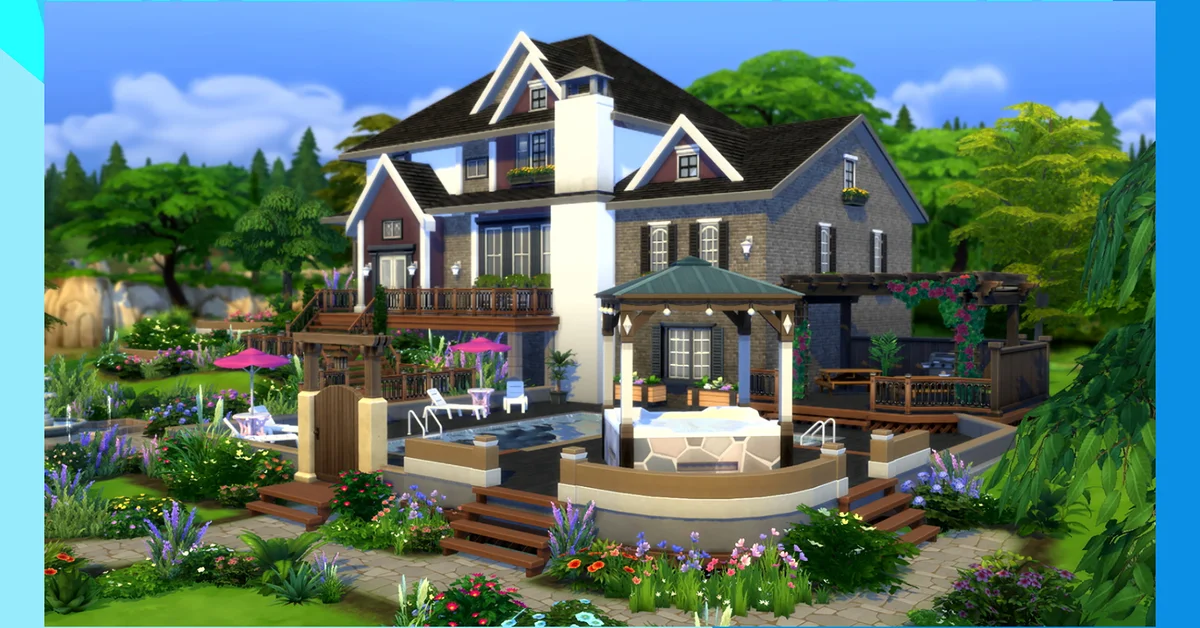
To build a great house in The Sims 4, plan the footprint before you place a wall, block the shell with the Wall and Room tools, get the roof right before you decorate, and only then furnish room by room with bb.moveobjects on for the details. Below we walk through that order, the Build Mode features EA has added in the patches since spring 2025 (glass walls, roof plants, adjustable stairs), the cheats that remove restrictions, and the mistakes that make a pretty build unplayable, all verified against official patch notes up to the September 22, 2026 update.
Plan the Footprint First
Start on the lot, not in the catalog. Open Build Mode (F3, or the hammer icon; on a controller it is the Build shortcut on the pause panel), zoom out and decide three things: which side faces the road, where the Sims will enter, and how many rooms you actually need. A starter household needs a bedroom, a bathroom, a kitchen with a table and one social room. Everything else is decoration.
Keep the footprint in even numbers of tiles so rooms centre on doors and windows, and leave at least one tile of walking space around beds and counters. Sims route badly through one-tile gaps and it is the number one reason a beautiful house plays badly. If the budget is the problem, our Sims 4 money cheats guide has the console line, and FreeRealEstate on (from EA’s own cheat list) makes any lot free to move into.
Block the Shell With Walls, Rooms and Foundations
Use the Room tool for the main boxes and the Wall tool to split them. Drag a room’s edge to resize it after placement; you do not have to delete and redraw. Set the foundation height with the slider that appears when you click an outside wall, and raise or lower whole rooms with the Platform tool for split-level interiors.
Two shell features are newer than the 2025 version of this guide. The July 1, 2025 update added glass walls: in Build Mode select Build, then Wall Patterns, and they sit with the other wall coverings. The February 3, 2026 update let you widen the top or bottom of a staircase, symmetrically or not, and apply a stair rail to one side only with a slider for its length. Both are base game.
Remember wall height: short, medium and tall are chosen per floor, and doors and windows come in matching heights. Pick one before you place openings, because swapping later means replacing every window.
Get the Roof Right Before You Decorate
Roofs are where most builds go wrong, and they are far more flexible than they look. Place a roof piece over each section, then use its handles: the top handle changes pitch, the side handles stretch it, and the curved handles on the edges bend the roof inward or outward. Overlap two roofs at right angles for a cross gable, and drop small roofs over porches and bay windows so nothing reads as a flat box.
Since the July 2025 update, “a selection of shrubs and flowers can now be placed on rooftops in Build Mode, if the footprint allows it”, which makes flat-roofed modern builds much easier to dress. The September 22, 2026 patch also fixed roof trim being clipped or invalidated by platforms and half walls nearby, and the July 21, 2026 patch fixed roof sections disappearing when viewing upper floors, so the two long-standing roof headaches are gone on the current build.
Furnish Room by Room, Then Add the Details
Furnish one room at a time and use the catalog filters, not the scroll bar. The catalog’s colour filter and the Eyedropper tool (which, since September 2026, also works on half wall trims) keep a palette consistent. Pick two or three wood tones and one accent colour for the whole house.
For anything the grid will not allow, enter bb.moveobjects on in the cheat console (Ctrl + Shift + C on PC and Mac; all four shoulder buttons on console). Per EA’s cheats FAQ this “removes restrictions on item placement”, so rugs can overlap, clutter can sit on shelves it was never designed for, and plants can poke through fences. Our guide to moving objects freely covers the height and free-placement keys, and how to rotate objects handles the fine angles.
Do not skip lighting. One ceiling light per room is the minimum; add a lamp on the nightstand and a wall light in the hallway, and lower the intensity of the ceiling light by clicking it in Build Mode. Warm bulbs read as lived in.
Unlock More Objects and Use the Gallery
Two more console lines open up the catalog: bb.showhiddenobjects for the debug clutter and bb.showliveeditobjects for the world’s trees and rocks. Both are covered in how to unlock all Build Mode objects. bb.ignoregameplayunlocksentitlement adds every career reward object, and bb.enablefreebuild lets you edit locked lots such as the hospital.
The Gallery is a legitimate shortcut, not a cheat. Since June 2026 its SimSearch supports cross-language and text-to-image search, so a query like “small blue house” or “metal fence” finds rooms and lots rather than exact titles. Download a styled room, drop it in, and re-skin it to match your palette. Outdoor features have their own tricks; see how to build ponds for water, and the Sims guides hub for the rest of our building coverage.
Mods and Custom Content
Builder mods like TwistedMexi’s Better BuildBuy and T.O.O.L. are popular for a reason, but they are the first thing to check when a build behaves oddly. The developer said in the September 2026 patch notes that its “top automated crash report was actually stemming from a conflict with outdated mod files”, and since the March 2026 patch the game blocks broken custom content at launch. Update mods after every monthly patch, or move them out of the Mods folder before opening a save. Our mods and custom content guide covers the folder layout.
Frequently Asked Questions
Do I need cheats to build a good house? No. Everything above except the bb. commands works in a vanilla game. The cheats remove placement limits and unlock objects; they do not add tools.
Is there a way to build on a lot that will not let me? Enter bb.enablefreebuild in the cheat console. EA lists it as enabling “ability to build anywhere, including locked lots”.
Why do my Sims get stuck in the house? Almost always a routing problem: one-tile corridors, furniture blocking a door swing, or objects placed with moveobjects inside a walkway. Widen the path or move the object.
Can I build the same way on console? Yes. The tools are identical; the controller uses the shoulder buttons to switch catalog categories and the cheat console opens with all four shoulder buttons. Placement is slower without a mouse, so plan before you start.
Does the Gallery work with mods installed? Downloading works, but lots built with custom content show missing objects if you do not have the same files. Filter Gallery results to exclude custom content if you want a clean download.