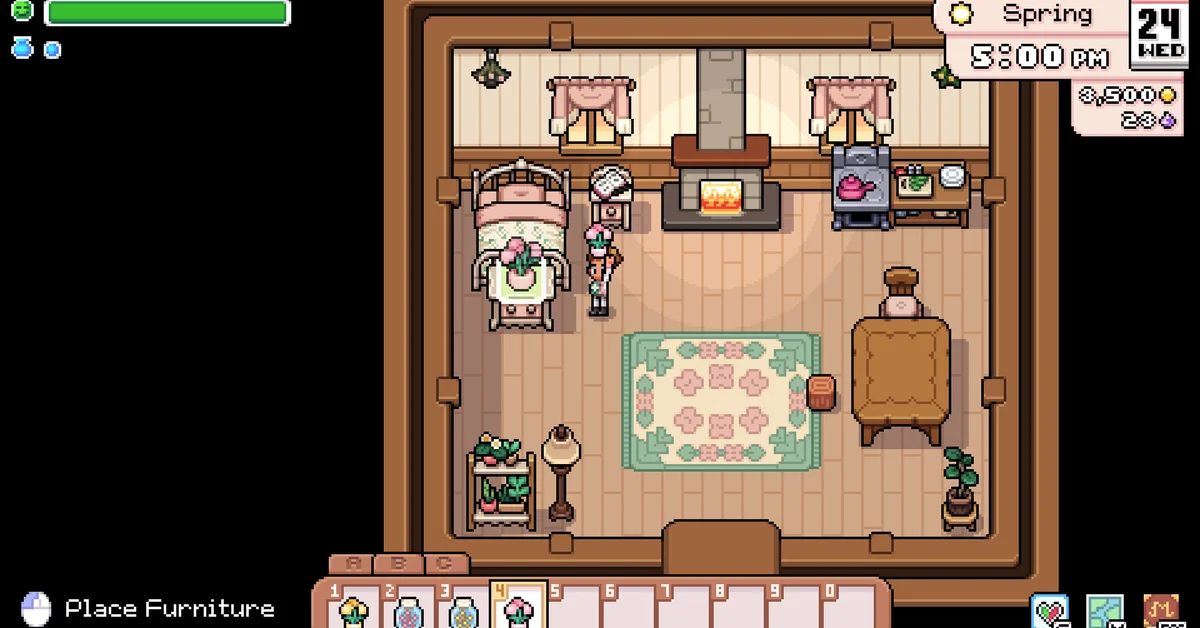
To move furniture in Fields of Mistria, hit the placed item once with your pickaxe. It pops back into a pickup on the floor, you collect it into your inventory, then select it on your toolbar and click to place it wherever you want, rotating it first if you need to. The pickaxe is the whole trick, and it works the same inside the farmhouse and outside on the farm. Below we cover the exact steps and controls, rotating and fine positioning, what to empty before you swing, and what cannot be moved at all.
This reflects the 1.0 release of Fields of Mistria on PC. The method has not changed since Early Access, but 1.0 added a small directional arrow while you place furniture, which makes rotation easier to read.
How to Pick Up Furniture
- Equip your pickaxe. Any tier works. If you do not have one yet, the Worn Pickaxe comes from Olric through the “Do a Bro a Favor” request, posted on the Request Board on Spring 2 of your first year.
- Stand next to the item and swing once with the tool button (left click on mouse).
- Pick up the item that pops out. It lands in your inventory like anything else, so make sure you have a free slot.
That is all it takes for beds, tables, rugs, lamps, plants, wall decor and outdoor decorations. Per the community wiki, the shipping bin beside your farmhouse can be moved the same way.
How to Place and Rotate Furniture
Select the item on your toolbar and the game previews where it will go, with a “Place Furniture” prompt in the bottom-left corner of the screen. Rotate it until it faces the way you want, then click to set it down. The rotation and nudge inputs below come from the community wiki’s controls table.
| Action | Keyboard and mouse | Controller (Xbox layout) |
|---|---|---|
| Place furniture | Left click | Follow the on-screen prompt |
| Rotate right | R or right click | Y |
| Rotate left | Q | Unassigned by default |
| Nudge position | Unassigned by default | Right stick |
The nudge actions (“Move Furniture Up”, “Down”, “Left” and “Right”) let you shift a piece in small steps. They are bound to the right stick on a controller but have no keyboard key by default, so if you decorate with a mouse and want finer control, assign keys to them under Settings, in the Controls section. Any binding there can be reset by holding Backspace on the keyboard.
Outdoors, clear debris first. Grass, stones and branches block furniture placement, and so do animals, which the game stopped allowing you to place furniture on top of back in Early Access.
What to Empty Before You Swing
- Storage chests. Breaking a chest with the pickaxe turns it back into an item, but everything inside spills onto the ground. Empty it first, or make sure you have the space to scoop everything back up. Our guide on increasing your inventory helps if this keeps biting you.
- Essence-powered machines. Since the v0.14.2 patch, machines drop their leftover essence when you break them, so you do not lose it, but you will have to pick it up.
- Animal toys. A toy an animal is currently using cannot be picked up. The v1.0.2 patch fixed a bug that made some toys permanently unremovable; now they come up with the pickaxe whenever no animal is on them.
What You Cannot Move This Way
The farmhouse cannot be moved at all, and neither can Caldarus’ shrine east of it. Barns, coops and greenhouses do not come up with a pickaxe either. They have their own removal option in the menu you get by interacting with the building, which hands back the blueprint and the materials so you can rebuild elsewhere, and barns and coops must be emptied of animals first. Moving a greenhouse destroys any crops growing inside, so harvest before you do it.
If you are after a new look rather than a new layout, the 1.0 update also lets you restyle the outside of your house. Once the farmhouse is fully upgraded, Landen sends a letter that unlocks exterior styles at the Carpenter’s Shop.
Decorating Tips
- Keep a decorating chest. Rather than carrying spare furniture around in a small bag, park it in a chest by the door.
- Set out spouse furniture. If you have followed our marriage guide, your spouse’s furniture arrives by mail after the wedding, and each spouse interacts with their pieces once they are placed.
- Display date photos. The Photo Cards you collect from dates can be hung on your walls.
Mistria’s approach is simpler than most life sims. You need no cheat like the one in our guide to moving objects freely in The Sims 4, and no Relocation Kits like the ones in our Pokemon Pokopia house moving guide. It is one swing and one click.
Frequently Asked Questions
How do you pick up furniture in Fields of Mistria? Hit it once with your pickaxe. It turns back into an item you can collect and place again.
How do you rotate furniture? Press R or right click to rotate right and Q to rotate left while holding the item, or Y on a controller in the Xbox layout.
Will breaking a chest destroy the items inside? No, but they all spill onto the ground around it. Empty the chest first.
Can you move your house in Fields of Mistria? No. The farmhouse and Caldarus’ shrine are fixed. Barns, coops and greenhouses can be moved through their building menu.
Why can’t I place furniture here? Something is in the way. Outdoors, clear any grass, stones or branches and make sure no animal is standing on the spot.