
GTA 6’s secret controls are the moves that never appear on the Control Scheme screen: reloading, the tactical flashlight, whistling, wheelies, the middle finger, holding hands, skipping a taxi ride, studying animals, surrendering and parrying all work, but none of them is listed on any of its preview pages. Most only show up as a prompt in the corner of the screen when the moment is right, or in a one-time tip.
On PS5, the flashlight is Up on the D-pad while aiming, the middle finger is R1 while holding L2 on someone, and a wheelie is just pulling back on the left stick. Below is every hidden control we’ve confirmed on our PS5 copy of Grand Theft Auto VI, with a guide for each, plus the GTA 5 moves that aren’t there at all.
Every Secret Control
The Control Scheme screen (Settings, Control Scheme) has preview pages for On Foot, Aiming, Melee, Land / Water Vehicles, Aircraft, Bicycle, Swimming and Parachute. None of these is on any of them:
| Secret control | How to do it on PS5 | Our guide |
|---|---|---|
| Reload | Press Square with a gun out that needs reloading | How to reload |
| Tactical flashlight | Aim with L2, then press Up on the D-pad (again to switch it off) | How to use the flashlight |
| Whistle | Hold L2 on a guard or enemy, then press Triangle when Whistle appears | How to whistle |
| Middle finger | Hold L2 to look at someone, then press R1 | How to flip someone off |
| Wheelie | Pull back on the left stick on a motorbike that can wheelie | How to wheelie |
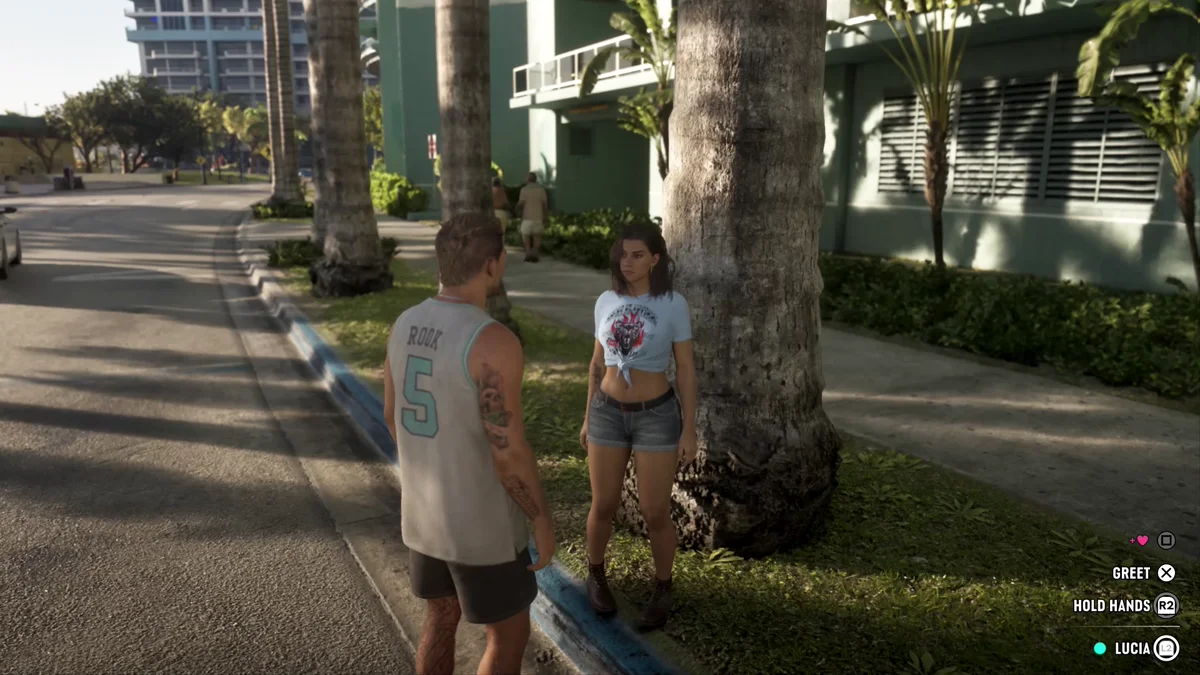
| Hold hands | Hold R2 while walking beside your partner | How to hold hands |
| Greet or compliment your partner | Press Cross when Greet or Compliment appears | How the romance works |
| Skip a taxi ride | Hold L2 for the driver menu, then hold Triangle to pay $100 | How to take a taxi |
| Study an animal | Hold R1 when Study appears | How to study animals |
| Surrender to the police | Hold R1 when Surrender appears | How to surrender |
| First person while aiming | Fit an optic, aim with L2, then press R3 | How to go first person |
| First person in a car | Press Up on the D-pad to take out the phone | How to go first person |
| Take Zombix | Hold L1, then press Square | What Zombix does |
| Dance with flair | Hold R2 to start dancing, then press Square | How to dance |
| Parry and counter | Press Cross just before an attack lands, then Square | How to fight |
Why They’re Missing
The Control Scheme pages list each button’s main job in a situation, and the moves above borrow a button that already has one. Square is Melee on the On Foot page, but with an empty magazine it reloads. Up on the D-pad is Zoom Scope In on the Aiming page, yet the game’s own tip uses it to toggle the tactical flashlight. R2 shoots on foot, but beside your partner it holds their hand.
The rest are prompts. Whistle, Study, Surrender, Greet and Compliment only appear in the bottom-right corner of the screen when there’s someone or something to use them on, so watch that corner when you lock on with L2.
The Two Tips Worth Catching
The game teaches a couple of these once and never again. The flashlight tip reads “Press Up while aiming to toggle your tactical flashlight,” and a later fight tip on our run read “Press Cross before an incoming attack to parry, then follow up with Square to counterattack.” If you skip past either, the table above has both.
GTA 5 Moves That Aren’t in GTA 6
- Combat roll. There’s no roll or dive on any page, and the old move adjusted to GTA 6’s buttons (aim with L2, push the left stick to one side, press Cross) did nothing for us. Our guide to rolling covers it.
- Flipping a car from the driver’s seat. Nothing on the vehicle page rights a car, and one on its roof stays there. Our guide to flipping a car has the details.
The buttons that are on the screen are in our GTA 6 controls guide and our guide to the Classic control scheme. Every GTA 6 guide is on our GTA 6 hub.
Frequently Asked Questions
Does GTA 6 have secret controls? Yes. Reloading, the flashlight, whistling, wheelies, the middle finger, holding hands, skipping a taxi ride and parrying all work but aren’t on the Control Scheme screen.
How do you turn on the flashlight in GTA 6? Aim with L2 and press Up on the D-pad. Press Up again while aiming to switch it off.
How do you do a wheelie in GTA 6? Pull back on the left stick on a motorbike that can wheelie. There’s no wheelie button.
Can you roll in GTA 6? Not that we’ve found. No page lists a roll, and the GTA 5 roll doesn’t work.
How do you parry in GTA 6? Press Cross just before an incoming attack, then press Square to counterattack.